
HDL Transformation Formula Deep Dive — Part 1: OPERATION Routing, METADATA Arrays, MAP Steps, WSA Caching, and LINEREPEATNO
How an HDL Transformation Formula turns one vendor CSV row into an ElementEntry header plus up to six ElementEntryValue rows — the OPERATION handshake, METADATA column definitions, the five MAP steps, why WSA caching is a correctness requirement and not just a performance one, and how LINEREPEATNO drives the passes. Part 1 of 3, concepts only.
Part 1 of 3 · HDL Transformation Formula Series
A third-party benefits vendor sends a CSV of deduction amounts every pay period. This formula turns each row into Oracle HDL format — resolving SSNs to assignment numbers, mapping vendor codes to element names, managing MultipleEntryCount, and generating both header and detail rows. This part covers the concepts. Part 2 is the code, Part 3 is the WSA implementation.
The Big Picture
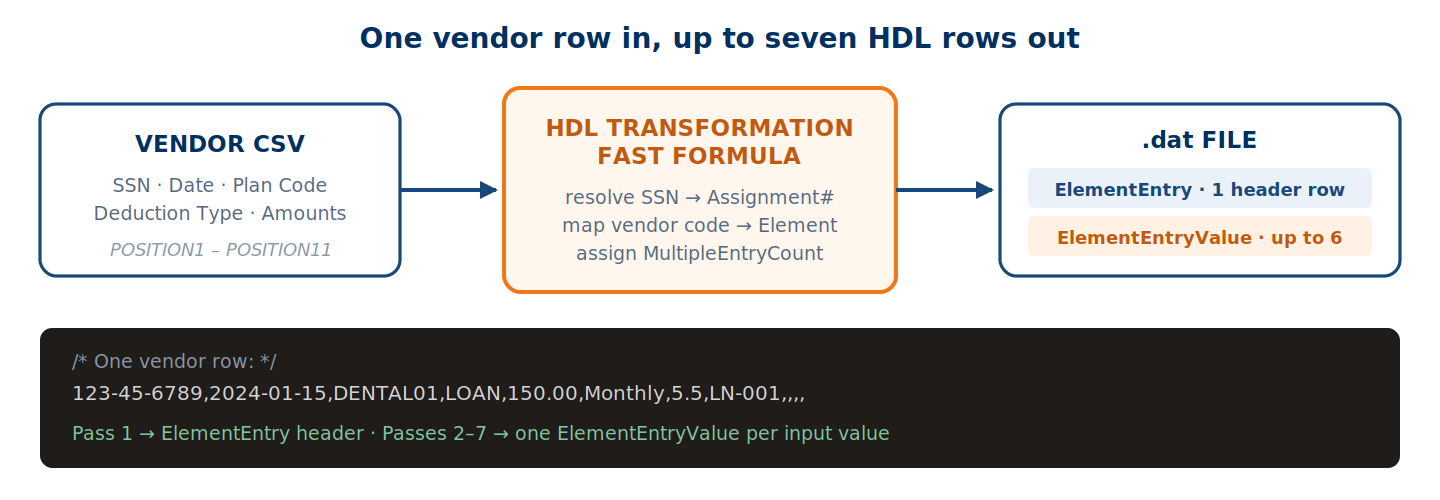
Every pay period the vendor sends a flat CSV with deduction details — medical, dental, vision, life, FSA, HSA, loans. The formula’s job is to translate each row into the .dat file HDL expects.
Section 1: The Vendor Inbound File
Each row maps to a set of delimited columns. The HDL engine reads them into POSITION variables.
| Column | Position | Description | Example |
|---|---|---|---|
| SSN | POSITION1 | Employee Social Security Number | 123-45-6789 |
| EFFECTIVE_DATE | POSITION2 | Date the deduction applies | 2024-01-15 |
| BENEFIT_PLAN_CODE | POSITION3 | Vendor’s internal plan code | DENTAL01 |
| DEDUCTION_TYPE | POSITION4 | Controls branching and how many input values load | LOAN, PRE, POST, CU |
| AMOUNT | POSITION5 | Deduction amount | 150.00 |
| PERIOD_TYPE | POSITION6 | Period type for the deduction | Monthly |
| PERCENTAGE | POSITION7 | Percentage for PRE/POST types | 5.5 or blank |
| LOAN_NUMBER | POSITION8 | Loan number, LOAN type only | LN-001 or blank |
| — | POSITION9–10 | Reserved / additional fields | varies |
| STATUS | POSITION11 | C = cancel/end-date, blank = active | blank |
POSITION4 is the most important field after SSN and date. It controls which LINEREPEATNO passes execute and which input values get loaded.
Section 2: Why Value Sets?
The vendor gives us an SSN and a vendor deduction code. Oracle needs an Assignment Number and an Element Name. Completely different identifiers in completely different systems.
Value sets are the bridge — SQL-backed lookups that run inside the formula engine. This formula uses eleven.
| # | Value Set | What it does | Returns |
|---|---|---|---|
| 1 | XXVA_DEDUCTION_CODES | Vendor plan code → Oracle element name | Element Name |
| 2 | XXVA_DEDUCTION_CODES_INPUT | Element → its input value name | Input Value Name |
| 3 | XXVA_GET_LATEST_ASSIGNMENT_NUMBER | SSN + date → assignment number | E12345 |
| 4 | XXVA_GET_PERSON_NUMBER | SSN → person number | 100045 |
| 5 | MAX_MULTI_ENTRY_COUNT | Highest existing count for Person+Element+Date | Max count or NULL |
| 6–7 | GET_ELEMENT_ENTRY_SOURCE_SYSTEM_ID / _OWNER | Existing SSID/SSO for MERGE key reuse | Existing SSID/SSO |
| 8–9 | GET_ELEMENT_ENTRY_VALUE_SOURCE_SYSTEM_ID / _OWNER | Same at value level | EEV-level SSID/SSO |
| 10 | GET_ELEMENT_ENTRY_START_DATE | For cancel rows — original start date | Start date |
| 11 | GET_ELEMENT_ENTRY_INPUT_START_DATE | Input-value-level start date | Start date |
Section 3: INPUTS ARE
INPUTS ARE OPERATION (TEXT),
LINEREPEATNO (NUMBER),
LINENO (NUMBER),
POSITION1 (TEXT), POSITION2 (TEXT), POSITION3 (TEXT),
POSITION4 (TEXT), POSITION5 (TEXT), POSITION6 (TEXT),
POSITION7 (TEXT), POSITION8 (TEXT),
POSITION9 (TEXT), POSITION10 (TEXT), POSITION11 (TEXT)

DEFAULT FOR LINENO IS 1
DEFAULT FOR LINEREPEATNO IS 1
DEFAULT FOR POSITION1 IS 'NO DATA'
DEFAULT FOR POSITION2 IS 'NO DATA'
/* ... same for POSITION3 through POSITION11 ... */
| Variable | What it does |
|---|---|
OPERATION | The engine calls the formula repeatedly with different values — FILETYPE, DELIMITER, READ, NUMBEROFBUSINESSOBJECTS, METADATALINEINFORMATION, then MAP per row. The formula is a router. |
LINEREPEATNO | The repeat counter. Set LINEREPEAT = 'Y' and HDL re-invokes for the same row with the counter incremented. |
LINENO | The line number from the source file. |
POSITION1–11 | The raw delimited columns of the current row. |
Section 4: OPERATION — The Setup Handshake
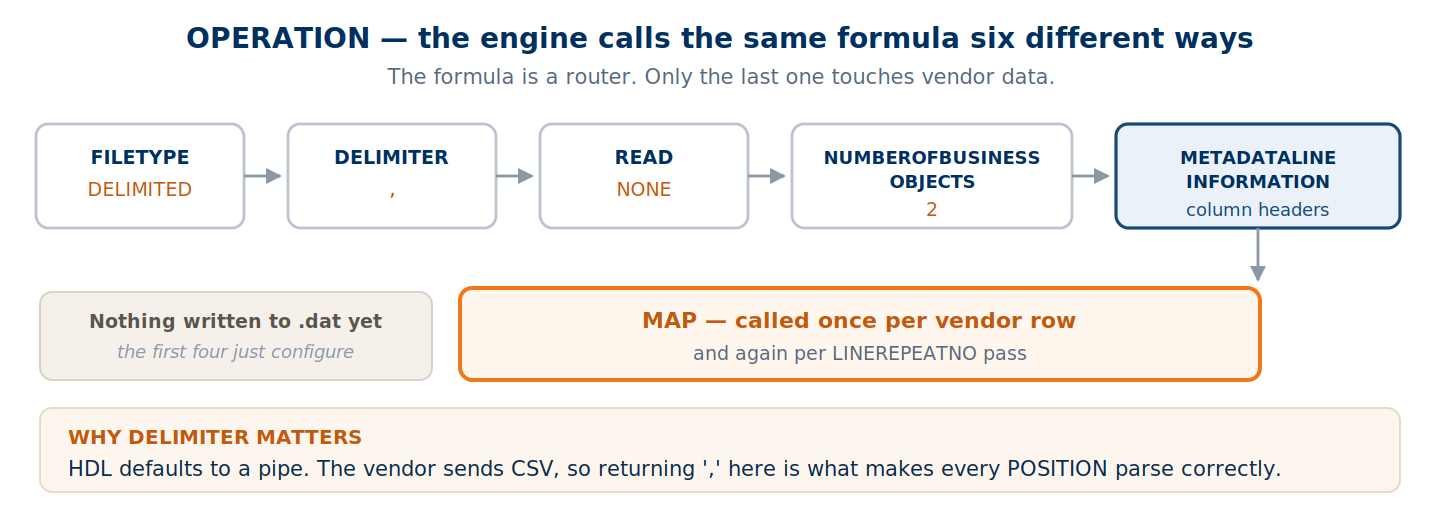
This part never touches vendor data. It configures the engine.
IF OPERATION = 'FILETYPE' THEN
    OUTPUTVALUE = 'DELIMITED'
ELSE IF OPERATION = 'DELIMITER' THEN
    OUTPUTVALUE = ','
ELSE IF OPERATION = 'READ' THEN
    OUTPUTVALUE = 'NONE'
ELSE IF OPERATION = 'NUMBEROFBUSINESSOBJECTS' THEN
(
    OUTPUTVALUE = '2'
    RETURN OUTPUTVALUE
)
| Operation | Engine asks | Our answer | Why |
|---|---|---|---|
FILETYPE | What kind of file? | DELIMITED | The only valid option for HDL transformation |
DELIMITER | What separates values? | , | The vendor sends CSV. HDL defaults to pipe, so we override. |
READ | Skip header rows? | NONE | No header row in this file — process every line |
NUMBEROFBUSINESSOBJECTS | How many HDL objects? | 2 | ElementEntry plus ElementEntryValue |
Section 5: METADATA — Generating the .dat Headers
Because we declared two business objects, the formula must define two METADATA arrays. These become the header rows at the top of each block in the .dat file.
ELSE IF OPERATION = 'METADATALINEINFORMATION' THEN
(
    /* METADATA1 — ElementEntry column definitions        */
    /* [1] = FileName, [2] = FileDiscriminator            */
    /* are auto-filled by the HDL engine. We start at [3] */

    METADATA1[3]  = 'LegislativeDataGroupName'
    METADATA1[4]  = 'EffectiveStartDate'
    METADATA1[5]  = 'ElementName'
    METADATA1[6]  = 'AssignmentNumber'
    METADATA1[7]  = 'CreatorType'
    METADATA1[8]  = 'EffectiveEndDate'
    METADATA1[9]  = 'EntryType'
    METADATA1[10] = 'MultipleEntryCount'
    METADATA1[11] = 'SourceSystemOwner'
    METADATA1[12] = 'SourceSystemId'
    METADATA1[13] = 'ReplaceLastEffectiveEndDate'
    /* METADATA2 — ElementEntryValue column definitions   */

    METADATA2[3]  = 'LegislativeDataGroupName'
    METADATA2[4]  = 'EffectiveStartDate'
    METADATA2[5]  = 'ElementName'
    METADATA2[6]  = 'AssignmentNumber'
    METADATA2[7]  = 'InputValueName'                    /* changes per pass */
    METADATA2[8]  = 'EffectiveEndDate'
    METADATA2[9]  = 'EntryType'
    METADATA2[10] = 'MultipleEntryCount'
    METADATA2[11] = 'ScreenEntryValue'                  /* the actual value */
    METADATA2[12] = '"ElementEntryId(SourceSystemId)"'  /* parent link */
    METADATA2[13] = 'SourceSystemOwner'
    METADATA2[14] = 'SourceSystemId'
    METADATA2[15] = 'ReplaceLastEffectiveEndDate'

    RETURN METADATA1, METADATA2
)
Those arrays produce these header lines:
METADATA|ElementEntry|LegislativeDataGroupName|EffectiveStartDate|ElementName|AssignmentNumber|CreatorType|EffectiveEndDate|EntryType|MultipleEntryCount|SourceSystemOwner|SourceSystemId|ReplaceLastEffectiveEndDate

METADATA|ElementEntryValue|LegislativeDataGroupName|EffectiveStartDate|ElementName|AssignmentNumber|InputValueName|EffectiveEndDate|EntryType|MultipleEntryCount|ScreenEntryValue|"ElementEntryId(SourceSystemId)"|SourceSystemOwner|SourceSystemId|ReplaceLastEffectiveEndDate
The names in METADATA must match your RETURN variable names exactly. That’s the contract — the engine maps returned values to columns by name.
Section 6: OPERATION: MAP — The Core Transformation
This is the heart of it. When the engine reaches a source row it calls OPERATION = 'MAP', hands you POSITION1–11, and expects Oracle HDL attributes back.
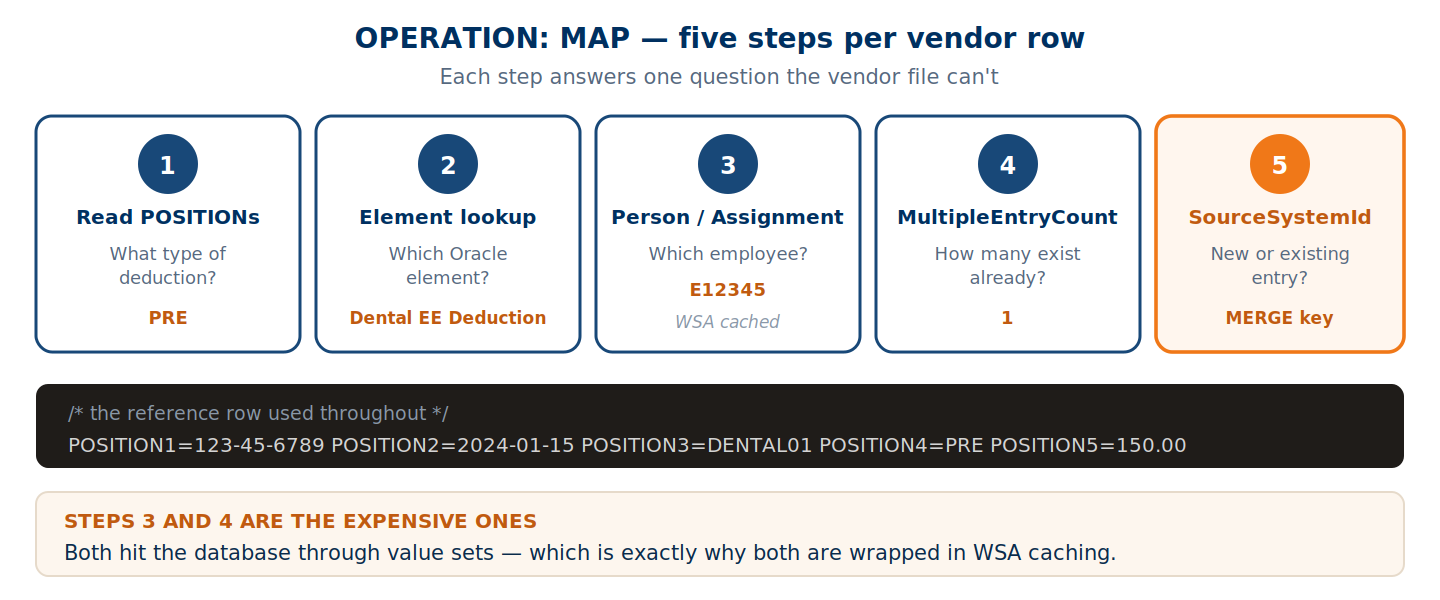
Step 1 — Read input values from POSITION fields
/* Read the key fields from the vendor row */
l_DeductionType = TRIM(POSITION4)     /* 'PRE', 'POST', 'LOAN', 'CU' */
l_Amount        = TRIM(POSITION5)     /* '150.00' */
l_PeriodType    = TRIM(POSITION6)     /* 'Monthly' */
l_Percentage    = TRIM(POSITION7)     /* '5.5'  (PRE/POST only) */
l_LoanNumber    = TRIM(POSITION8)     /* 'LN-001' (LOAN only) */
Step 2 — Translate the vendor code to an Oracle element
L_VendorPayCode = TRIM(POSITION3)     /* e.g. 'DENTAL01' */

/* Value set 1: vendor code -> Oracle Element Name */
l_ElementName = GET_VALUE_SET('XXVA_DEDUCTION_CODES',
    '|=P_PAY_CODE=''' || L_VendorPayCode || '''')
/* 'DENTAL01' -> 'Dental EE Deduction' */

/* Value set 2: vendor code -> Input Value Name */
l_InputValueName = INITCAP(GET_VALUE_SET('XXVA_DEDUCTION_CODES_INPUT',
    '|=P_PAY_CODE=''' || L_VendorPayCode || ''''))
/* 'DENTAL01' -> 'Amount' */
Step 3 — Resolve the person and assignment
/* Build a unique WSA key from SSN + Date */
/* e.g. 'PER_123-45-6789_2024-01-15' */

IF WSA_EXISTS('PER_' || POSITION1 || '_' || POSITION2) THEN
(
    /* Cache hit - read stored values */
    L_PersonNumber     = WSA_GET('PER_' || POSITION1 || '_' || POSITION2, ' ')
    l_AssignmentNumber = WSA_GET('ASG_' || POSITION1 || '_' || POSITION2, ' ')
)
ELSE
(
    /* Cache miss - call value sets (hits DB) */
    l_AssignmentNumber = GET_VALUE_SET('XXVA_GET_LATEST_ASSIGNMENT_NUMBER', ...)
    L_PersonNumber     = GET_VALUE_SET('XXVA_GET_PERSON_NUMBER', ...)

    /* Save to WSA - next row with same SSN skips the DB */
    WSA_SET('PER_' || POSITION1 || '_' || POSITION2, L_PersonNumber)
    WSA_SET('ASG_' || POSITION1 || '_' || POSITION2, l_AssignmentNumber)
)
Step 4 — Assign MultipleEntryCount
When an employee has more than one entry for the same element on the same date, Oracle distinguishes them by MultipleEntryCount. Getting this wrong means collisions.
/* Check: did a previous row already assign a count for this combo? */
IF WSA_EXISTS('MEC_' || L_PersonNumber || '_' || l_ElementName || '_' || POSITION2) THEN
(
    /* YES - read last assigned count and add 1 */
    l_MultipleEntryCount = WSA_GET('MEC_' || ..., 0) + 1
)
ELSE
(
    /* NO - first row for this combo. Ask the database. */
    l_db_max = GET_VALUE_SET('MAX_MULTI_ENTRY_COUNT', ...)

    IF ISNULL(l_db_max) = 'N' THEN
        l_MultipleEntryCount = 1             /* Nothing in cloud -> start at 1 */
    ELSE
        l_MultipleEntryCount = l_db_max + 1  /* Cloud has 1 -> assign 2 */
)

/* Save what we assigned - next row reads this instead of hitting the DB */
WSA_SET('MEC_' || L_PersonNumber || '_' || l_ElementName || '_' || POSITION2,
        l_MultipleEntryCount)
Step 5 — Build the SourceSystemId
/* For active employees - construct using PersonNumber */
'HDL_XXVA' || l_AssignmentNumber || '_EE_' || L_PersonNumber
           || '_' || l_ElementName || '_' || POSITION2

/* For terminated employees (PersonNumber unavailable) - use SSN */
'HDL_XXVA' || l_AssignmentNumber || '_EE_' || POSITION1
           || '_' || l_ElementName || '_' || POSITION2
The SourceSystemId is the MERGE key. Reuse the same value and HDL updates the existing record; produce a new one and it creates a new record.
WSA Deep Dive — Working Storage Area
WSA is, per Oracle’s documentation, a mechanism for storing global values across formulas. Local variables die after each invocation; WSA values persist across calls within the same session. Write on row 1, read it back on row 500.
Names are case-independent — 'PER_123' and 'per_123' are the same item. In PL/SQL terms it’s a package-level associative array, TABLE OF VARCHAR2 INDEX BY VARCHAR2.
The API
| Method | PL/SQL equivalent | What it does |
|---|---|---|
WSA_EXISTS(item [, type]) | g_cache.EXISTS(key) | Tests whether the item exists. The optional type restricts to TEXT, NUMBER, DATE, TEXT_TEXT, TEXT_NUMBER and so on. |
WSA_GET(item, default) | l_val := g_cache(key) | Retrieves the value, or the default if absent. The default’s data type determines the expected type. |
WSA_SET(item, value) | g_cache(key) := val | Sets the value. Any existing item of the same name is overwritten. |
WSA_DELETE([item]) | g_cache.DELETE(key) | Deletes the item, or everything if no name is given. |
What this formula caches
| WSA key | Stores | Used in |
|---|---|---|
PER_<ssn>_<date> | Person Number | Step 3 |
ASG_<ssn>_<date> | Assignment Number | Step 3 |
MEC_<person>_<element>_<date> | Last assigned MultipleEntryCount | Step 4 |
HDR_<person>_<element>_<date> | Whether the header row was already written | LINEREPEATNO = 1 |
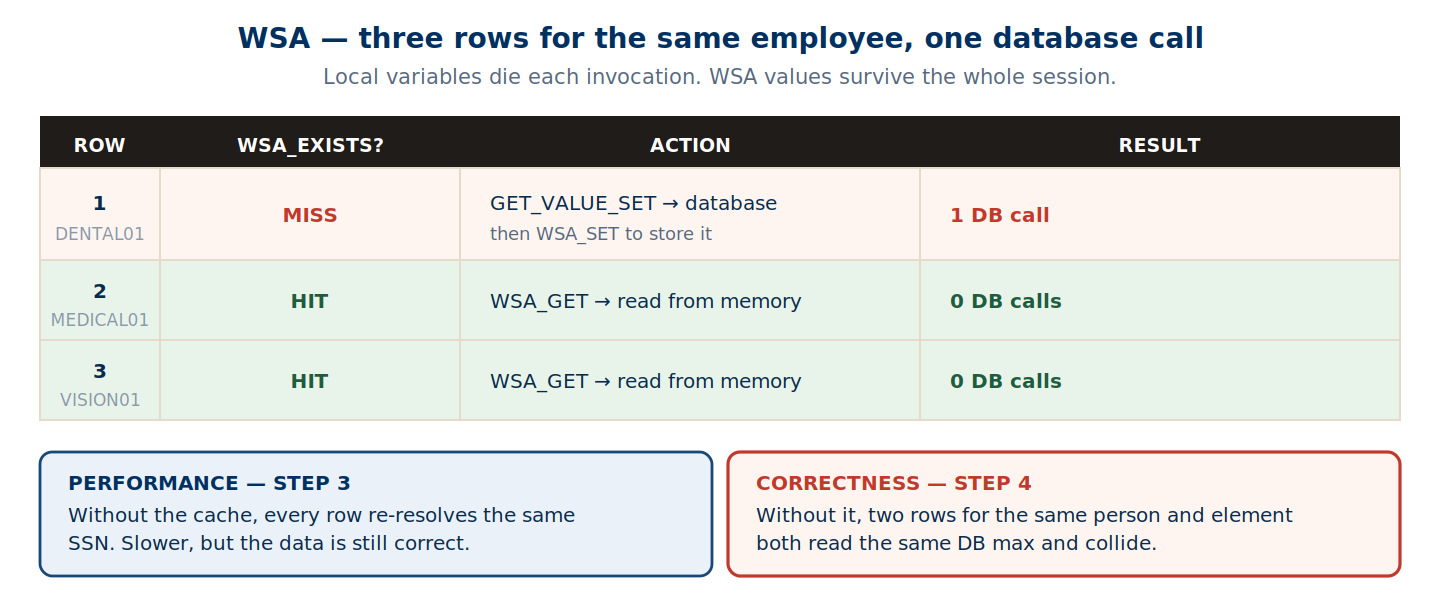
The two uses are not equivalent. In Step 3, dropping the cache costs performance — you re-resolve the same SSN on every row, but the answer is still right. In Step 4 it costs correctness: two rows for the same person and element would both read the same database maximum, both assign the same count, and collide. That’s the bug that puts two rows with
MultipleEntryCount = 2in the.datfile.
Section 7: LINEREPEATNO = 1 — The ElementEntry Row
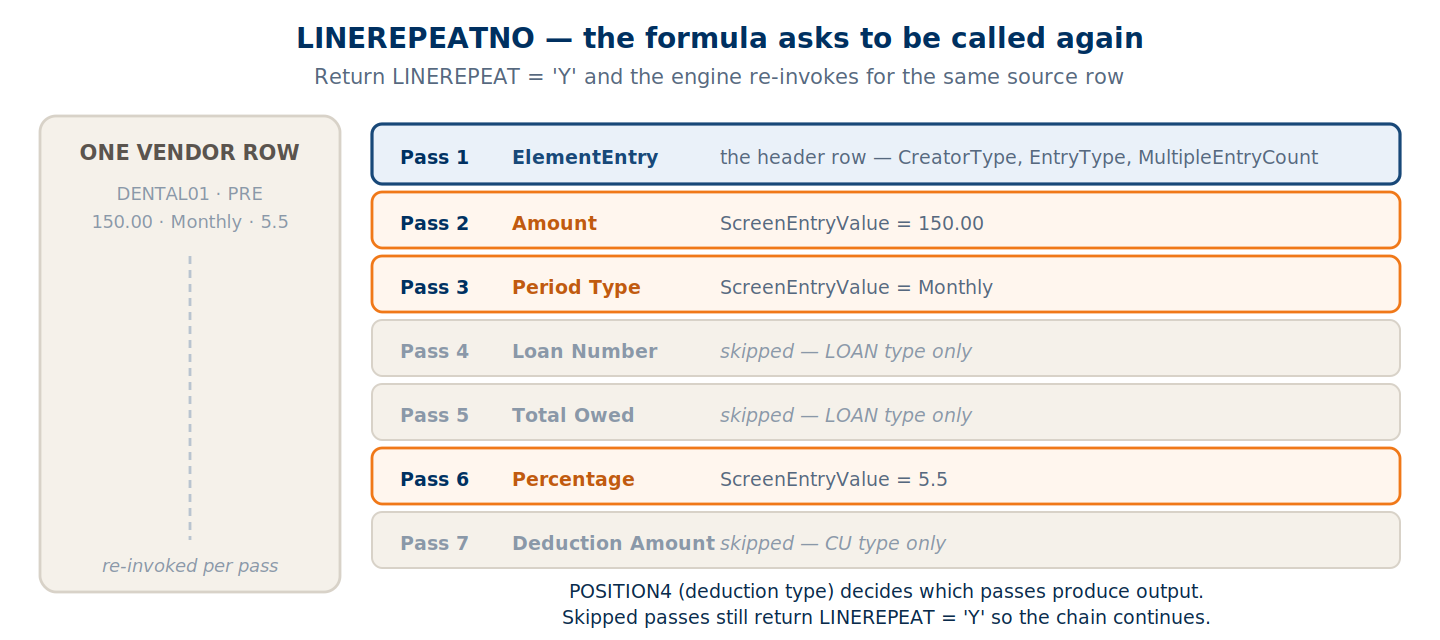
The engine calls the formula once per source row with LINEREPEATNO = 1. Return LINEREPEAT = 'Y' and it calls again for the same row with the counter incremented.
IF LINEREPEATNO = 1 THEN
(
    /* ACTIVE entry - create new ElementEntry */

    FileName                 = 'ElementEntry'
    BusinessOperation        = 'MERGE'
    FileDiscriminator        = 'ElementEntry'
    LegislativeDataGroupName = l_LegislativeDataGroupName
    AssignmentNumber         = l_AssignmentNumber
    ElementName              = l_ElementName
    EffectiveStartDate       = TO_CHAR(TO_DATE(TRIM(POSITION2),'YYYY/MM/DD'),'YYYY/MM/DD')
    EntryType                = l_entry_type
    CreatorType              = l_CreatorType
    SourceSystemOwner        = l_SourceSystemOwner
    SourceSystemId           = l_SourceSystemId
    LINEREPEAT               = 'Y'    /* call me again for ElementEntryValue */

    RETURN BusinessOperation, FileName, FileDiscriminator,
           CreatorType, EffectiveStartDate, ElementName,
           LegislativeDataGroupName, EntryType, AssignmentNumber,
           SourceSystemOwner, SourceSystemId,
           LINEREPEAT, LINEREPEATNO
)
The cancel branch
When POSITION11 = 'C', the row is an end-date rather than a new entry:
IF (TRIM(POSITION11) = 'C') THEN
(
    /* Fetch the original start date from cloud */
    l_Effective_Start_Date = GET_VALUE_SET('XXVA_GET_EE_START_DATE', ...)

    FileName                    = 'ElementEntry'
    BusinessOperation           = 'MERGE'
    FileDiscriminator           = 'ElementEntry'
    EffectiveStartDate          = TO_CHAR(TO_DATE(l_Effective_Start_Date,...),'YYYY/MM/DD')
    EffectiveEndDate            = TO_CHAR(TO_DATE(TRIM(POSITION2),...),'YYYY/MM/DD')
    ReplaceLastEffectiveEndDate = 'Y'
    LINEREPEAT                  = 'N'    /* no pass 2 for cancel */

    RETURN BusinessOperation, FileName, FileDiscriminator,
           CreatorType, EffectiveStartDate, EffectiveEndDate,
           ElementName, LegislativeDataGroupName, EntryType,
           AssignmentNumber, SourceSystemOwner, SourceSystemId,
           ReplaceLastEffectiveEndDate,
           LINEREPEAT, LINEREPEATNO
)
Note LINEREPEAT = 'N'. A cancel needs no value rows, so the chain stops at pass 1.
Section 8: LINEREPEATNO = 2–7 — The ElementEntryValue Rows
Each pass loads a different input value.
| Pass | InputValueName | ScreenEntryValue source | Applies to |
|---|---|---|---|
| 2 | Amount | l_Amount (POSITION5) | all types |
| 3 | Period Type | l_PeriodType (POSITION6) | all types |
| 4 | Loan Number | POSITION8 | LOAN only |
| 5 | Total Owed | l_TotalOwed | LOAN only |
| 6 | Percentage | l_Percentage (POSITION7) | PRE / POST only |
| 7 | Deduction Amount | l_DeductionAmount | CU only |
ELSE IF (LINEREPEATNO = 2) THEN
(
    l_InputValueName = 'Amount'

    /* Look up the ElementEntryValue SourceSystemId (or construct a new one) */
    l_EEV_SourceSystemId    = GET_VALUE_SET('XXVA_GET_EEV_SOURCE_SYSTEM_ID', ...)
    l_EEV_SourceSystemOwner = GET_VALUE_SET('XXVA_GET_EEV_SOURCE_SYSTEM_OWNER', ...)

    IF ISNULL(l_EEV_SourceSystemId) = 'N' THEN
    (
        l_EEV_SourceSystemId = 'HDL_XXVA' || l_AssignmentNumber
            || '_EEV_' || L_PersonNumber
            || '_' || l_ElementName
            || '_' || l_InputValueName
            || '_' || TO_CHAR(TO_DATE(TRIM(POSITION2),...),'YYYYMMDD')
    )

    FileName                         = 'ElementEntry'      /* always ElementEntry */
    BusinessOperation                = 'MERGE'
    FileDiscriminator                = 'ElementEntryValue' /* THIS is the difference */
    LegislativeDataGroupName         = l_LegislativeDataGroupName
    AssignmentNumber                 = l_AssignmentNumber
    ElementName                      = l_ElementName
    EntryType                        = l_entry_type
    EffectiveStartDate               = TO_CHAR(...)
    "ElementEntryId(SourceSystemId)" = l_SourceSystemId    /* links to the parent */
    ScreenEntryValue                 = l_Amount
    InputValueName                   = l_InputValueName
    LINEREPEAT                       = 'Y'
)
FileNamestays'ElementEntry'whileFileDiscriminatorbecomes'ElementEntryValue'. That pair is what tells HDL these rows belong to the same business object but a different block. Getting it wrong is a common cause of orphaned value rows.
A note on formatting amounts — trailing zeros in the source can produce values HDL rejects:
RTRIM(RTRIM(TRIM(l_Amount), '0'), '.')
End-to-End: One Vendor Row
Vendor CSV row:
123-45-6789,2024-01-15,DENTAL01,150.00,,,

STEP 1: Type -> PRE, Amount -> 150.00
STEP 2: DENTAL01 -> Dental EE Deduction
STEP 3: SSN -> Person# 100045, Asg# E12345  (via WSA)
STEP 4: MultipleEntryCount = 1
STEP 5: SourceSystemId constructed
Pass 1 produces the header row:
MERGE|ElementEntry|570|2019/09/22|Dental EE Deduction|123141402543|H||E|1
Pass 2 produces the amount row:
MERGE|ElementEntryValue|570|2019/09/22|Dental EE Deduction|123141402543|Amount||E||1|150.00
What You Now Understand
You can explain, without looking at code, how an HDL Transformation Formula works end to end: what each OPERATION does, why METADATA arrays define the .dat column headers, how MAP transforms source data in five steps, why WSA exists for both performance and correctness, how LINEREPEATNO turns one source row into one header plus up to six value rows, and how named RETURN variables map to METADATA columns.
The concepts don’t change whether you’re building a vendor deduction interface, a benefits enrollment loader, or a payroll costing feed. Every HDL Transformation Formula follows this structure.
Next in the Series
Part 2 — Code Walkthrough. Every concept here shown as actual formula code: the full INPUTS ARE block, every POSITION mapped to its vendor column, the exact GET_VALUE_SET parameter string construction with pipe delimiters and date conversions, and the complete lookup-or-construct pattern for both SourceSystemId levels.
Part 3 — WSA Implementation. The caching layer in full, key construction patterns, and the deployment rule that makes single-threaded processing non-negotiable.
Abhishek Mohanty · Oracle ACE Associate | AIOUG Member | Oracle HCM Cloud Consultant & Technical Architect — Fast Formulas, Absence Management, Time & Labor, Core HR, Redwood, HDL, OTBI.