
HDL Transformation Formula Deep Dive — Part 2: The Code, Line by Line
The actual formula code — INPUTS ARE and DEFAULT FOR, GET_VALUE_SET parameter string construction with pipe delimiters and triple quotes, why ISNULL returns 'N' for null, the lookup-or-construct SourceSystemId pattern, ESS_LOG_WRITE tracing, and the LINEREPEATNO passes including the Cancel end-dating branch. Part 2 of 3.
Part 2 of 3 · HDL Transformation Formula Series
Part 1 covered the concepts with no code. This is the code — the value set calls, the quote syntax that trips everyone, the ISNULL inversion, SourceSystemId resolution, debug tracing, and the two LINEREPEATNO passes including the Cancel branch. Part 3 covers WSA and building your own.
What This Post Covers
| Section | Covers |
|---|---|
| OPERATION routing | The setup handshake and the METADATA definitions |
| INPUTS ARE / DEFAULT FOR | Declaring POSITION variables and why every one needs a default |
| GET_VALUE_SET | Parameter string syntax, pipe delimiters, ISNULL checks |
| SourceSystemId | The lookup-or-construct pattern behind MERGE |
| ESS_LOG_WRITE | Where to put trace logs and how to read them |
| LINEREPEATNO | Pass 1 header, Pass 2 value row, and the Cancel path |
Not here: WSA caching code. Part 1 explained the concept; Part 3 shows the full WSA_EXISTS / WSA_GET / WSA_SET implementation.
OPERATION Routing
The HDL engine calls your formula many times. OPERATION tells the formula why it’s being called.
IF OPERATION = 'FILETYPE' THEN
    OUTPUTVALUE = 'DELIMITED'
ELSE IF OPERATION = 'DELIMITER' THEN
    OUTPUTVALUE = ','
ELSE IF OPERATION = 'READ' THEN
    OUTPUTVALUE = 'NONE'
ELSE IF OPERATION = 'NUMBEROFBUSINESSOBJECTS' THEN
(
    OUTPUTVALUE = '2'          /* ElementEntry + ElementEntryValue */
    RETURN OUTPUTVALUE
)
That’s the setup handshake — the engine asks configuration questions, the formula answers. It’s the same in every HDL transformation formula.
Then the METADATA definitions, which become the .dat column headers:
ELSE IF OPERATION = 'METADATALINEINFORMATION' THEN
(
    /* Object 1: ElementEntry columns */
    METADATA1[1]  = 'ElementEntry'          /* FileName (reserved)          */
    METADATA1[2]  = 'ElementEntry'          /* FileDiscriminator (reserved) */
    METADATA1[3]  = 'LegislativeDataGroupName'
    METADATA1[4]  = 'EffectiveStartDate'
    METADATA1[5]  = 'ElementName'
    METADATA1[6]  = 'AssignmentNumber'
    METADATA1[7]  = 'CreatorType'
    METADATA1[8]  = 'EntryType'
    METADATA1[9]  = 'MultipleEntryCount'
    METADATA1[10] = 'SourceSystemOwner'
    METADATA1[11] = 'SourceSystemId'

    /* Object 2: ElementEntryValue columns */
    METADATA2[1]  = 'ElementEntry'          /* FileName (reserved)          */
    METADATA2[2]  = 'ElementEntryValue'     /* FileDiscriminator (reserved) */
    METADATA2[3]  = 'LegislativeDataGroupName'
    METADATA2[4]  = 'EffectiveStartDate'
    METADATA2[5]  = 'ElementName'
    METADATA2[6]  = 'AssignmentNumber'
    METADATA2[7]  = 'InputValueName'
    METADATA2[8]  = 'EntryType'
    METADATA2[9]  = 'MultipleEntryCount'
    METADATA2[10] = 'ScreenEntryValue'      /* the actual dollar amount     */
    METADATA2[11] = 'ElementEntryId(SourceSystemId)'
    METADATA2[12] = 'SourceSystemOwner'
    METADATA2[13] = 'SourceSystemId'
)
The column names here must exactly match the variable names in the RETURN statement later. That’s the contract — the engine maps returned values to columns by name, not position.
INPUTS ARE and DEFAULT FOR
The engine reads your CSV and puts each column into a POSITION variable — column 1 into POSITION1, and so on.
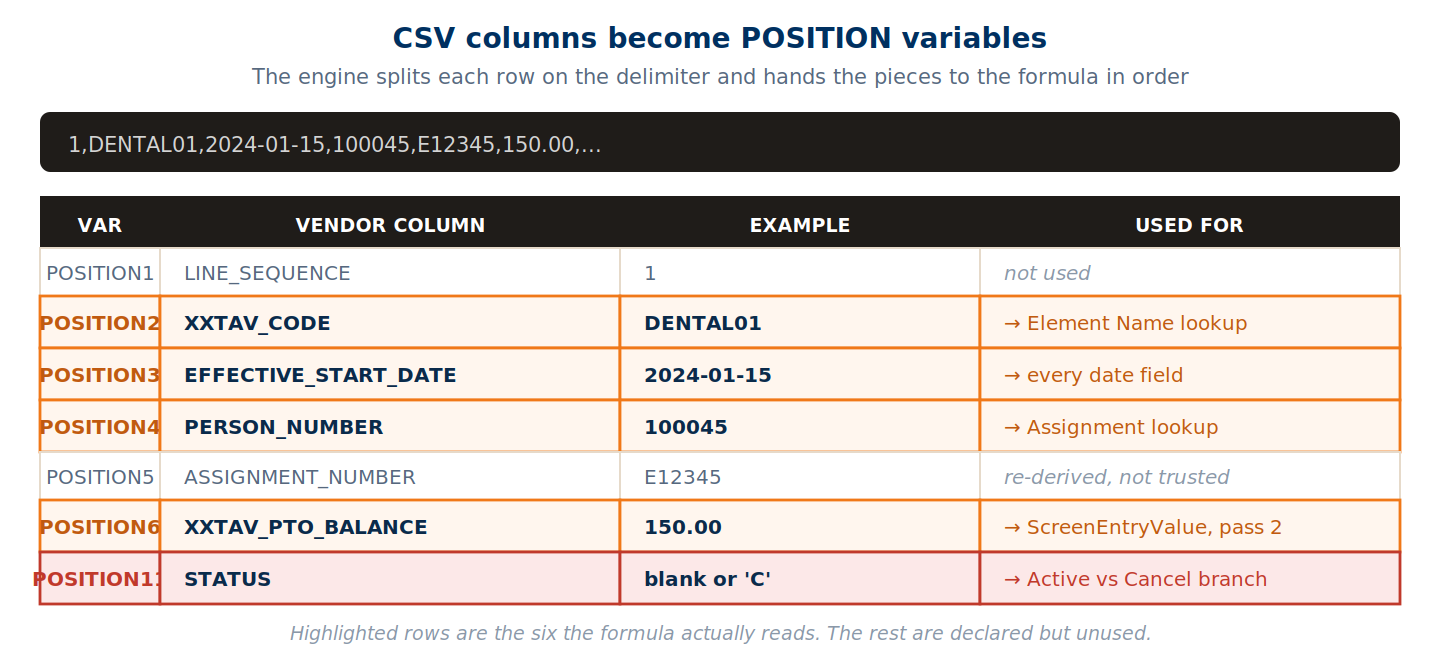
INPUTS ARE OPERATION (TEXT),      /* Engine control signal                    */
  LINEREPEATNO (NUMBER),          /* Which pass: 1 = header, 2 = value row    */
  LINENO (NUMBER),                /* Source file line number                  */
  POSITION1 (TEXT),               /* LINE_SEQUENCE                            */
  POSITION2 (TEXT),               /* XXTAV_CODE — vendor pay code           * */
  POSITION3 (TEXT),               /* EFFECTIVE_START_DATE — YYYY-MM-DD      * */
  POSITION4 (TEXT),               /* PERSON_NUMBER                          * */
  POSITION5 (TEXT),               /* ASSIGNMENT_NUMBER                        */
  POSITION6 (TEXT),               /* XXTAV_PTO_BALANCE — the amount         * */
  POSITION7 (TEXT),  POSITION8 (TEXT),
  POSITION9 (TEXT),  POSITION10 (TEXT),
  POSITION11 (TEXT)               /* STATUS — blank or 'C'                  * */
Why every POSITION needs a default
DEFAULT FOR LINENO IS 1
DEFAULT FOR LINEREPEATNO IS 1
DEFAULT FOR POSITION1 IS 'NO DATA'
/* ... same for POSITION2 through POSITION11 ... */
DEFAULT FOR POSITION11 IS 'NO DATA'
The first five engine calls — FILETYPE, DELIMITER, READ, NUMBEROFBUSINESSOBJECTS, METADATALINEINFORMATION — happen before any CSV row is read. The POSITION variables are empty during those calls. Without defaults the formula errors on a null before it ever reaches the MAP block.
GET_VALUE_SET
The vendor sends a code like DENTAL01. Oracle doesn’t know it. GET_VALUE_SET runs a SQL query and brings back the answer.
l_AssignmentNumber = GET_VALUE_SET(
    'XXTAV_GET_LATEST_ASSIGNMENT_NUMBER',
    '|=P_PERSON_NUMBER=''' || POSITION4 || ''''
 || '|P_EFFECTIVE_START_DATE='''
 || TO_CHAR(TO_DATE(POSITION3,'YYYY-MM-DD'),'YYYY-MM-DD')
 || '''')
That parameter string is where most people lose an afternoon.
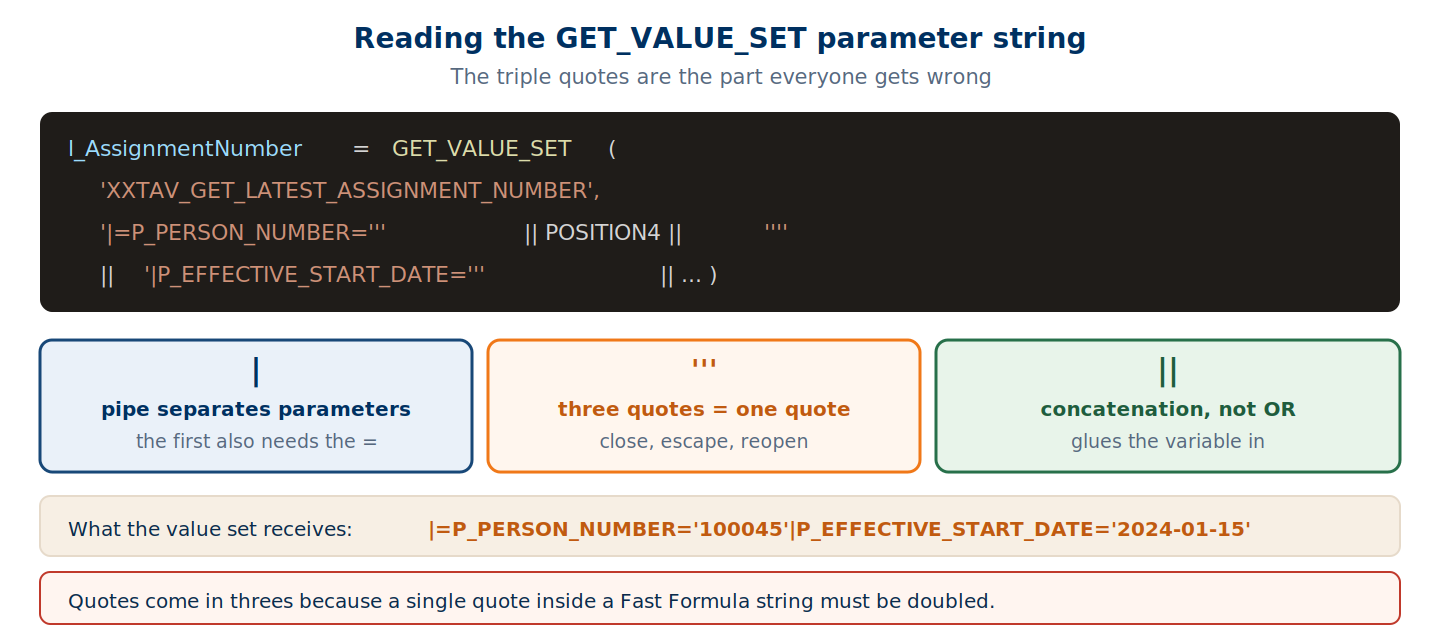
Three mechanisms are at work:
|separates parameters. The first one also carries the=—|=P_PERSON_NUMBER=.'''is one literal quote. A single quote inside a Fast Formula string must be doubled, so closing the string, escaping a quote, and reopening produces a run of three. Four in a row ('''') closes the string and emits a quote.||is concatenation, not logical OR.
A simpler call, for contrast — one parameter, no date handling:
l_ElementName = GET_VALUE_SET(
    'XXTAV_ACCRUAL_ELEMENTS TEST',
    '|=P_PAY_CODE=''' || TRIM(POSITION2) || '''')
TRIM matters. If the vendor sends ' DENTAL01 ' with padding, the value set lookup fails silently on the untrimmed string.
Why ISNULL returns ‘N’ for null
This one reads backwards until you find the right mental model.
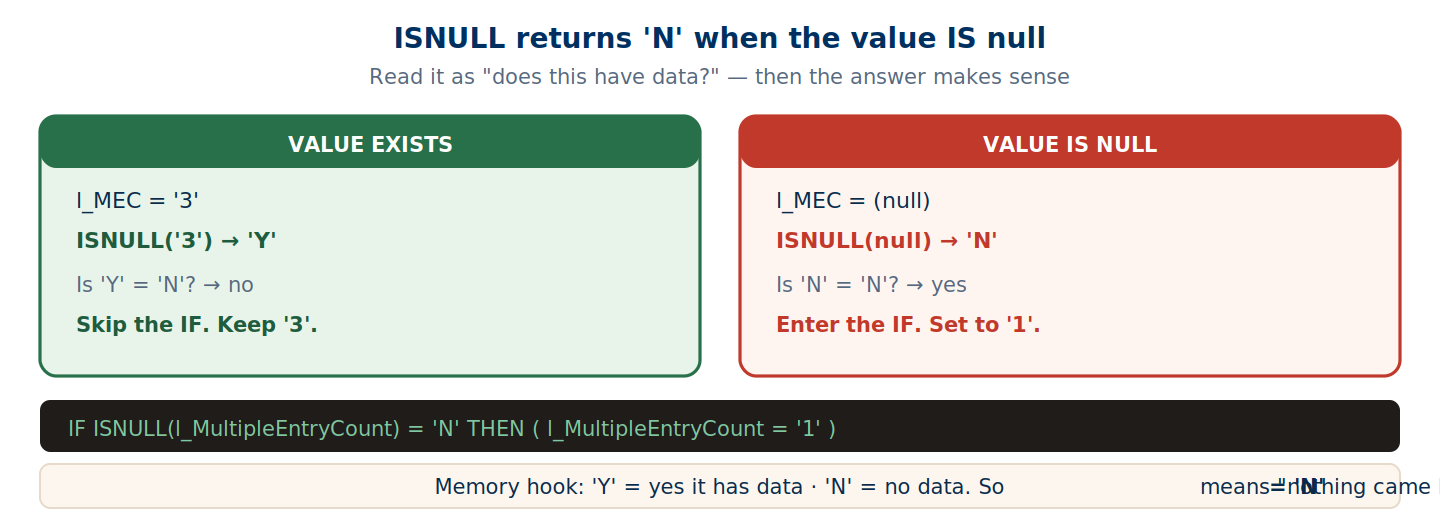
IF ISNULL(l_MultipleEntryCount) = 'N' THEN
(
    l_MultipleEntryCount = '1'     /* default to 1 */
)
Read ISNULL as asking “does this have data?” — 'Y' means yes it does, 'N' means no data came back. So = 'N' is the null check.
Call order matters
The GET_VALUE_SET calls aren’t independent. Each depends on the output of an earlier one: the person number resolves the assignment number, the vendor code resolves the element name, and both feed the MultipleEntryCount and SourceSystemId lookups. Reorder them and the later calls get empty parameters.
SourceSystemId — Lookup or Construct
Every element entry carries a SourceSystemId, a unique tag. During MERGE, Oracle checks whether an entry with that tag exists — if yes it updates, if no it creates.
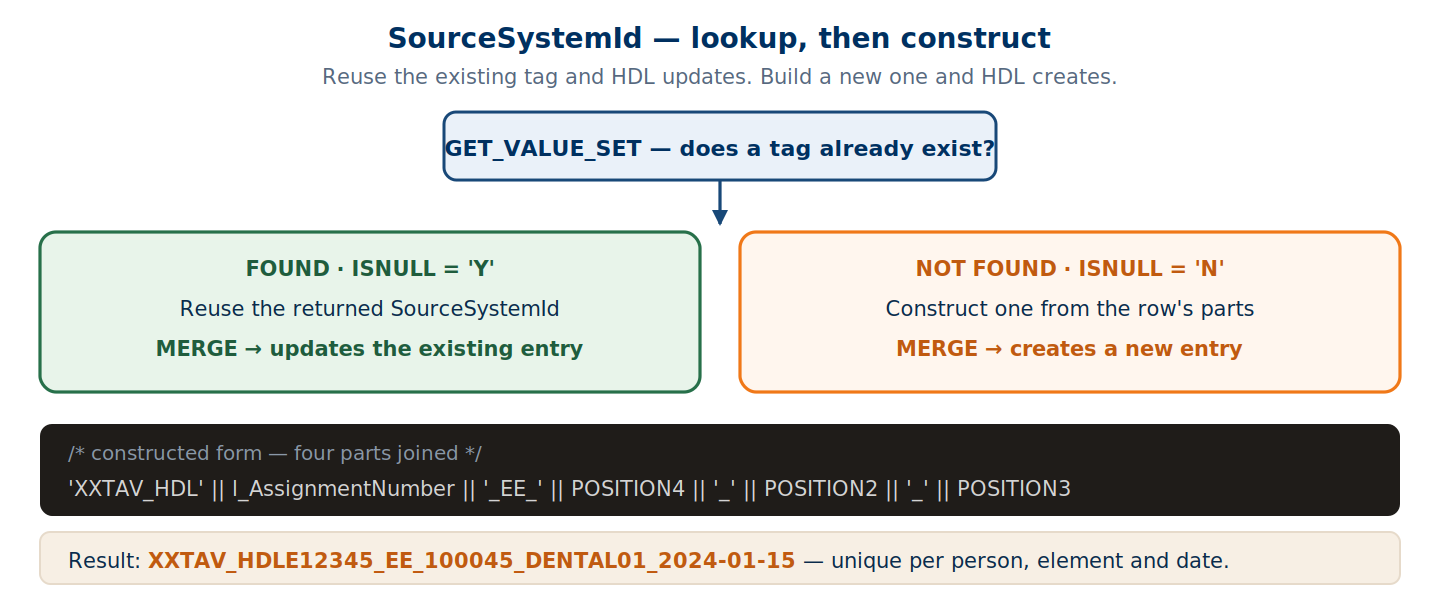
/* Step 1: Try cloud lookup */
l_SourceSystemId = GET_VALUE_SET(
    'XXTAV_GET_ELEMENT_ENTRY_SOURCE_SYSTEM_ID',
    '|=P_PERSON_NUMBER=''' || POSITION4 || ''''
 || '|P_EFFECTIVE_START_DATE=''' || ... || ''''
 || '|P_ELEMENT_NAME=''' || l_ElementName || '''')

/* Step 2: If null, build a new one */
IF ISNULL(l_SourceSystemId) = 'N' THEN
(
    l_SourceSystemId = 'XXTAV_HDL' || l_AssignmentNumber
        || '_EE_' || POSITION4
        || '_'    || POSITION2
        || '_'    || POSITION3
)
The constructed form comes out as XXTAV_HDLE12345_EE_100045_DENTAL01_2024-01-15 — unique per person, element and date, which is exactly the grain at which entries need to be distinguished.
ESS_LOG_WRITE
There’s no debugger. Trace messages to the ESS job log are the entire toolkit.
/* STEP 1: Log the raw input from the CSV row */
ESS_LOG_WRITE('XXTAV > START'
    || ' | Line='   || TO_CHAR(LINENO)
    || ' | Code='   || POSITION2
    || ' | Person=' || POSITION4)

/* STEP 2: After the element name lookup */
ESS_LOG_WRITE('XXTAV > ELEMENT = ' || l_ElementName)

/* STEP 3: After the assignment number lookup */
ESS_LOG_WRITE('XXTAV > ASSIGNMENT = ' || l_AssignmentNumber)

/* STEP 4: Final resolved values before output */
ESS_LOG_WRITE('XXTAV > MEC=' || l_MultipleEntryCount
    || ' | SSID=' || l_SourceSystemId)
After running Load Data from File, open Scheduled Processes → your job → Log tab:
XXTAV > START | Line=1 | Code=DENTAL01 | Person=100045
XXTAV > ELEMENT = Dental EE Deduction
XXTAV > ASSIGNMENT = E12345
XXTAV > MEC=1 | SSID=XXTAV_HDLE12345_EE_100045_DENTAL01_2024-01-15
Each line is one step. If the formula fails at the assignment lookup you’ll see steps 1 and 2 but not 3 — which tells you exactly where it broke. The XXTAV > prefix makes your output searchable in a log that may carry messages from other formulas in the same batch.
Before production, remove or comment out every
ESS_LOG_WRITEcall. At 10,000 rows and four calls per row that’s 40,000 log entries, which slows the load and buries anything genuinely worth reading.
LINEREPEATNO — Generating the Output Rows
The vendor’s status field drives two completely different paths.
Active (POSITION11 blank) | Cancel (POSITION11 = 'C') | |
|---|---|---|
| EffectiveStartDate | vendor date (POSITION3) | fetched from cloud |
| EffectiveEndDate | not set | vendor’s cancel date |
| LINEREPEAT | 'Y' — pass 2 follows | 'N' — done |
| Result | Oracle creates or updates | Oracle end-dates |
Pass 1, Active path
IF LINEREPEATNO = 1 THEN
(
    FileName                 = 'ElementEntry'
    BusinessOperation        = 'MERGE'
    FileDiscriminator        = 'ElementEntry'      /* use METADATA1 layout   */
    LegislativeDataGroupName = l_LegislativeDataGroupName
    AssignmentNumber         = l_AssignmentNumber  /* from value set call 1  */
    ElementName              = l_ElementName       /* from value set call 2  */
    EffectiveStartDate       = TO_CHAR(TO_DATE(POSITION3,'YYYY-MM-DD'),'YYYY/MM/DD')
    MultipleEntryCount       = l_MultipleEntryCount
    EntryType                = l_entry_type        /* 'E' = normal entry     */
    CreatorType              = l_CreatorType       /* 'H' = HDL created      */
    SourceSystemOwner        = l_SourceSystemOwner
    SourceSystemId           = l_SourceSystemId
    LINEREPEAT               = 'Y'                 /* call me again, pass 2  */
Note the date conversion: input arrives as YYYY-MM-DD and HDL wants YYYY/MM/DD. TO_DATE then TO_CHAR normalises it.
Then the guard that decides whether to write anything at all:
    /* GUARD: did the element lookup return a valid name? */
    IF ISNULL(l_ElementName) = 'N' THEN
    (
        /* Element IS null — vendor code not in the value set mapping.  */
        /* Return only LINEREPEAT + LINEREPEATNO, no data variables.    */
        /* Engine writes nothing to .dat for this row. Silent skip.     */
        RETURN LINEREPEAT, LINEREPEATNO
    )
    ELSE
    (
        RETURN BusinessOperation, FileName, FileDiscriminator,
               MultipleEntryCount, CreatorType, EffectiveStartDate,
               ElementName, LegislativeDataGroupName, EntryType,
               AssignmentNumber, SourceSystemOwner, SourceSystemId,
               LINEREPEAT, LINEREPEATNO
    )
)
This silent skip is worth knowing about. An unmapped vendor code produces no
.datrow and no error — the load succeeds with fewer records than the source file had. YourESS_LOG_WRITEtrace is the only thing that will tell you it happened.
Pass 1, Cancel path
The vendor sends only the cancellation date. Oracle also needs the original start date, so the formula fetches it:
IF (TRIM(POSITION11) = 'C') THEN
(
    l_Effective_Start_Date = GET_VALUE_SET(
        'XXTAV_GET_ELEMENT_ENTRY_START_DATE', ...)

    EffectiveStartDate = TO_CHAR(TO_DATE(
        l_Effective_Start_Date,'YYYY-MM-DD'),'YYYY/MM/DD')   /* from cloud  */

    EffectiveEndDate   = TO_CHAR(TO_DATE(
        TRIM(POSITION3),'YYYY-MM-DD'),'YYYY/MM/DD')          /* from vendor */

    ReplaceLastEffectiveEndDate = 'Y'    /* override the existing end date */
    LINEREPEAT = 'N'                     /* done — no pass 2               */

    RETURN ..., EffectiveStartDate, EffectiveEndDate,
           ReplaceLastEffectiveEndDate, LINEREPEAT, LINEREPEATNO
)
Two dates from two different places, which is the thing to hold onto: the start date comes from the cloud, the end date from the vendor file.
Pass 2, the value row
ELSE IF (LINEREPEATNO = 2) THEN
(
    l_ScreenEntryValue = RTRIM(RTRIM(TRIM(POSITION6),'0'),'.')

    IF ISNULL(l_ScreenEntryValue) = 'N' THEN
    (   l_ScreenEntryValue = '0'   )
That nested RTRIM strips trailing zeros then a trailing dot — 150.00 becomes 150. If stripping empties the string entirely, it defaults to '0'.
Only three things change from pass 1:
    /* Change 1: switch to the ElementEntryValue layout */
    FileDiscriminator     = 'ElementEntryValue'

    /* Change 2: two new variables carry the value data */
    InputValueName        = l_InputValueName     /* 'XXTAV_PTO BALANCE' */
    ScreenEntryValue      = l_ScreenEntryValue   /* '150' (cleaned)     */

    /* Change 3: done with this row */
    LINEREPEAT            = 'N'

    SourceSystemId        = l_EEV_SourceSystemId
    SourceSystemOwner     = l_EEV_SourceSystemOwner
    /* AssignmentNumber, ElementName etc. — same as pass 1 */
Everything else is identical. FileName stays 'ElementEntry'; only FileDiscriminator changes.
A Three-Row File, End to End
Row 1:  1,DENTAL01,2024-01-15,100045,E12345,150.00,...
Row 2:  2,MEDICAL01,2024-01-15,100045,E12345,200.00,...
Row 3:  3,VISION01,2024-03-15,100045,E12345,,C
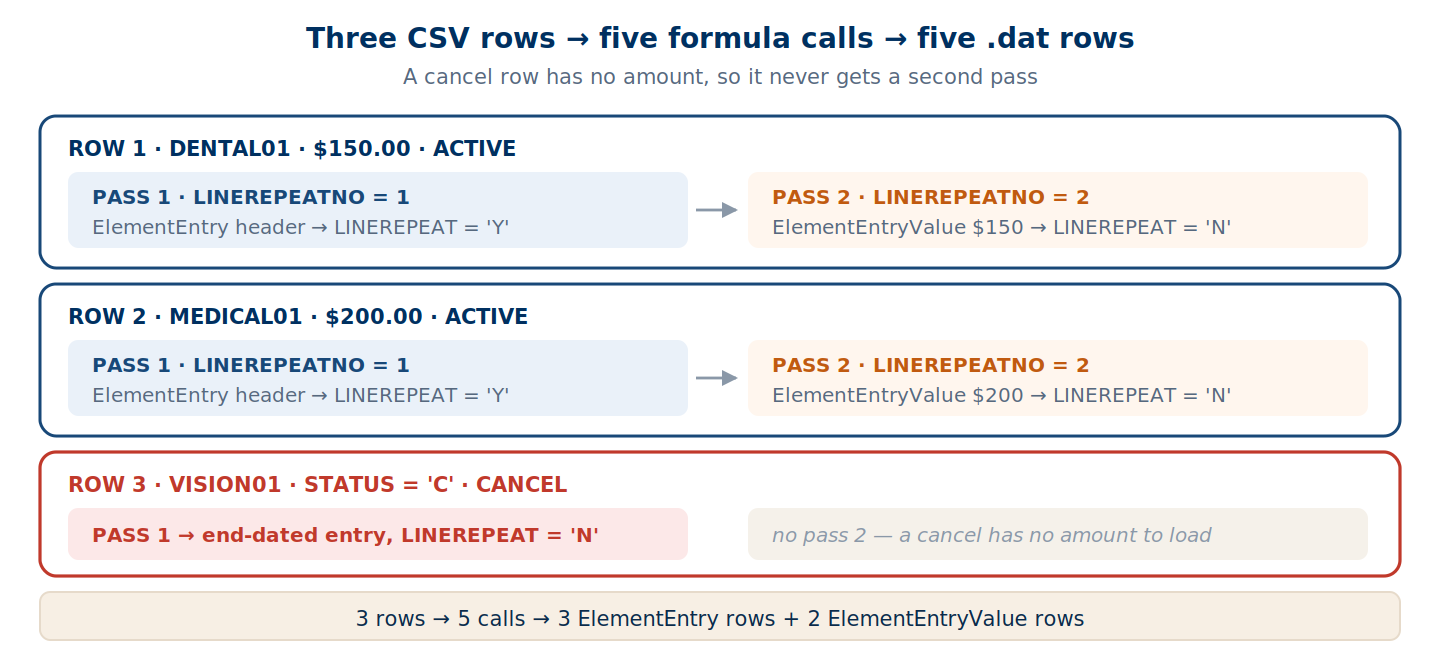
Three rows, five formula calls, five .dat rows:
/* ElementEntry block */
METADATA|ElementEntry|LDG|EffStart|ElementName|Asg#|Creator|Entry|MEC
MERGE|ElementEntry|US LDG|2024/01/15|Dental EE Deduction|E12345|H|E|1
MERGE|ElementEntry|US LDG|2024/01/15|Medical EE Deduction|E12345|H|E|1
MERGE|ElementEntry|US LDG|2024/01/01|Vision EE Deduction|E12345|H|2024/03/15|E|1

/* ElementEntryValue block */
METADATA|ElementEntryValue|LDG|EffStart|ElementName|Asg#|InputValue|Entry|MEC|ScreenValue
MERGE|ElementEntryValue|US LDG|2024/01/15|Dental EE|E12345|XXTAV_PTO BALANCE|E|1|150
MERGE|ElementEntryValue|US LDG|2024/01/15|Medical EE|E12345|XXTAV_PTO BALANCE|E|1|200
/* No row for Vision — a cancel has no dollar amount */
What You Can Do Now
After Parts 1 and 2 you can open any HDL Transformation Formula and read it. You know the engine calls the formula repeatedly — setup first, then once per row, then once per pass. You can decode the triple-quote syntax in GET_VALUE_SET calls. You know ISNULL(x) = 'N' means the value is null. You understand lookup-or-construct for SourceSystemId, where to place ESS_LOG_WRITE, and how the Cancel branch differs from Active.
Next in the Series
Part 3 — Build Your Own. The WSA implementation in full — WSA_EXISTS, WSA_GET, WSA_SET — the complete formula assembled end to end, HDL configuration, test loads, and production debugging. Everything copy-paste ready.
Abhishek Mohanty · Oracle ACE Associate | AIOUG Member | Oracle HCM Cloud Consultant & Technical Architect — Fast Formulas, Absence Management, Time & Labor, Core HR, Redwood, HDL, OTBI.