
Oracle HCM Cloud Fast Formula: The 12-Tier OT Counter Cascade — Why the TCR Unrolls Instead of Loops
Twelve sequential IF blocks, one per accumulated OT threshold, each firing its own recognition trigger. Why Fast Formula's variable-naming constraint forces the unrolled pattern, why a WHILE loop can't replace it, and what happens when the accumulator finally clears the top tier.
Part 9 of 11 · TCR Deep Dive Series
Twelve sequential IF blocks, one per accumulated OT threshold, each firing its own recognition trigger. Why Fast Formula’s variable-naming constraint forces the unrolled pattern, why a WHILE loop can’t replace it, and what happens when the accumulator finally clears the top tier.
Part 5 introduced l_ot_counter — a cumulative running total incremented every time the cascade allocated an OT hour. By the end of a busy period the counter can hit twelve, twenty, or more. Part 9 covers what actually consumes that counter: a stack of twelve sequential IF blocks at the end of the formula, each checking whether the counter has crossed its threshold, each firing a distinct downstream recognition trigger when it has.
This pattern surprises engineers coming from Java or Python. The obvious refactor — a WHILE loop iterating from one to twelve — is impossible in Fast Formula. Not “harder.” Impossible. The reason forces you to think about how the language actually works.
The worked example continues from Part 8: l_ot_counter reaches 12 by END_PERIOD. Every tier fires. Twelve downstream recognition variables get set to 'Y', each one addressable by name from the payroll formulas that consume the TCR’s output.
The Cascade Structure — Twelve Independent Gates
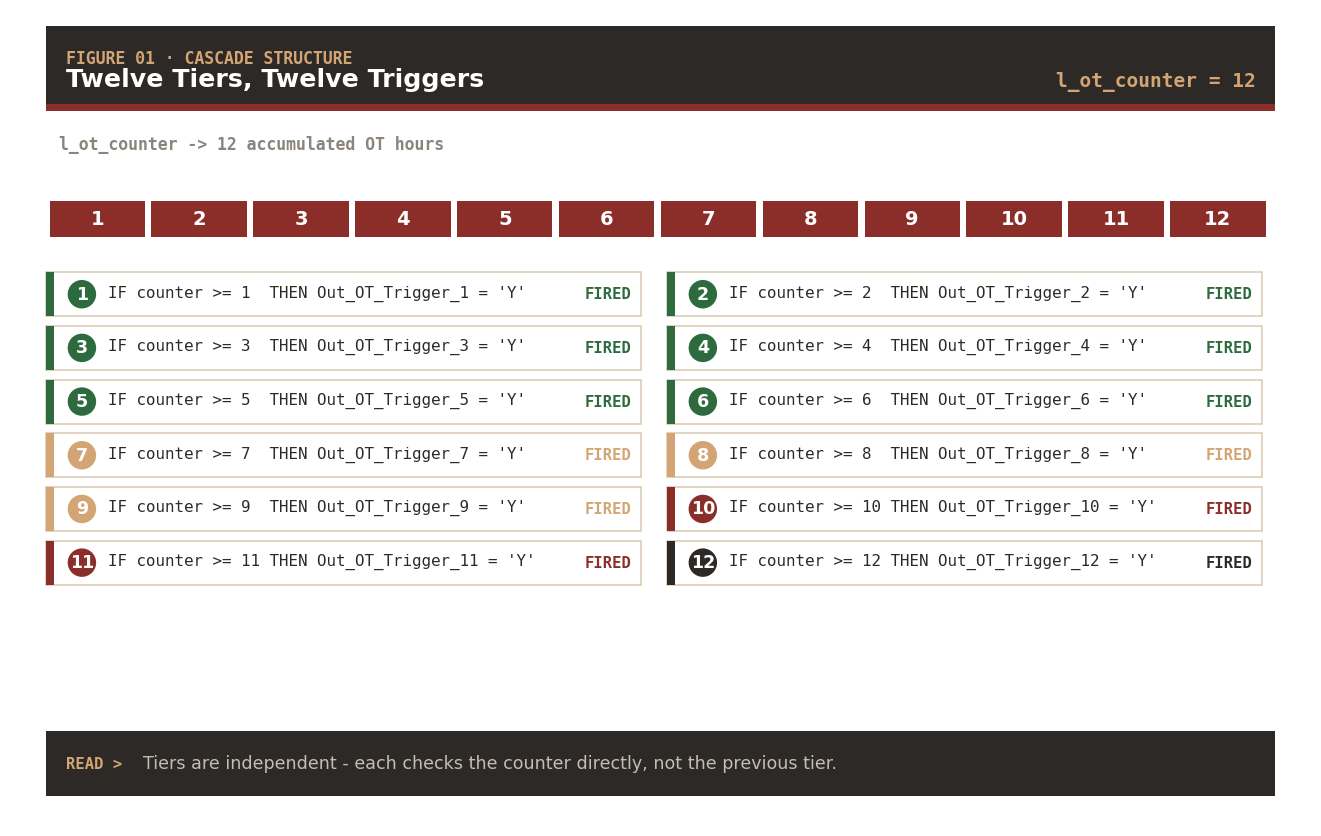
The cascade sits after the main iteration loop, in the block that fires when aiRecPosition = 'END_PERIOD'. Each of the twelve gates checks whether the accumulated l_ot_counter has crossed that specific threshold. Every gate that fires sets its own distinctly-named trigger variable — and those variables are what payroll downstream references by name.
| Tier | Threshold | Trigger variable | Semantic zone | Status (counter=12) |
|---|---|---|---|---|
| T1 | >= 1 | Out_OT_Trigger_1 | Regular OT | ✓ Fired |
| T2 | >= 2 | Out_OT_Trigger_2 | Regular OT | ✓ Fired |
| T3 | >= 3 | Out_OT_Trigger_3 | Regular OT | ✓ Fired |
| T4 | >= 4 | Out_OT_Trigger_4 | Regular OT | ✓ Fired |
| T5 | >= 5 | Out_OT_Trigger_5 | Regular OT | ✓ Fired |
| T6 | >= 6 | Out_OT_Trigger_6 | Regular OT | ✓ Fired |
| T7 | >= 7 | Out_OT_Trigger_7 | Extended OT · fatigue audit | ✓ Fired |
| T8 | >= 8 | Out_OT_Trigger_8 | Extended OT · fatigue audit | ✓ Fired |
| T9 | >= 9 | Out_OT_Trigger_9 | Extended OT · fatigue audit | ✓ Fired |
| T10 | >= 10 | Out_OT_Trigger_10 | Critical · mandatory review | ✓ Fired |
| T11 | >= 11 | Out_OT_Trigger_11 | Critical · mandatory review | ✓ Fired |
| T12 | >= 12 | Out_OT_Trigger_12 | Critical · mandatory review | ✓ Fired |
Tier semantics — Tiers 1–6 signal “regular OT accumulation,” 7–9 signal “extended OT (fatigue-related audit),” 10–12 signal “critical OT (mandatory review).” Payroll formulas downstream branch on the highest fired tier to select the correct rate element, notification, or escalation.
The tiers are independent, not sequential. Tier 5 doesn’t check whether tier 4 fired — it checks the counter directly. If the counter had reached 8, tiers 1–8 would fire and 9–12 wouldn’t, without any inter-tier communication.
Why Unrolled Instead of a Loop
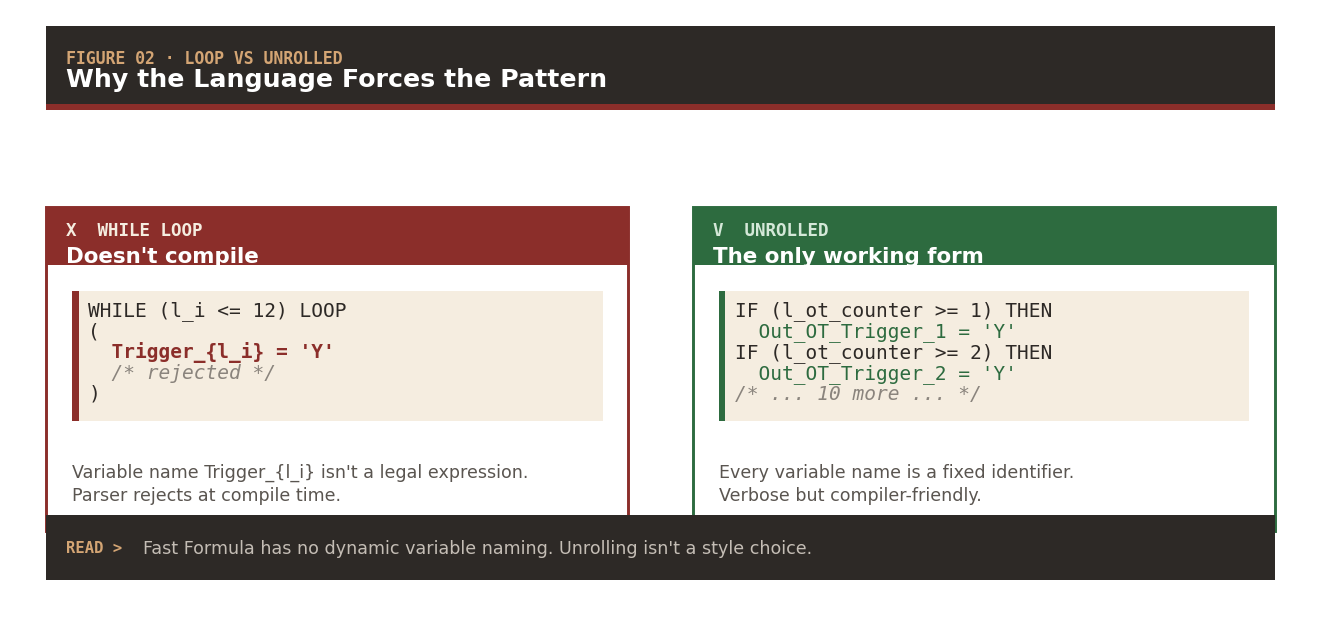
The obvious refactor a developer new to Fast Formula reaches for looks like this:
/* ❌ This is not possible in Fast Formula */
l_i = 1
WHILE (l_i <= 12) LOOP
(
  IF (l_ot_counter >= l_i) THEN
  (
    Out_OT_Trigger_{l_i} = 'Y'   /* no dynamic names */
  )
  l_i = l_i + 1
)
The problem is the highlighted line. Fast Formula has no dynamic variable naming — no equivalent of Python’s globals()[name] or SQL’s dynamic identifiers. Every variable name is a fixed compile-time symbol. You can loop through values but not through variable names. If twelve trigger variables need to exist and each needs to be assigned separately, the assignment has to be written out twelve times.
Loop vs Unrolled — Side by Side
✗ WHILE loop | ✓ Unrolled |
|---|---|
Trigger_{l_i} = 'Y' — rejected at parse time | Out_OT_Trigger_1 = 'Y' — fixed identifier |
| Compiler can’t resolve the dynamic name | Compiler validates every symbol at compile time |
| Shorter, non-functional | Verbose, the only working form |
Language constraint · not a style choice — The unrolled cascade isn’t a preference or an anti-pattern to refactor. It’s the only shape the parser accepts when the downstream API expects twelve individually-named outputs. Rewriting it as a loop makes the code shorter and non-functional.
Fast Formula was designed with a static output contract. Payroll formulas that consume the TCR’s output reference each variable by name at compile time — Out_OT_Trigger_5 is a symbol they can bind to. A dynamic array wouldn’t preserve that contract.
Tier Progression Through the Period
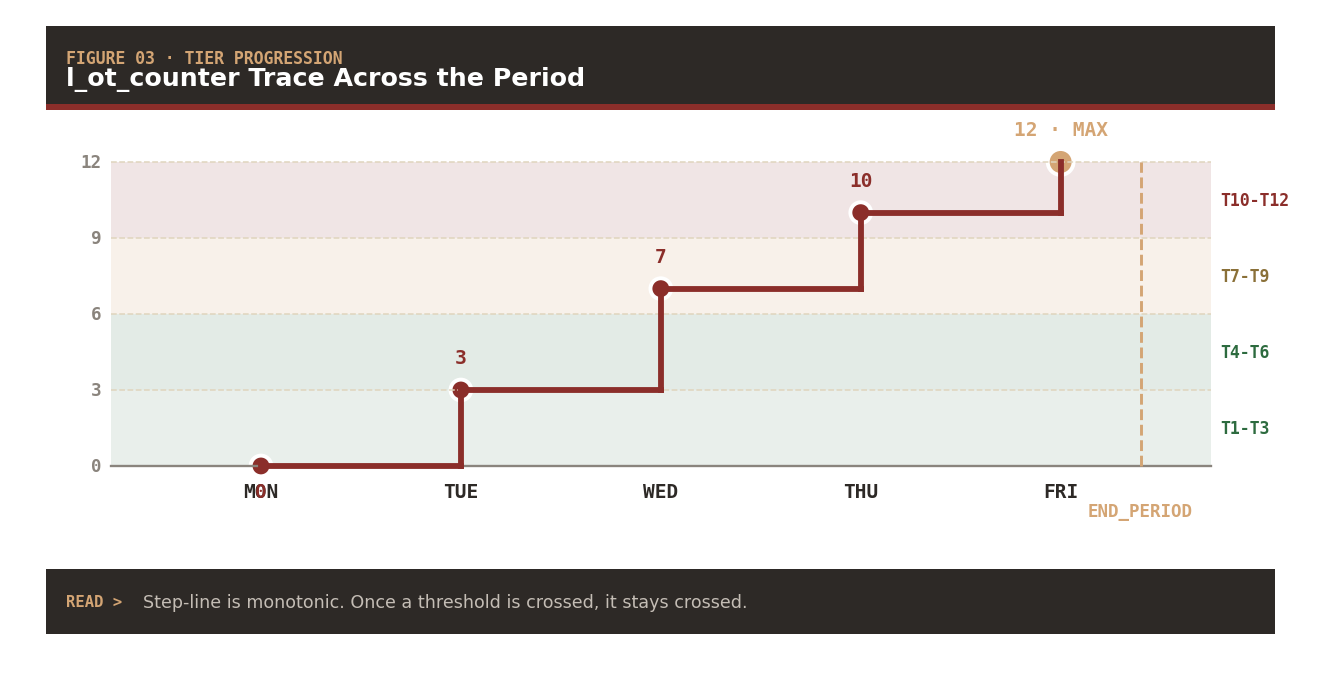
The tiers fire at END_PERIOD — after all the DETAIL iterations have finished and l_ot_counter holds its final value. But conceptually, you can trace each tier as being “unlocked” by the moment during the period when the counter crossed its threshold. Trace across a full week:
| Day | Cumulative counter | Tiers unlocked |
|---|---|---|
| Mon end | 0 | none |
| Tue end | 3 | T1, T2, T3 |
| Wed end | 7 | T4, T5, T6, T7 |
| Thu end | 10 | T8, T9, T10 |
| Fri end · END_PERIOD | 12 | T11, T12 |
Moment of each tier’s unlock — Tue’s shifts pushed the counter to 3 (unlocking T1–T3). Wed added 4 more (T4–T7 unlocked). Thu added 3 more (T8–T10 unlocked). Fri finished with 2 more (T11–T12 unlocked). The tiers themselves don’t fire until END_PERIOD — but each threshold’s crossing is traceable to a specific shift.
The counter is monotonic. Once the counter reaches a value, it never decreases (unlike Part 5’s l_total daily accumulator). The tier register is one-way — cross a threshold and it stays crossed.
The Complete Cascade Skeleton
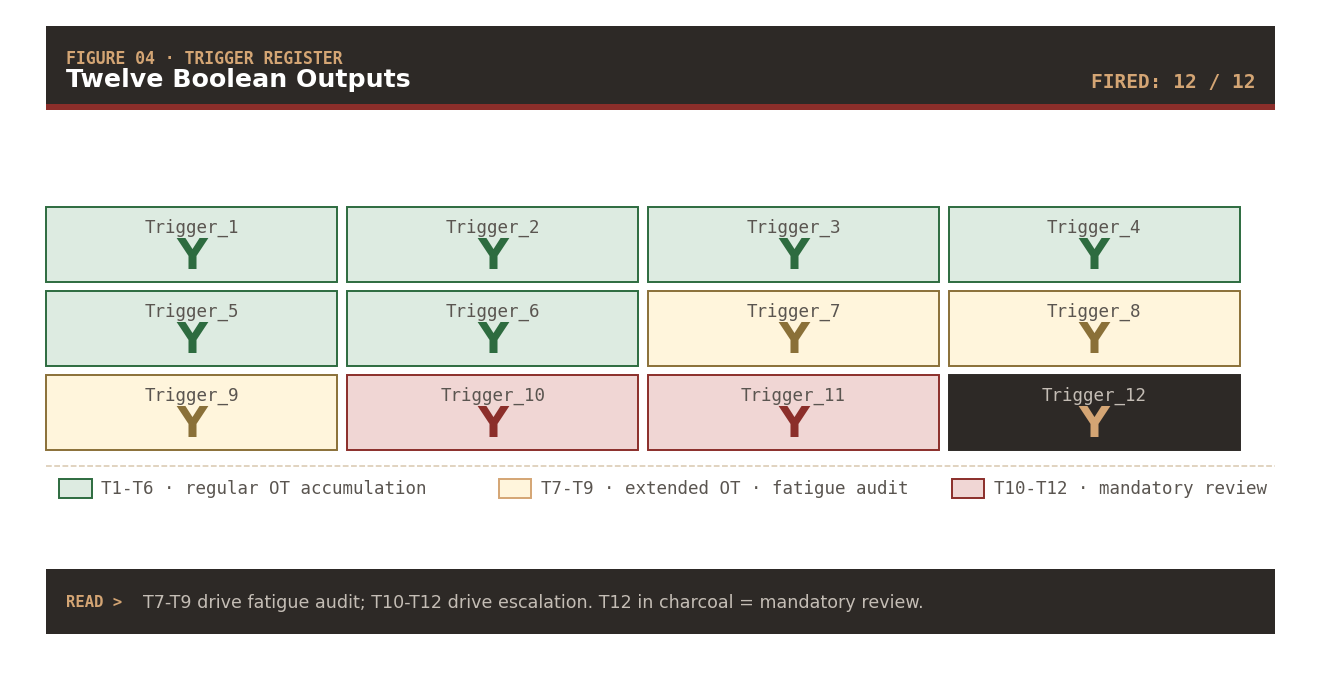
Twelve unrolled tiers in one END_PERIOD block. The pattern is deliberately identical across tiers — same shape, same structure, only the numeric constant and the trigger name change:
IF (aiRecPosition = 'END_PERIOD') THEN
(
  IF (l_ot_counter >= 1)  THEN Out_OT_Trigger_1  = 'Y'
  IF (l_ot_counter >= 2)  THEN Out_OT_Trigger_2  = 'Y'
  IF (l_ot_counter >= 3)  THEN Out_OT_Trigger_3  = 'Y'
  IF (l_ot_counter >= 4)  THEN Out_OT_Trigger_4  = 'Y'
  IF (l_ot_counter >= 5)  THEN Out_OT_Trigger_5  = 'Y'
  IF (l_ot_counter >= 6)  THEN Out_OT_Trigger_6  = 'Y'
  IF (l_ot_counter >= 7)  THEN Out_OT_Trigger_7  = 'Y'
  IF (l_ot_counter >= 8)  THEN Out_OT_Trigger_8  = 'Y'
  IF (l_ot_counter >= 9)  THEN Out_OT_Trigger_9  = 'Y'
  IF (l_ot_counter >= 10) THEN Out_OT_Trigger_10 = 'Y'
  IF (l_ot_counter >= 11) THEN Out_OT_Trigger_11 = 'Y'
  IF (l_ot_counter >= 12) THEN Out_OT_Trigger_12 = 'Y'
)
Every trigger variable initializes to 'N' at the top of the formula (default value in the output declaration). Any tier that fires flips its trigger to 'Y'. Tiers that don’t fire keep their default. Downstream payroll formulas read the twelve variables and branch accordingly — a fatigue-audit rule might key off Out_OT_Trigger_9, a mandatory-review rule off Out_OT_Trigger_12.
Next in the Series
Part 10 — TCR Indexing Anatomy: nidx, the Parallel-Indexing Contract, and Why You Increment It Yourself
The variable that walks the parallel arrays. What nidx actually is, how one index reaches into every parallel track simultaneously, why Fast Formula makes you manage the increment by hand, and the bounds-and-guard patterns that keep the loop honest.
Abhishek Mohanty · Oracle ACE Associate | AIOUG Member | Oracle HCM Cloud Consultant & Technical Lead — Fast Formulas, Absence Management, Time & Labor, Core HR, Redwood, HDL, OTBI.
TCR Deep Dive · Part 9 / 11 · Series tag: #TCRDeepDive