
Oracle HCM Cloud Fast Formula: Night Surcharge Detection in a TCR — The PayrollTimeType Match, UPPER() Case-Insensitive Compare, and the Dual Daily/Period Night Accumulators
Oracle HCM Cloud Fast Formula: Night Surcharge Detection in a TCR — The PayrollTimeType Match, UPPER() Case-Insensitive Compare, and the Dual...
Oracle HCM Cloud Fast Formula: Night Surcharge Detection in a TCR — The PayrollTimeType Match, UPPER() Case-Insensitive Compare, and the Dual Daily/Period Night Accumulators
l_daily_night_total resets at END_DAY while l_period_night_total keeps climbing, and how Out_Measure_Night_Hours stacks alongside the Reg / OT-150 / OT-200 buckets from Part 5 without disturbing any of them.Part 5 covered how a worked hour gets classified into Regular, OT 150%, or OT 200% based on day type and daily threshold. Part 6 adds a second classification that runs in parallel: night surcharge. It doesn't replace any bucket — it stacks on top. The same hour can be Regular pay and Night Surcharge at the same time, without either classification interfering with the other.
The design choice matters because it's counterintuitive. If you're new to TCR output semantics, your instinct is that a worked hour belongs to one bucket — Regular or OT 150 or OT 200. But when night surcharge enters the picture, that mental model breaks. A single hour can (and often does) appear in two buckets simultaneously. Payroll then compensates each classification at its own rate.
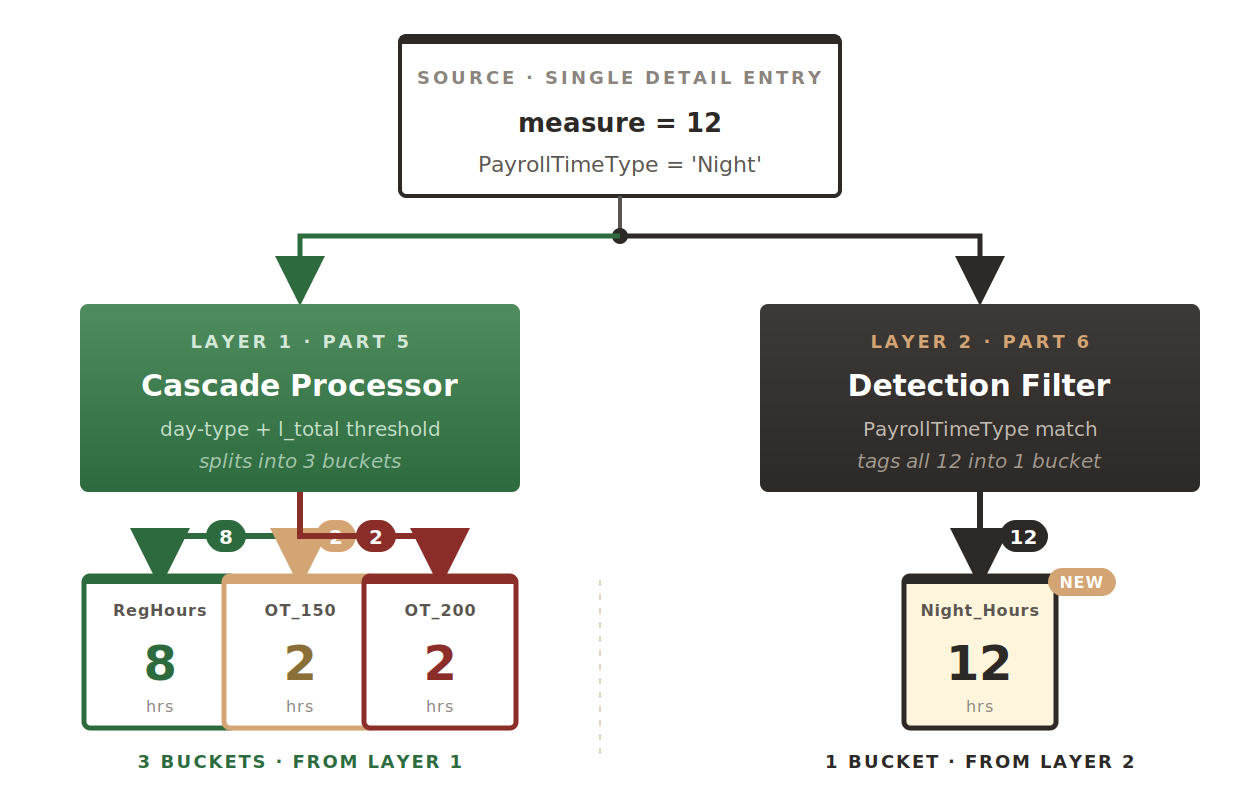
A concrete example threads through the post: a worker logs a 12-hour Wednesday shift tagged as night time. Part 5's cascade produces 8 Regular + 2 OT 150% + 2 OT 200%. Part 6's detection produces 12 Night Surcharge hours — the entire shift. Both classifications hit the outputs; payroll pays for both. That's the layering pattern this post explains.
Night Surcharge as a Parallel Classification
The mental model to hold is: every DETAIL entry passes through two independent classification layers. Layer 1 is the day-type-plus-threshold cascade from Part 5 that decides Reg / OT-150 / OT-200. Layer 2 is the PayrollTimeType match from Part 6 that decides Night Surcharge or not. Neither layer knows or cares what the other layer decided.
The PayrollTimeType Match — Detecting a Night Entry
PayrollTimeType is one of the parallel-array input variables introduced in Part 3 — it sits alongside measure, StartTime, StopTime in the input block and gets populated by the worker's timecard entry classification. When the worker submits a shift as "Night," the entry lands in the TCR with PayrollTimeType[nidx] = 'Night' (or whatever code the LDG uses).
The TCR's job is to match that value against the configured night-time code. Two small subtleties matter:
IF (PayrollTimeType.exists(nidx)) THEN
(
l_time_type = UPPER(PayrollTimeType[nidx])
/* Case-insensitive compare against the configured code */
IF (l_time_type = UPPER(l_night_code)) THEN
(
l_night_hours = measure[nidx]
l_daily_night_total = l_daily_night_total + l_night_hours
l_period_night_total = l_period_night_total + l_night_hours
Out_Measure_Night_Hours = Out_Measure_Night_Hours + l_night_hours
)
)
Two things to notice:
- The
.exists()guard is mandatory. Phase markers (END_DAY, END_PERIOD from Part 3) leavePayrollTimeTypeempty. ReadingPayrollTimeType[nidx]at those positions without the guard raises "no data found" and aborts the rule. - Both sides of the compare go through
UPPER(). Timecard entry data can be entered in any case — 'Night', 'night', 'NIGHT'. Wrapping both operands inUPPER()makes the compare case-insensitive without needing to enforce case at the entry layer. A single-sideUPPER()is a common bug — it works during dev testing with clean data and quietly misses matches in production.
The Configurable Night-Time Code
Hardcoding 'Night' as the trigger value would work for one implementation and break the next. Different LDGs use different codes — 'NIGHT', 'NGT', 'NIGHT_SHIFT', 'N'. The TCR reads the value from a rule input parameter, defaulting to a sensible fallback if the parameter isn't set:
l_night_code = get_rvalue_text(rule_id, 'NIGHT_TIME_CODE', 'Night')
Same pattern Part 2 used for the holiday category code. The three-argument form of get_rvalue_text takes the rule ID, the parameter name, and a default value used when the parameter isn't configured on the rule instance. Deploy the same formula to two LDGs, configure different night codes on their respective rule instances, and both work without a formula change.
Two Night Accumulators — Daily Reset vs Period Persistence
Alongside Out_Measure_Night_Hours, the formula maintains two local night accumulators — l_daily_night_total and l_period_night_total. They differ in exactly one behavior: what happens at the END_DAY phase marker.
l_daily_night_total is zeroed at END_DAY — just like l_total from Part 3. It tracks night hours within a single day, which matters for day-level rules (e.g., a maximum night-hour cap per day). l_period_night_total is not reset — it keeps accumulating across days, ending the period with the total night hours worked. That's the value the monthly night differential is computed against.
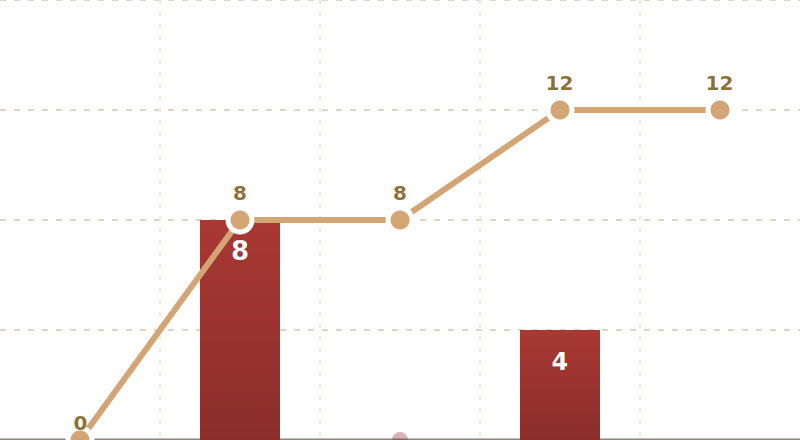
The reset itself is one line in the END_DAY branch of the main loop:
(
l_total = 0
l_daily_night_total = 0
/* l_period_night_total NOT reset — deliberate */
)
Stacking on Top of the Day-Type Buckets
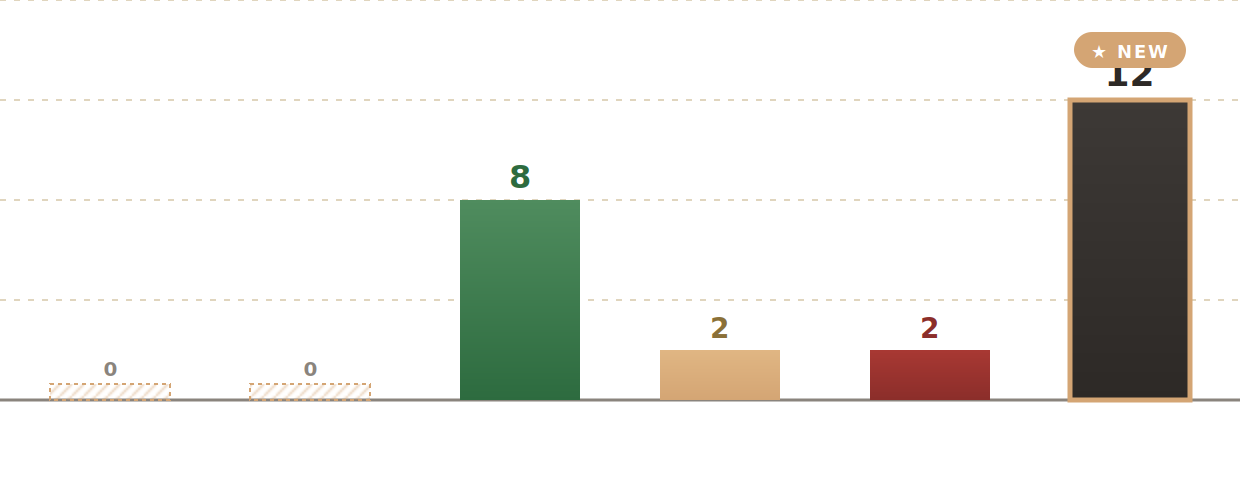
Back to the worked example: a 12-hour Wednesday shift tagged as night time. The day-type/threshold layer from Part 5 splits the 12 hours into Reg/OT-150/OT-200 buckets. The night detection from Part 6 puts all 12 hours into Out_Measure_Night_Hours. Both classifications hit the outputs independently:
The Weekday Night Split — Preparing for the Cascade
A subtle refinement to watch for in production formulas: some regimes split the night accumulator further into weekday night hours vs weekend/holiday night hours. The pattern reads the day type Part 5 computed and increments a different local depending on the branch:
(
IF (l_day_type = 'WD') THEN
(
l_period_weekday_night_total = l_period_weekday_night_total + l_night_hours
)
ELSE
(
l_period_weekend_night_total = l_period_weekend_night_total + l_night_hours
)
/* Combined total for the single output bucket */
Out_Measure_Night_Hours = Out_Measure_Night_Hours + l_night_hours
)
Why the split? Weekday night hours often feed the Part 9 OT cascade differently than weekend night hours — the weekend variant is usually already at OT 200% via Sunday/Public Holiday classification, so its night differential compounds a different way. Separating the two accumulators inline avoids a downstream re-scan of the output buckets.
The Night Output Bucket
One output array carries night classification to downstream payroll processing. Together with the three worked-time buckets from Part 5 and the two absence buckets from Part 4, the TCR now returns six output arrays at END_PERIOD:
Part 7 — Night OT Spillover with IS_DATE_BETWEEN, the StartTimeMid Wrap, and the Four-Bucket Allocation
A shift starting at 22:00 crosses midnight into the next day. The PayrollTimeType may not be tagged as night, but the physical clock time falls squarely in the 22:00–06:00 window. Part 7 covers the second night-detection path — IS_DATE_BETWEEN against the night window, the StartTimeMid + 24 arithmetic that handles day-boundary crossings, and the allocation into four different output buckets (regular night, night OT-150, night OT-200, weekend night) without any minute being counted twice.