
Oracle HCM Cloud Fast Formula: Night OT Spillover in a TCR — IS_DATE_BETWEEN, the StopTime+24 Midnight Wrap, and the Four-Bucket Night Allocation
Oracle HCM Cloud Fast Formula: Night OT Spillover in a TCR — IS_DATE_BETWEEN, the StopTime+24 Midnight Wrap, and the Four-Bucket Night Allocation
Oracle HCM Cloud Fast Formula: Night OT Spillover in a TCR — IS_DATE_BETWEEN, the StopTime+24 Midnight Wrap, and the Four-Bucket Night Allocation
PayrollTimeType, how IS_DATE_BETWEEN plus the StopTime + 24 unwrap handle a shift that crosses midnight, and how the resulting night hours split across four output buckets based on day type and the Part 5 tier they fell into.Part 6 covered the easy case — the timecard entry is tagged as PayrollTimeType = 'Night' and the TCR just needs to detect the tag. Part 7 covers the case that gives engineers pause: the entry isn't tagged, but its physical clock time falls squarely inside the night window. A shift stamped 'Regular' can still owe night differential if it runs from 22:00 through the small hours.
The TCR has to detect the overlap between the shift and the configured night window purely from StartTime and StopTime. And because shifts routinely cross midnight — 22:00 to 06:00 is one of the most common patterns in a 24/7 operation — the arithmetic has to handle a stop-time that's numerically less than the start-time. That's where StopTime + 24 comes in.
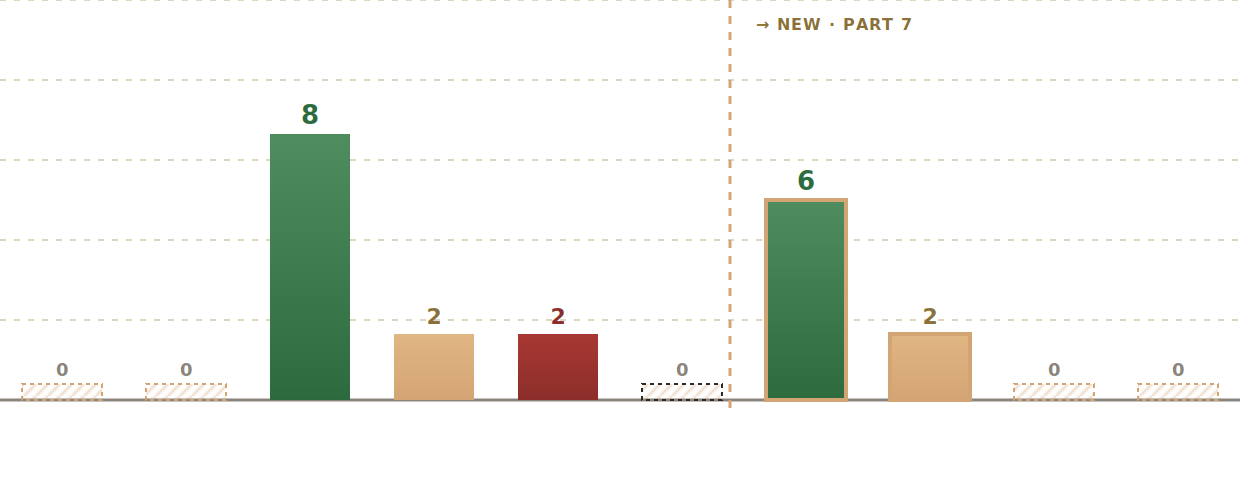
The worked example threading through the post: a worker logs one shift starting at 20:00 Wednesday and ending at 08:00 Thursday — 12 hours total, tagged PayrollTimeType = 'Regular'. Part 6's detection sees nothing to do. Part 7's detection finds 8 hours in the night window — from 22:00 Wednesday to 06:00 Thursday — and has to split those 8 hours across the four night buckets based on which Part 5 tier each hour fell into. The final allocation: 6 Regular-Night + 2 OT-150-Night + 0 OT-200-Night + 0 Weekend-Night.
The Untagged Night Entry Problem
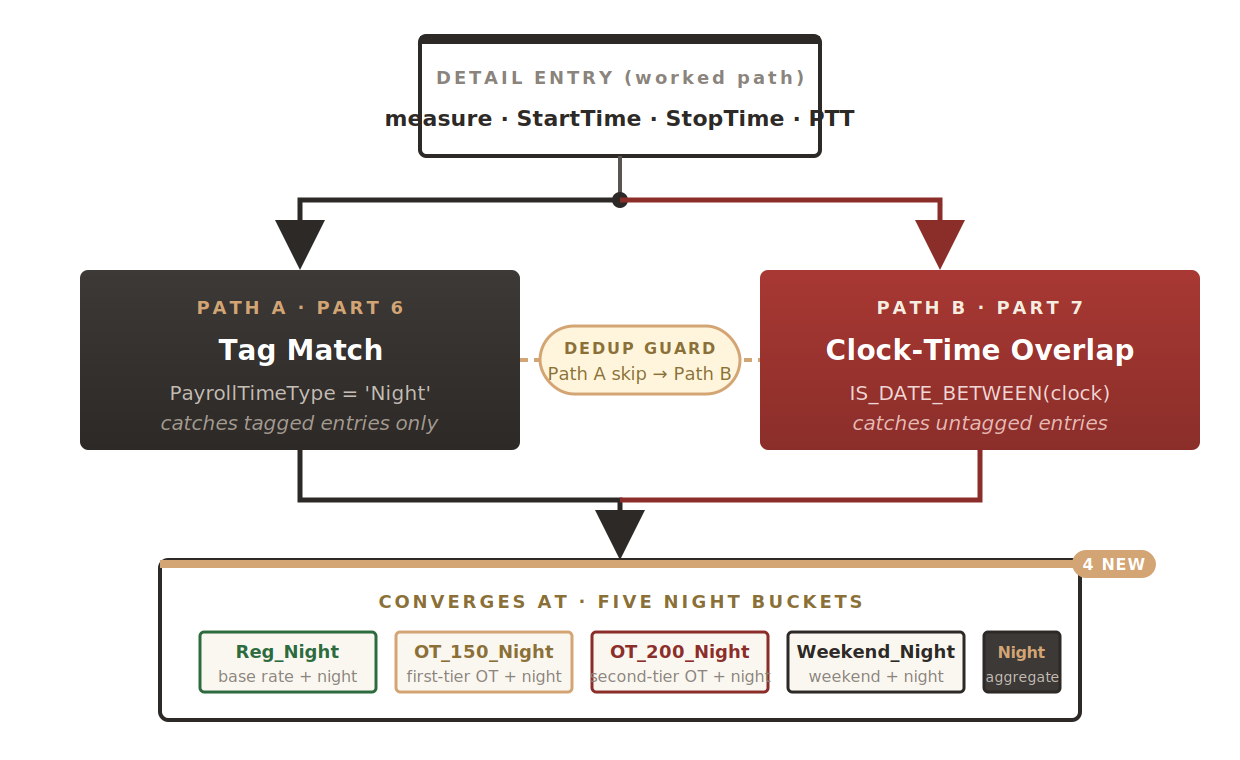
Not every organization tags night shifts at the timecard entry layer. Some rely purely on PayrollTimeType for classification (Part 6's world). Others let workers submit everything as 'Regular' and expect the TCR to figure out night eligibility from the clock time. A robust TCR runs both detection paths — one for the tag, one for the time — so the formula works regardless of how the timecard is configured downstream.
The Night Window as a Rule Parameter
The night window's start and end hours aren't hardcoded — they're rule input parameters. Different jurisdictions define night hours differently (22:00–06:00 is common but not universal), and even within one jurisdiction the definition can differ by contract:
l_night_start = get_rvalue_number(rule_id, 'NIGHT_WINDOW_START', 22)
l_night_end = get_rvalue_number(rule_id, 'NIGHT_WINDOW_END', 6)
Two numbers held in decimal hours. 22 means 22:00 (10 PM); 6 means 06:00 (6 AM). The formula treats these as anchors on a 24-hour clock — with the understanding that when end < start, the window wraps past midnight.
IS_DATE_BETWEEN and the StopTime + 24 Unwrap
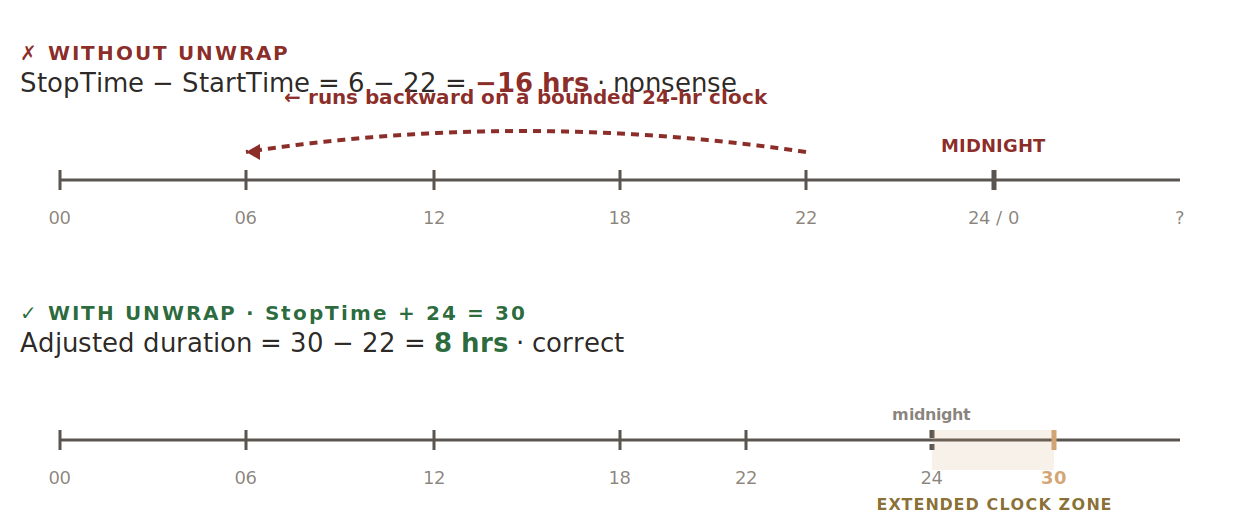
A shift from 22:00 Wednesday to 06:00 Thursday is 8 hours long. But if you subtract StopTime - StartTime naively, you get 6 - 22 = -16. Negative. Because the numeric clock resets to zero at midnight, and any arithmetic that ignores day boundaries collapses. The StopTime + 24 unwrap is the standard fix: if the stop-time is numerically less than the start-time, add 24 to it. Now the shift runs from 22 to 30 on an extended clock, and every subsequent calculation works.
Computing the Night-Window Overlap
Once the shift's clock times are unwrapped, computing the overlap with the night window is a two-line clamp. GREATEST and LEAST — same idiom Part 5 used for spillover — do the whole job:
l_win_start = l_night_start /* 22 */
l_win_end = l_night_end + 24 /* 6 + 24 = 30 */
/* Overlap interval between (l_start, l_stop_adj) and (l_win_start, l_win_end) */
l_overlap_start = GREATEST(l_start, l_win_start)
l_overlap_end = LEAST (l_stop_adj, l_win_end)
l_night_hours = GREATEST(0, l_overlap_end - l_overlap_start)
Plug in the worked example — l_start = 20, l_stop_adj = 32, l_win_start = 22, l_win_end = 30. Overlap runs from MAX(20,22) = 22 to MIN(32,30) = 30, so night hours detected = 30 - 22 = 8. The shift includes 2 hours before the night window (20:00–22:00) and 2 hours after (06:00–08:00) that don't qualify.
Allocating Night Hours Across Four Buckets
The 8 detected night hours can't all go into one bucket. Payroll needs to know which tier each night hour belonged to under Part 5's cascade — because a night hour that's also an OT 200 hour pays at a different combined rate than a night hour that's still Regular. Four output buckets carry the split:
Out_Measure_Reg_Night_Hours— weekday night hours in the Regular tier (below the daily OT threshold)Out_Measure_OT_150_Night_Hours— weekday night hours in the OT 150 tierOut_Measure_OT_200_Night_Hours— weekday night hours in the OT 200 tierOut_Measure_Weekend_Night_Hours— all night hours on Saturday, Sunday, or Public Holiday (day-type takes precedence over tier)
In the worked example the shift is on a Wednesday (weekday), so the Weekend_Night bucket stays at zero. The remaining 8 night hours split by Part 5 tier — specifically, where each night hour falls in the shift's running l_total position:
Deduplication with Part 6 Detection
If both detection paths were allowed to fire on the same entry, the same night hours would be counted twice — once via Part 6's tag match and once via Part 7's clock-time overlap. The formula prevents that by giving Part 6 priority: if the entry is tagged as night, Part 7 skips the entry entirely. A local flag set inside Part 6's branch does the guarding:
IF (l_time_type = UPPER(l_night_code)) THEN
(
/* ... existing Part 6 logic ... */
l_night_detected = 'Y'
)
/* Part 7 detection skips if Part 6 already handled it */
IF (l_night_detected = 'N') THEN
(
/* Run IS_DATE_BETWEEN + overlap + four-bucket allocation */
)
The flag is reset at every new DETAIL iteration. Two paths, one policy, zero double-counts.
The Updated Output Portfolio
Four new buckets join the running inventory. The output-array count is now ten — two absence, three worked-time, one aggregate night, and four granular night buckets:
Part 8 — OT Claim Reconciliation with GET_PLAN_BALANCE Inside a CHANGE_CONTEXTS Block
How the TCR reconciles OT hours it just allocated against previously-claimed OT balances stored in the absence plan — using GET_PLAN_BALANCE inside a CHANGE_CONTEXTS block so the balance function reads under the right effective-date and legislation code, and why doing it outside the CHANGE_CONTEXTS block returns silently wrong values.