
Oracle HCM Cloud Fast Formula: Debug Logging with ADD_RLOG, the Log Level Profile Trap, and the Final RETURN — Series Finale
Why ADD_RLOG is the right way to log from a TCR, why the ORA_HWM_RULES_LOG_LEVEL profile is the piece everyone forgets to set, why ESS_LOG_WRITE silently does nothing in real-time formulas — and what the RETURN statement finally sends home. Series closes.
Part 11 of 11 · TCR Deep Dive Series
Why ADD_RLOG is the right way to log from a TCR, why the ORA_HWM_RULES_LOG_LEVEL profile is the piece everyone forgets to set, why ESS_LOG_WRITE silently does nothing in real-time formulas — and what the RETURN statement finally sends home. Series closes.
Ten parts covered how the TCR computes its outputs. This one covers the two topics every author needs when the formula misbehaves in production: how to see what it’s doing, and how it finally hands its answers off to payroll. Both are simpler than the allocation math, and both catch first-time TCR authors off guard for the same reason — they involve an invisible switch elsewhere in the system that has to be set correctly, or the code silently does nothing.
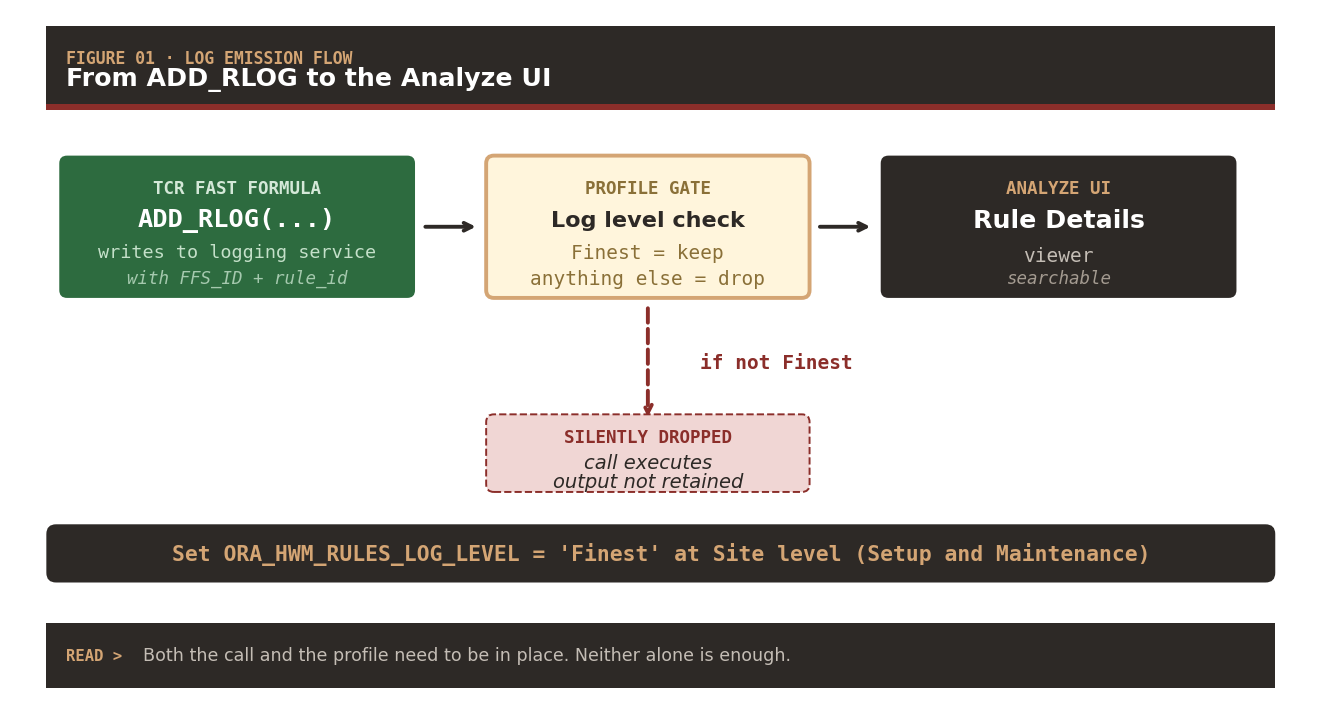
The debug story starts with ADD_RLOG — the OTL-specific logging function whose output shows up in the Analyze Rule Processing Details UI, exactly where a support engineer looks first when a rule produces wrong values. The catch is the profile. Without ORA_HWM_RULES_LOG_LEVEL set to Finest at Site level, the call executes and no output is retained.
The RETURN story is straightforward — the formula names its outputs in a declaration block at the top, computes their values through the body, and returns them by name in a single closing statement. But the RETURN is what ends the series: it’s the point where ten parts of computation flow back to the payroll formulas that were waiting for it.
ADD_RLOG — The Preferred Method
ADD_RLOG is OTL’s dedicated logging function. It takes three arguments: the formula-setup ID, the rule ID, and the message string. The two IDs are context variables OTL populates automatically — HWM_FFS_ID and HWM_RULE_ID — so you just pass them through. The message string is whatever you want to see, typically a labeled variable dump:
ADD_RLOG(HWM_FFS_ID, HWM_RULE_ID,
         'nidx=' || TO_CHAR(nidx) ||
         ' | l_total=' || TO_CHAR(l_total) ||
         ' | l_ot_counter=' || TO_CHAR(l_ot_counter))
Drop calls like this at the branches you care about — inside the DETAIL branch, inside the absence branch, at the END_PERIOD reset, before and after each cascade tier. Each line’s output attaches to the formula-setup instance, viewable through the Analyze Rule Processing Details screen in Time Management. That’s exactly where a support engineer starts investigating an incorrect result, so leaving RLOG calls in production code is a feature, not a leak.
Log Emission Flow
[TCR Fast Formula]
   ADD_RLOG(FFS_ID, RULE_ID, message)
              │
              ▼
[Profile Gate: ORA_HWM_RULES_LOG_LEVEL]
   • If 'Finest' → keep
   • Anything else → drop silently
              │
        ┌─────┴─────┐
        │           │
     (Finest)   (not Finest)
        │           │
        ▼           ▼
   Analyze UI   SILENTLY DROPPED
   Rule Details (call executes,
                 output not retained)
The invisible switch — The profile lives in Setup and Maintenance — outside the formula, outside the rule, outside Time Management altogether. A developer with proper OTL permissions but without profile-management access can spend hours wondering why their ADD_RLOG calls produce nothing. The switch is there; it just needs someone with the right role to flip it.
Action item: Set ORA_HWM_RULES_LOG_LEVEL = 'Finest' at Site level via Setup and Maintenance.
Both the ADD_RLOG call and the profile setting need to be in place for logging to be visible. The formula’s calls execute either way — but the output disappears silently if the profile isn’t Finest.
The Real-Time Formula Trap — ESS_LOG_WRITE Doesn’t Work
ESS_LOG_WRITE is the standard logging function for scheduled processes (ESS jobs) in the Oracle Fusion stack. Reasonable to assume it works everywhere. It doesn’t. In an OTL Time Entry Validation formula — a real-time formula that fires when a worker submits their timecard — ESS_LOG_WRITE executes without error and produces no output, because there’s no ESS job in the calling context to attach the log to.
This matters mainly for adjacent rules (Time Entry Validation, some Time Card Approval formulas). The TCR itself typically runs in a batch context where ADD_RLOG plus profile-set-to-Finest is the correct combination. But once you’re maintaining a suite of related OTL formulas, the ESS_LOG_WRITE limitation is one you’ll hit — and the workaround is uncomfortable but reliable:
The Forced-Fail Debug Trick
Force the formula to fail deliberately, embedding your debug string inside the error message. The timecard entry gets rejected, the message shows up in the validation error UI, and you see the values you wanted:
/* Force failure with debug info in the error message */
VALID = 'N'
ERROR_MESSAGE = 'DEBUG: nidx=' || TO_CHAR(nidx) ||
                ' | l_total=' || TO_CHAR(l_total) ||
                ' | l_ot_counter=' || TO_CHAR(l_ot_counter)
Not a technique to leave in production. Not a technique that scales beyond a few debug points. But when you need to see what’s happening inside a Time Entry Validation formula and nothing else works, forced-fail is the reliable last resort.
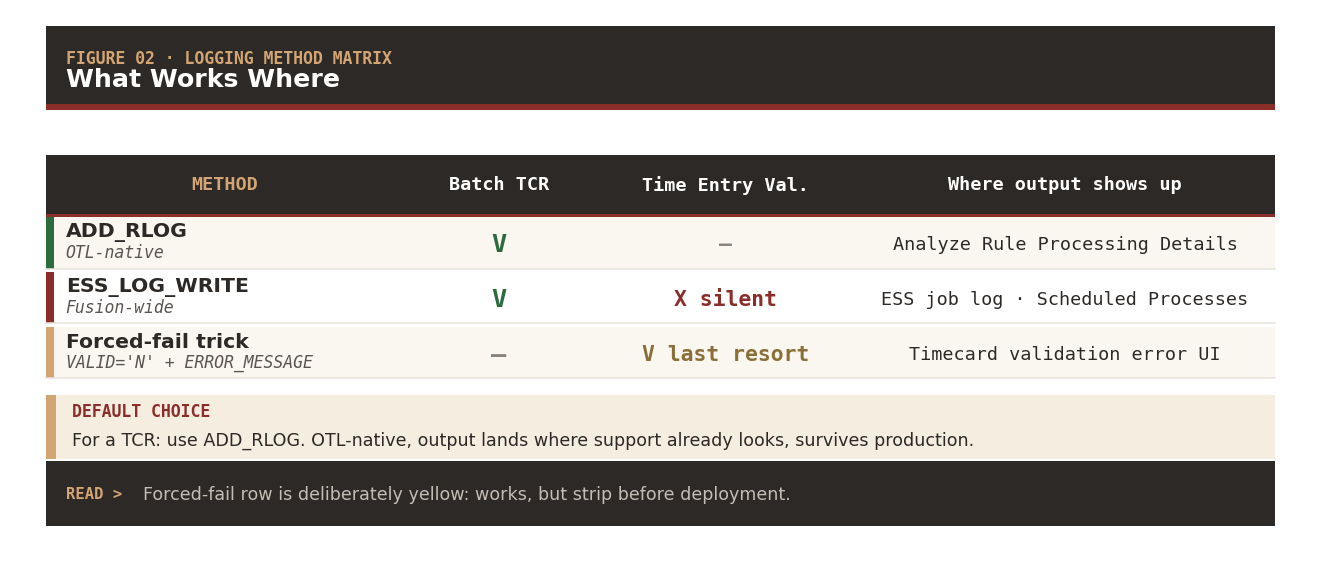
Logging Method Matrix — What Works Where
| Method | Batch TCR | Time Entry Validation | Where output shows up |
|---|---|---|---|
ADD_RLOG (OTL-native) | ✓ | — | Analyze Rule Processing Details |
ESS_LOG_WRITE (Fusion-wide) | ✓ | ✗ silent | ESS job log · Scheduled Processes |
| Forced-fail trick (VALID=‘N’ + ERROR_MESSAGE) | — | ✓ last resort | Timecard validation error UI |
Default choice — For a TCR: use ADD_RLOG. It’s OTL-native, the output lands in the Analyze UI where support tools already look, and it survives production without any special handling. ESS_LOG_WRITE also works in batch — but adds no value over ADD_RLOG in a TCR context, and it fails in the real-time contexts you might be tempted to reuse the formula in.
The forced-fail row works, but it’s a debugging technique, not a production pattern. Strip it before deployment.
The Final RETURN Statement
Everything the formula computes lives in local variables and output arrays through the body. The RETURN statement at the bottom is what actually hands those values off to the payroll formulas waiting upstream. The syntax is minimal — RETURN followed by a comma-separated list of every output variable the formula’s declaration block promised:
RETURN
  /* Absence bundle */
  Out_Abs_Cd, Out_Abs_Hours,

  /* Worked-time cascade (Part 5) */
  Out_Measure_RegHours,
  Out_Measure_OT_150_Hours,
  Out_Measure_OT_200_Hours,

  /* Night detection (Parts 6-7) */
  Out_Measure_Night_Hours,
  Out_Measure_Reg_Night_Hours,
  Out_Measure_OT_150_Night_Hours,
  Out_Measure_OT_200_Night_Hours,
  Out_Measure_Weekend_Night_Hours,

  /* Reconciliation (Part 8) */
  Out_Measure_OT_Reconciled_Hours,

  /* Trigger register (Part 9) */
  Out_OT_Trigger_1,  Out_OT_Trigger_2,  Out_OT_Trigger_3,
  Out_OT_Trigger_4,  Out_OT_Trigger_5,  Out_OT_Trigger_6,
  Out_OT_Trigger_7,  Out_OT_Trigger_8,  Out_OT_Trigger_9,
  Out_OT_Trigger_10, Out_OT_Trigger_11, Out_OT_Trigger_12
Every name in this list must also appear in the output declarations at the top of the formula — with the same type and (for arrays) the same default. The RETURN statement isn’t allowed to introduce new outputs; it can only ship the ones the formula promised. And every promised output must appear in the RETURN — omitting one is a compile error.
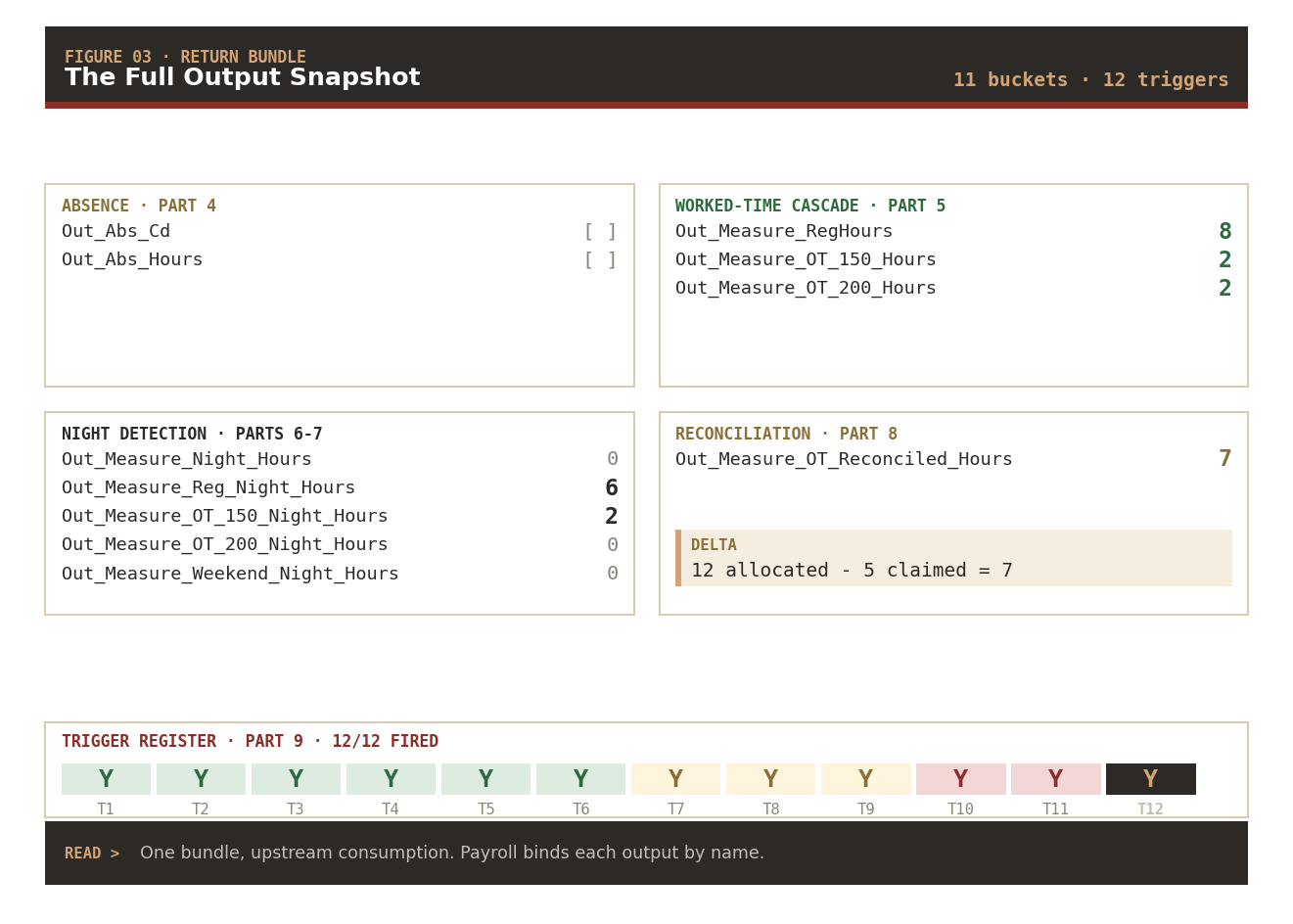
The Full Output Snapshot from the Running Example
Absence bundle (Part 4) — no absences in this scenario, both stay empty.
Worked-time cascade (Part 5):
| Bucket | Value |
|---|---|
Out_Measure_RegHours | 8 |
Out_Measure_OT_150_Hours | 2 |
Out_Measure_OT_200_Hours | 2 |
Night detection (Parts 6-7):
| Bucket | Value |
|---|---|
Out_Measure_Night_Hours | 0 (aggregate) |
Out_Measure_Reg_Night_Hours | 6 |
Out_Measure_OT_150_Night_Hours | 2 |
Out_Measure_OT_200_Night_Hours | 0 |
Out_Measure_Weekend_Night_Hours | 0 |
Reconciliation (Part 8):
| Bucket | Value | Delta |
|---|---|---|
Out_Measure_OT_Reconciled_Hours | 7 | 12 allocated − 5 claimed |
Trigger register (Part 9) · 12 of 12 fired:
| T1 | T2 | T3 | T4 | T5 | T6 | T7 | T8 | T9 | T10 | T11 | T12 |
|---|---|---|---|---|---|---|---|---|---|---|---|
| Y | Y | Y | Y | Y | Y | Y | Y | Y | Y | Y | Y |
One bundle · upstream consumption — Payroll formulas that reference this TCR bind to each named output at compile time. The absence bundle feeds absence rate calc. The three worked-time buckets feed the primary earnings elements. The five night buckets feed differential rate elements. The reconciliation delta drives the plan-balance update. The twelve triggers drive downstream fatigue and audit rules. Every consumer sees only the names it needs.
This is the final shape of the formula’s contract with the payroll system. Every value the TCR computed across ten parts lands in one of these named slots. Nothing else escapes.
Series Conclusion — Complete Formula Anatomy
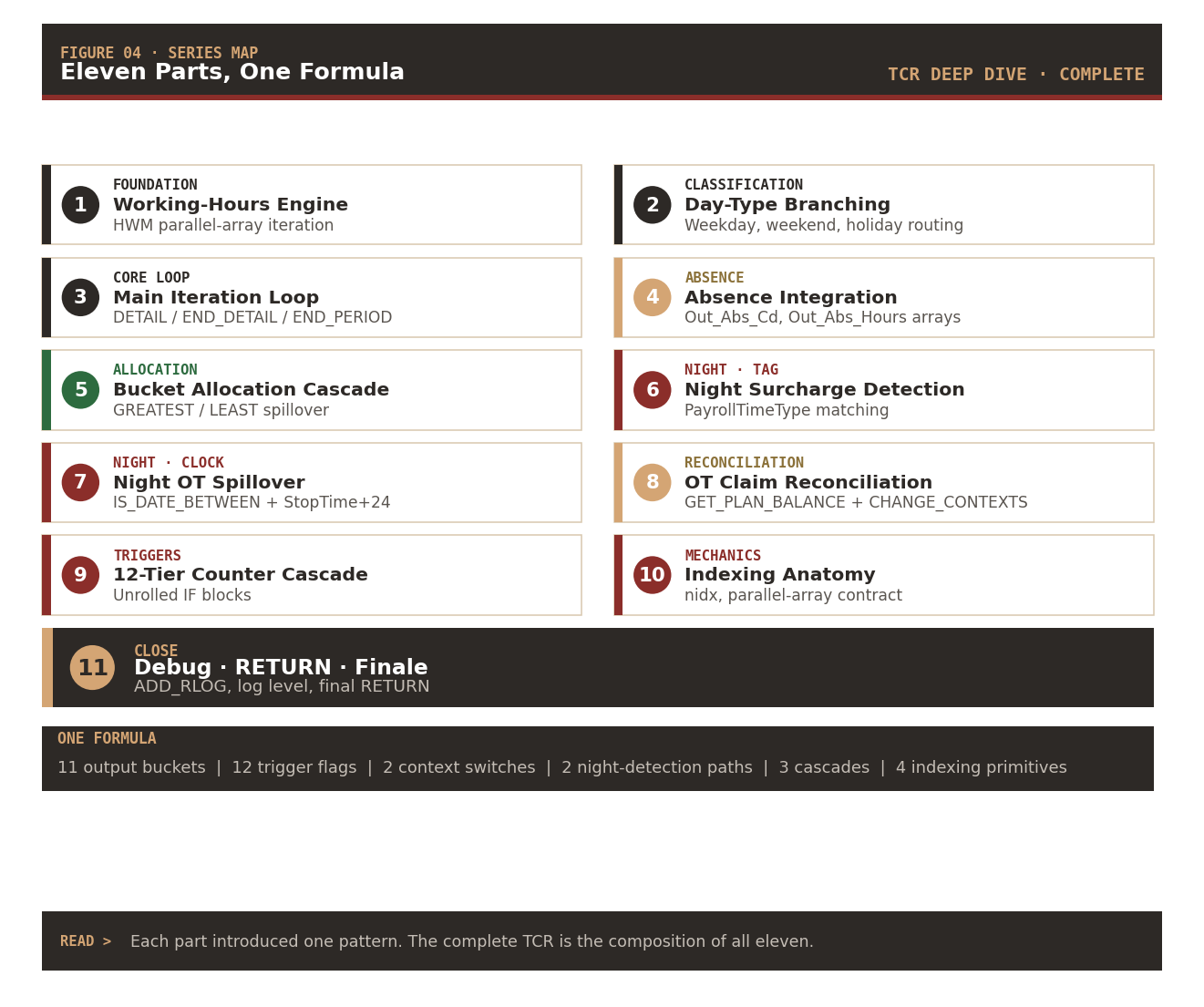
Eleven parts. One formula. From the working-hours engine that reads holiday and calendar inputs, through the day-type branching that separates weekday from weekend from public holiday, into the DETAIL loop that iterates every entry, out through the absence and worked-time cascades, past two independent night-detection paths, through balance reconciliation with correct context, past twelve unrolled cascade tiers, and finally out through the RETURN. Each part was a technique — the assembled techniques are the formula.
Series Map · All Eleven Parts
| # | Category | Post | What it introduced |
|---|---|---|---|
| 1 | Foundation | Working-Hours Engine | HWM parallel-array iteration, holiday DBI reads, calendar inputs |
| 2 | Classification | Day-Type Branching | Weekday, weekend, and public holiday routing |
| 3 | Core Loop | Main Iteration Loop | DETAIL / END_DETAIL / END_PERIOD position semantics |
| 4 | Absence | Absence Integration | Out_Abs_Cd, Out_Abs_Hours parallel arrays |
| 5 | Allocation | Bucket Allocation Cascade | Reg → OT 150 → OT 200 GREATEST/LEAST spillover |
| 6 | Night · Tag | Night Surcharge Detection | PayrollTimeType matching, single aggregate bucket |
| 7 | Night · Clock | Night OT Spillover | IS_DATE_BETWEEN + StopTime+24 wrap + 4 buckets |
| 8 | Reconciliation | OT Claim Reconciliation | GET_PLAN_BALANCE inside CHANGE_CONTEXTS |
| 9 | Triggers | 12-Tier Counter Cascade | Unrolled IF blocks — no dynamic naming |
| 10 | Mechanics | Indexing Anatomy | nidx, parallel-array contract, horizontal slice, .exists() safety |
| 11 | Close | Debug · RETURN · Finale | ADD_RLOG, log level trap, ESS_LOG_WRITE limit, final RETURN |
One formula · 11 output buckets · 12 trigger flags · 2 context switches · 2 night-detection paths · 3 cascades · 4 indexing primitives
The complete TCR is the composition of every technique the series covered. Reading any one part in isolation shows a pattern; reading them together shows how they interlock into a production-grade time calculation rule that stays honest across re-runs and adjustment periods.
If you’ve read all eleven parts and built something with these patterns — that’s the point. The techniques don’t need to stay bundled as one TCR. They redeploy into other OTL Fast Formulas the same way, one composable pattern at a time.
Series Close
Thank you for reading through the eleven parts. Feedback, corrections, and questions from practitioners running these patterns in their own environments are always welcome — that’s how technical writing gets better.
The next series is in early planning: Payroll Fast Formula Deep Dive, tracing the same discipline through a different sub-module. If you want it, tell me what patterns you’d like unpacked.
Coming up as a bonus: Part 12 assembles every technique from Parts 1–11 into a single reference implementation — the complete anonymized formula from INPUTS declaration to final RETURN, sectioned by which post introduced each block.
Abhishek Mohanty · Oracle ACE Associate | AIOUG Member | Oracle HCM Cloud Consultant & Technical Lead — Fast Formulas, Absence Management, Time & Labor, Core HR, Redwood, HDL, OTBI.
The views expressed in this post are my own and do not represent the views of my employer or Oracle Corporation. Oracle, Oracle HCM Cloud, and related marks are trademarks of Oracle Corporation.
TCR Deep Dive · Part 11 / 11 · Series complete · Series tag: #TCRDeepDive