
Oracle Fast Formula: The TER Algorithm — Setup, Per-Line Routing, and the Pairwise Overlap Test
The five setup blocks that run before the loop, the routing tree that decides which validation applies to each timecard row, and the day-boundary overlap test — including the strict less-than that separates a usable formula from an unusable one.
Part 3 of 4 · The TER Series
Parts 1 and 2 covered what TER does and the data it receives. Now the algorithm: the setup phase, the per-line routing logic that decides which checks apply to which rows, and the day-boundary pairwise overlap test. Part 4 finishes with the state machine.
Setup — What Runs Before the Loop
Five blocks of scaffolding run once at the top of the formula, before the loop touches a single timecard line.
| Block | Job |
|---|---|
| 1 | Declare the input arrays so the formula won’t crash on an empty slot |
| 2 | Capture framework identifiers and write a startup log line |
| 3 | Bind the worker’s assignment context once for the entire formula body |
| 4 | Read tunable values from the rule configuration |
| 5 | Initialise output array, counters, day buffer, stretch tracker, meal flag |
Block 1 — Crash Prevention
DEFAULT FOR RECORD_POSITIONS IS EMPTY_TEXT_NUMBER
DEFAULT FOR measure          IS EMPTY_NUMBER_NUMBER
DEFAULT FOR PayrollTimeType  IS EMPTY_TEXT_NUMBER
DEFAULT FOR StartTime        IS EMPTY_DATE_NUMBER
DEFAULT FOR StopTime         IS EMPTY_DATE_NUMBER

INPUTS ARE RECORD_POSITIONS, measure, PayrollTimeType,
           StartTime, StopTime
Marker rows carry a value only in RECORD_POSITIONS — the other columns are genuinely missing, not blank, not zero. Reading StartTime[1] on a HEADER row asks for data that isn’t there, and Fast Formula doesn’t return null in that case.
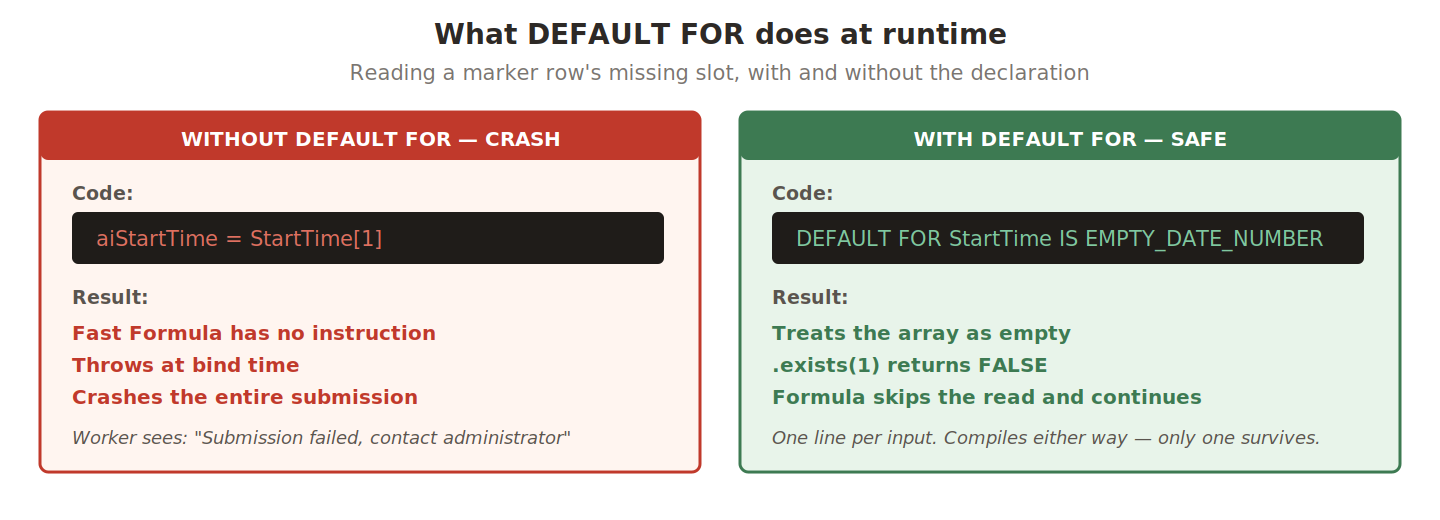
The constant names follow a strict pattern — EMPTY_<value-type>_<key-type>:
| Constant | Use it for |
|---|---|
EMPTY_TEXT_NUMBER | RECORD_POSITIONS, PayrollTimeType |
EMPTY_DATE_NUMBER | StartTime, StopTime |
EMPTY_NUMBER_NUMBER | measure |
Pick the wrong constant and you get a type-mismatch at compile time — loud and easy to fix. The dangerous bug is forgetting the declaration entirely, which compiles silently.
Block 2 — Self-Identification
ffName  = 'XX_TER_CONTINUOUS_HOURS_VALIDATION'
ffs_id  = GET_CONTEXT(HWM_FFS_ID, 0)
rule_id = GET_CONTEXT(HWM_RULE_ID, 0)

NullDate = '01-JAN-1900' (DATE)
NullText = '**FF_NULL**'

rLog = add_rlog(ffs_id, rule_id, '>>> Enter ' || ffName)
ffs_id identifies this specific submission; rule_id identifies the rule that triggered the run. Together they’re the address support uses to filter production logs down to one worker’s submission.
The two sentinels solve a Fast Formula quirk: once an array slot exists, it must hold a value. There’s no “declared but contains nothing” state. So the formula needs impossible values to stand in for emptiness. A date a century in the past and a string with double-asterisks are values real data could never produce — which makes them a debugging tool too. If 01-JAN-1900 ever reaches a worker’s screen, something upstream failed to overwrite it, and the bug is visible rather than silent.
Block 3 — Single Context Wrap
CHANGE_CONTEXTS(HR_ASSIGNMENT_ID = HWM_PER_ASG_ASSIGNMENT_ID)
(
  /* the entire formula body lives inside this block */
CHANGE_CONTEXTS binds an HCM context for everything inside its parentheses. Every binding carries fixed setup and teardown cost — perhaps two milliseconds. Inside a 200-iteration loop, that compounds.
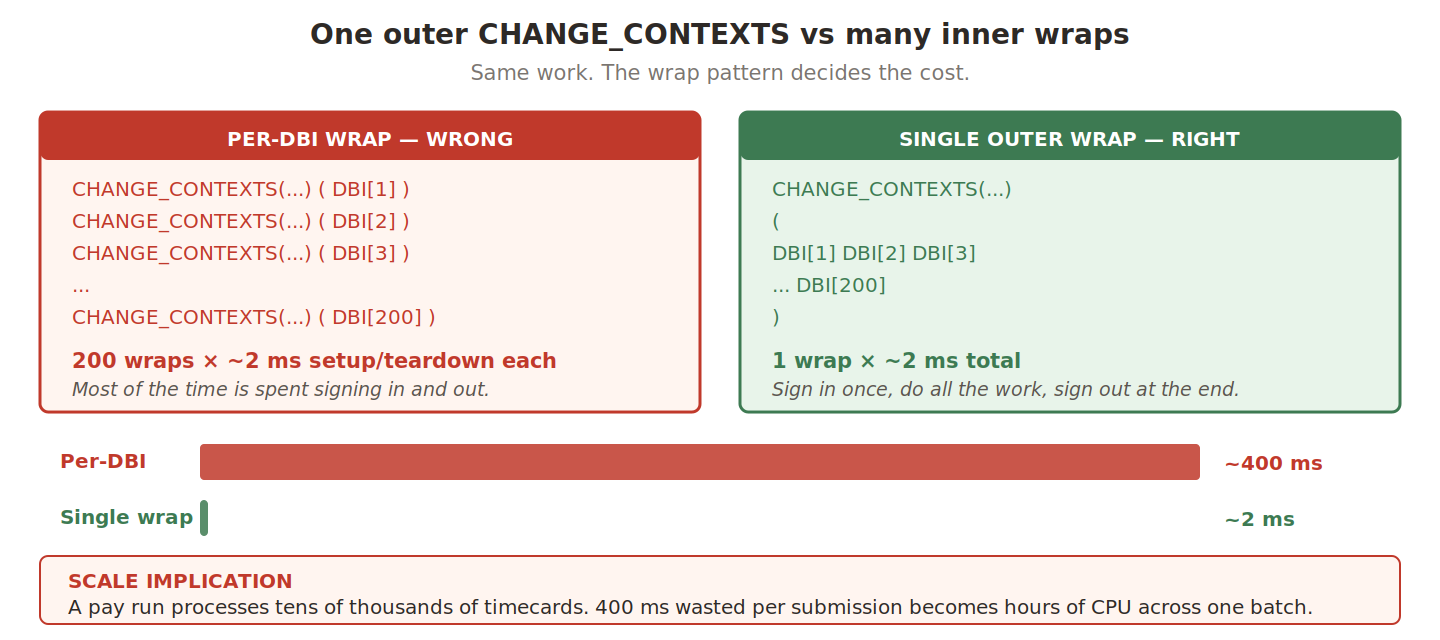
The trade-off is structural: your entire formula body now sits inside one giant pair of parentheses. Tag the closing paren with a comment so you can find it when scrolling 200 lines later.
Block 4 — Per-LE Configuration
p_break_type    = 'Meal Break'
p_reg_type      = 'Regular Hours'

p_sched_start   = get_rvalue_number(rule_id, 'SCHEDULE_START_HOUR', 9)
p_sched_end     = get_rvalue_number(rule_id, 'SCHEDULE_END_HOUR', 18)
p_max_cont_err  = get_rvalue_number(rule_id, 'MAX_CONTINUOUS_HRS_ERR', 6)
p_max_cont_warn = get_rvalue_number(rule_id, 'MAX_CONTINUOUS_HRS_WARN', 5)
The values split into two categories, and the distinction decides whether the formula is portable.
Hardcoded — time-type names match the OTL timecard layout, which is shared across every entity in the rollout. They genuinely don’t vary.
Rule-driven — schedule bounds and continuous-work caps change per legal entity, so they must be tunable without touching source. One entity’s local labour law caps continuous work at 5 hours; another self-imposes 6 as company policy. Same formula, different rule parameters, no source change.
Where an entity has regional nuance, the answer is multiple rules — one per sub-jurisdiction, each parameterised independently. Never an IF region = 'A' THEN ... ELSIF region = 'B' chain inside the formula. Configuration scales; conditional code doesn’t.
On the fallback argument — The third argument to
get_rvalue_numberis what the formula uses if the parameter wasn’t configured. It’s a safety net, not a production default. Always set the parameter explicitly on every LE rule. A useful go-live check: query rule configuration for every active LE and confirm the thresholds match the rollout plan. Any LE showing the fallback value is a configuration gap.
Block 5 — Three Lifetimes
OUT_MSG = EMPTY_TEXT_NUMBER
wMaAry  = HWM_CTXARY_RECORD_POSITIONS.count

cntr = 0
nidx = 0

/* day buffer — per-day lifetime */
dayStarts = EMPTY_DATE_NUMBER
dayStops  = EMPTY_DATE_NUMBER
dayIdxs   = EMPTY_NUMBER_NUMBER
dayCnt    = 0

/* stretch tracker — per-stretch lifetime */
stretchStart = NullDate
stretchEnd   = NullDate
inStretch    = 'N'

l_meal_taken = 'N'
Three groups of variables coexist here with three different reset triggers.
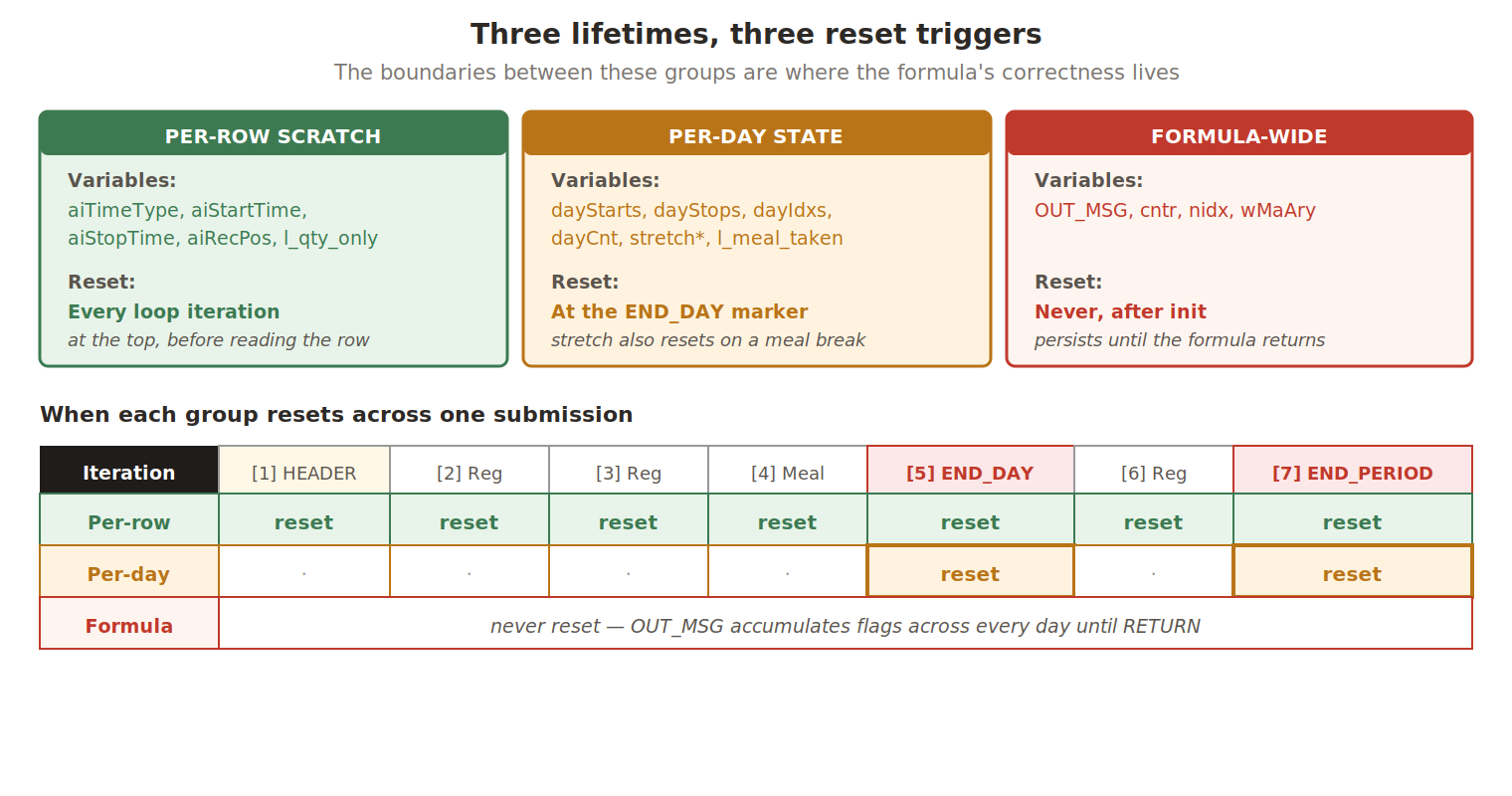
dayIdxs is the architectural insight in the day buffer. The buffer’s internal indexing is sequential — 1, 2, 3 — but those don’t match the worker’s view. On a real timecard, the same Reg Hours entries might sit at row positions [2], [4], and [7] with markers and other time types in between. Without dayIdxs, when the overlap test flags buffer entries 2 and 3, the formula has no way to translate that back into the worker’s row numbers. Errors land on the wrong rows.
The stretch tracker has a dual reset trigger — a meal break or the day ending. This mirrors the legal definition: the cap measures uninterrupted work, eating interrupts it, the next stretch is a fresh start. Resetting only at end-of-day would miss the meal case and produce a falsely-large stretch.
The per-row reset trap — Fast Formula does not automatically clear local variables between loop iterations. Iteration 4 reads a Reg Hours row and sets
aiTimeType = 'Regular Hours'. Iteration 5 hits a HEADER row with no time type, so the guarded read is skipped andaiTimeTypestill holds the old value. Downstream checks evaluate against stale data. No crash, no error, just wrong validation — the hardest kind to trace. Reset per-row scratch at the top of every iteration, and only per-row scratch. Day-level state is supposed to survive.
The Algorithm — Inside the Loop
Three blocks carry the actual validation, executing once per timecard row. Block 6 reads and routes. Block 7 fires only at day boundaries. Block 8 maintains the state machine that Part 4 covers.
Block 6 — Per-Line Routing
Every timecard row falls into one of five paths based on two questions: is this a marker row? and what’s the time type?
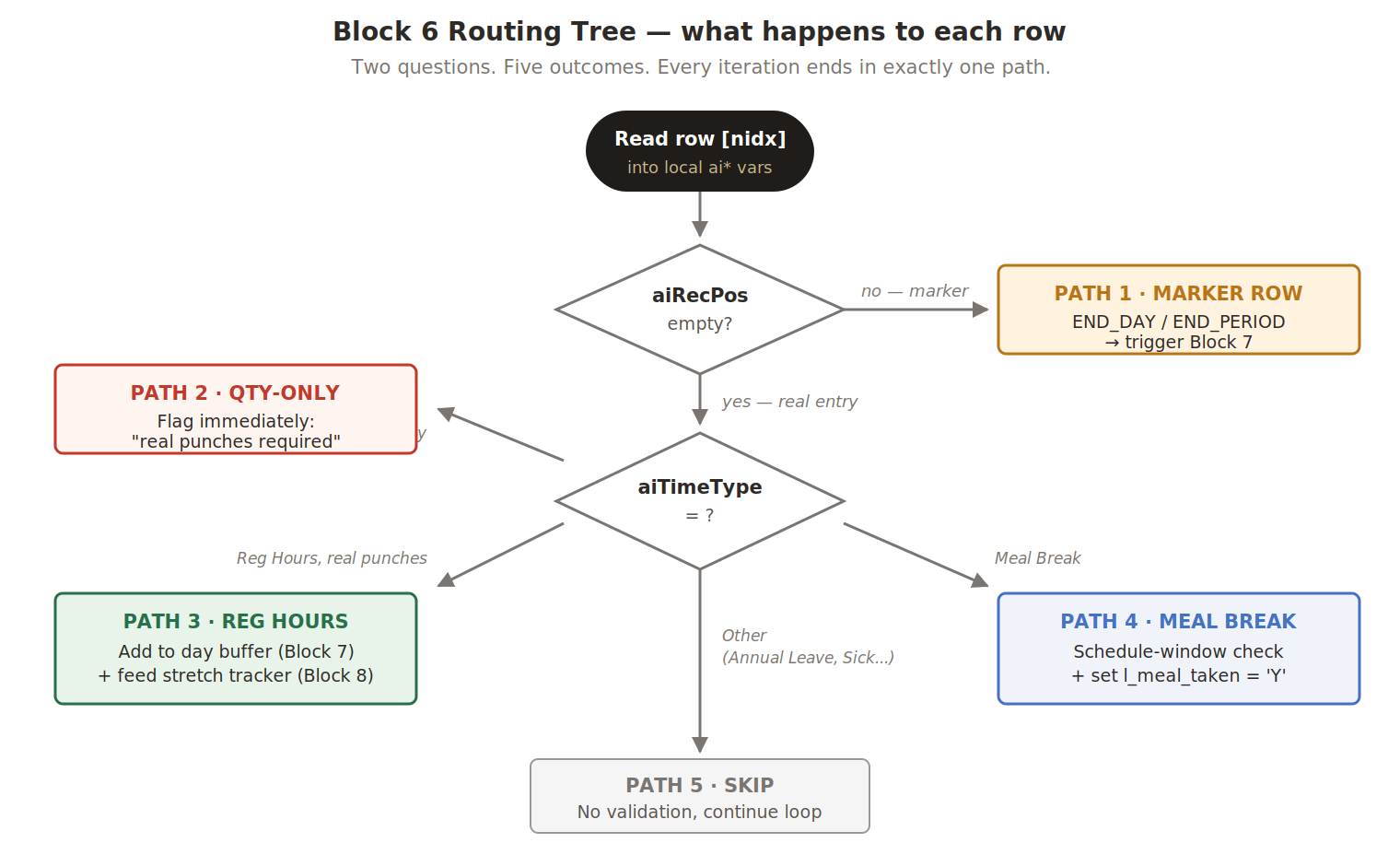
Practitioner’s tip — Path 5 is where most TER scope-creep comes from. A client says “we also need to validate Annual Leave is at least 0.5 days” and the reflex is to add a sixth time-type branch. Resist it. If you have multiple validation domains, write multiple TER formulas and attach them via separate rules — OTL supports this cleanly. Keep each formula’s routing tree small enough to fit on one diagram.
6a — Defensive reads
IF (RECORD_POSITIONS.exists(nidx)) THEN
  aiRecPos = RECORD_POSITIONS[nidx]
IF (PayrollTimeType.exists(nidx)) THEN
  aiTimeType = PayrollTimeType[nidx]
IF (StartTime.exists(nidx)) THEN
  aiStartTime = StartTime[nidx]
IF (StopTime.exists(nidx)) THEN
  aiStopTime = StopTime[nidx]
Block 1’s DEFAULT FOR and these .exists() checks look redundant but operate at different levels. DEFAULT FOR protects against the array variable being unbound — without it the formula can’t start. .exists() protects against individual slots being absent within an otherwise valid array. In code that gates payroll, redundancy is a feature.
Every read populates a local ai* variable rather than working off the input directly. That creates a consistent snapshot for the iteration, gives you one place to apply guards, and makes the data flow obvious in review.
6b — Qty-only detection
IF (aiTimeType = p_reg_type
    AND aiStartTime <> NullDate
    AND aiStopTime <> NullDate) THEN
( l_st_hr = TO_NUMBER(TO_CHAR(aiStartTime, 'HH24'))
          + TO_NUMBER(TO_CHAR(aiStartTime, 'MI'))/60
  l_sp_hr = TO_NUMBER(TO_CHAR(aiStopTime,  'HH24'))
          + TO_NUMBER(TO_CHAR(aiStopTime,  'MI'))/60
  IF (l_st_hr < 0.01 AND l_sp_hr > 23.9) THEN
  ( l_qty_only = 'Y' )
)
When a worker enters just a quantity — “8 hours” — OTL still needs something in the punch columns, so it writes 00:00 to 23:59. The row looks like a 24-hour shift but isn’t. Without detection, that fake interval goes into the day buffer and falsely overlaps with every other entry on the day.
The conversion trick turns a date into hours-since-midnight as a single decimal: 09:30 becomes 9.5, 17:45 becomes 17.75. That makes the check one comparison instead of comparing hours and minutes separately.
Why 0.01 and 23.9 rather than exactly 0 and 24? Floating-point representation. A value that should be 0.0 can end up as 0.0000003 after conversion, the same maths that makes 0.1 + 0.2 equal 0.30000000000000004 in most languages. The buffers absorb that drift while staying narrow enough that no real punch can fall inside them.
The flag doesn’t fire an error itself. It changes how three later blocks treat the row: 6c flags it as missing punches, 6d excludes it from the day buffer, and Block 8 excludes it from continuous-hours counting.
6c — The hard requirement
IF (aiTimeType = p_reg_type
    AND (aiStartTime = NullDate
         OR aiStopTime = NullDate
         OR l_qty_only = 'Y')) THEN
( OUT_MSG[nidx] =
    get_msg_attribute('StartTime') ||
    get_output_msg('HXT', p_msg_reghrs)
)
Note the structure of the assignment. It isn’t just message text — get_msg_attribute('StartTime') tells OTL which column to highlight. Without it the worker sees a red marker on the row but no indication of which field caused it, and has to guess. With it, the StartTime column itself lights up.
This is the only validation in the formula demanding both punches. The asymmetry is deliberate: “I worked from X to Y” needs both endpoints, while some companies record only when a break starts. Not every time type follows the same rules.
6d — Buffer for overlap
IF (aiTimeType = p_reg_type
    AND l_qty_only = 'N'
    AND aiStartTime <> NullDate
    AND aiStopTime <> NullDate) THEN
( dayCnt = dayCnt + 1
  dayStarts[dayCnt] = aiStartTime
  dayStops[dayCnt]  = aiStopTime
  dayIdxs[dayCnt]   = nidx
)
This block fires no errors. It collects evidence for Block 7’s overlap test. What stays excluded matters as much as what goes in — if Meal Breaks went into the buffer, a 12:00–13:00 lunch would overlap the 09:00–12:00 morning shift by construction, and the formula would generate noise instead of signal.
6e — Schedule window
IF (aiTimeType = p_break_type
    AND aiStartTime <> NullDate) THEN
( bk_st = TO_NUMBER(TO_CHAR(aiStartTime, 'HH24'))
  bk_sp = TO_NUMBER(TO_CHAR(aiStopTime,  'HH24'))
  IF ((bk_st < p_sched_start
       OR bk_sp > p_sched_end)
      AND l_day <> 'SAT'
      AND l_day <> 'SUN') THEN
  ( OUT_MSG[nidx] = ... p_msg_break )
  l_meal_taken = 'Y'
)
A meal outside working hours usually means the worker mis-entered the time, and it doesn’t satisfy the legal purpose of a break — giving rest during a shift. The check is suspended on weekends.
Those parentheses around the OR are not cosmetic.
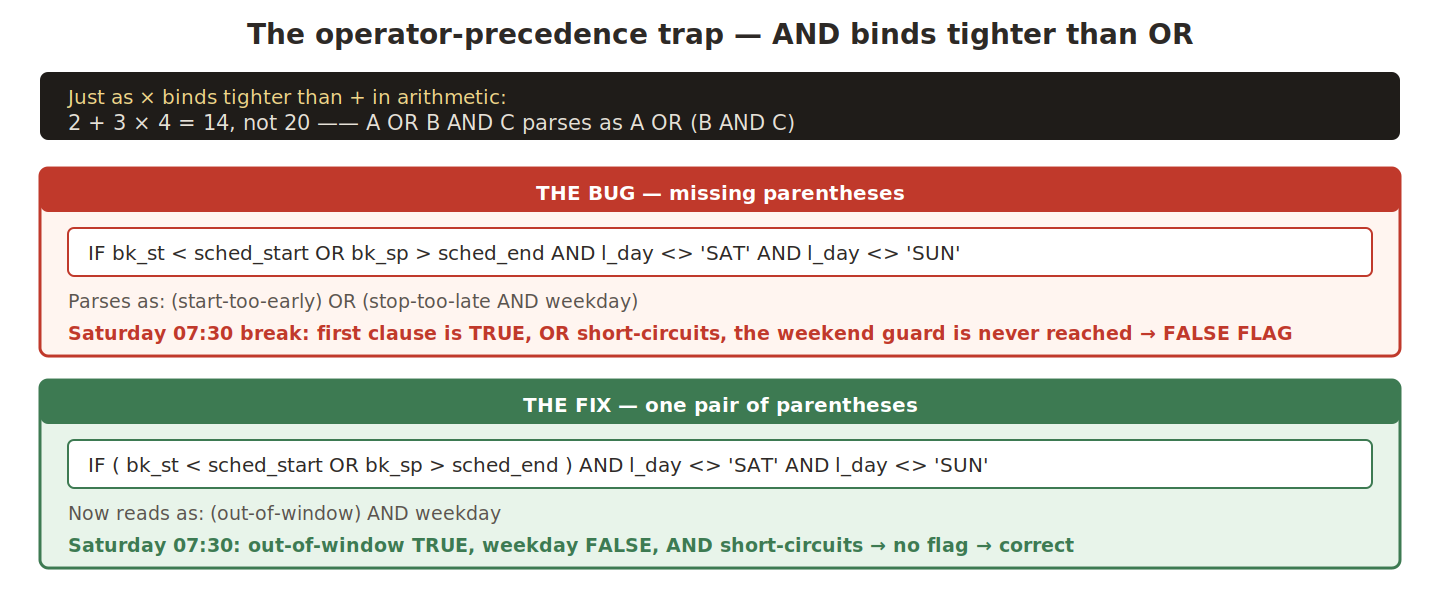
The general rule: any time you mix AND and OR in the same expression, wrap the OR clause explicitly. Don’t trust default precedence to match your intent.
The last line is easy to overlook. l_meal_taken = 'Y' is set regardless of whether the schedule check passed — the worker did eat, even if they entered the time wrong. Treating an invalid meal as though it never happened would let the stretch tracker keep counting past lunch, producing cascading false errors.
Block 7 — Day Boundary and Pairwise Overlap
Block 7 is the only block that runs conditionally. Blocks 6 and 8 fire on every iteration; Block 7 activates only at an END_DAY or END_PERIOD marker.
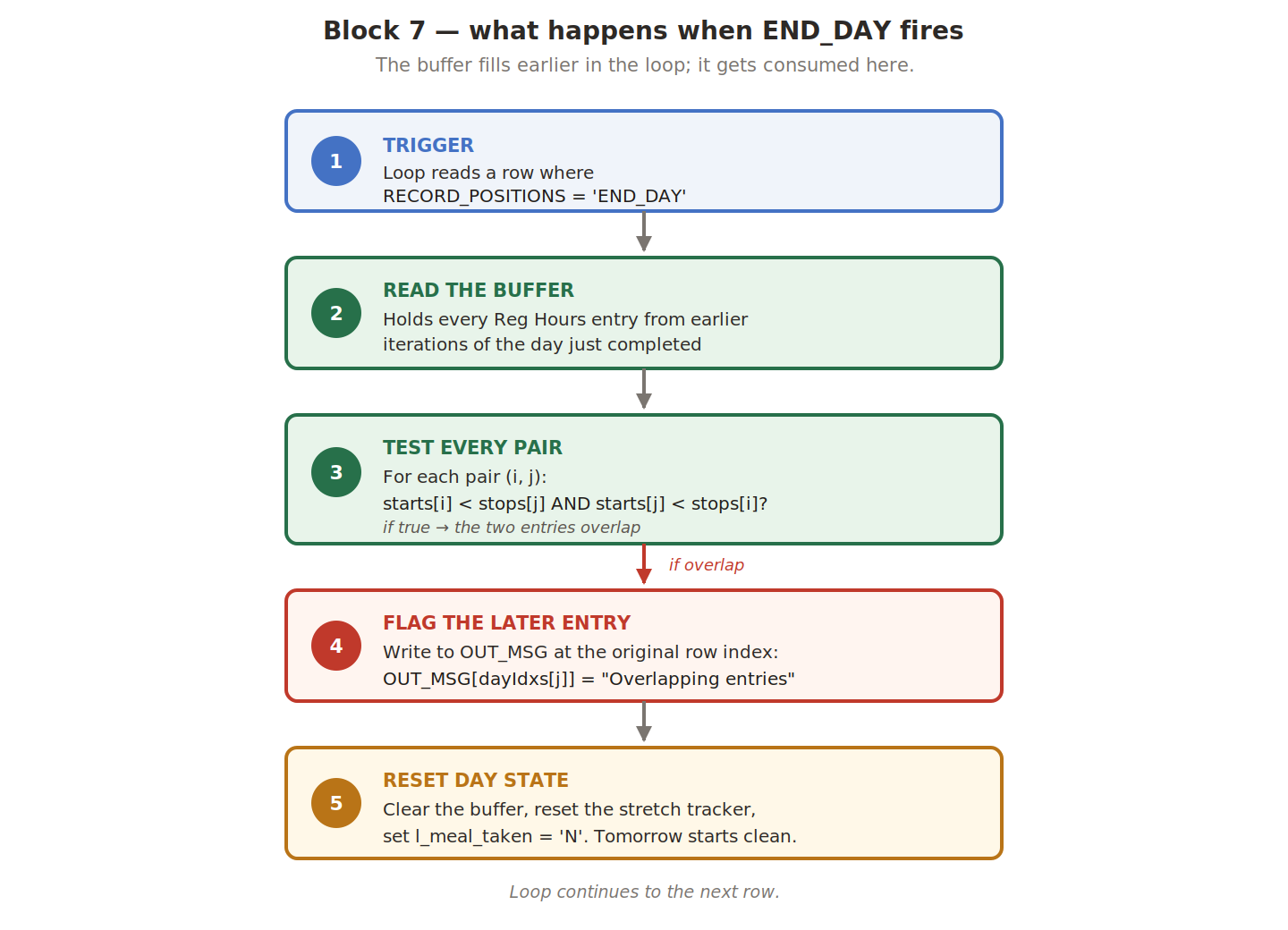
The pairwise loop
i = 1
WHILE (i < dayCnt) LOOP (
  j = i + 1
  WHILE (j <= dayCnt) LOOP (
    ... compare (i, j) ...
    j = j + 1
  )
  i = i + 1
)
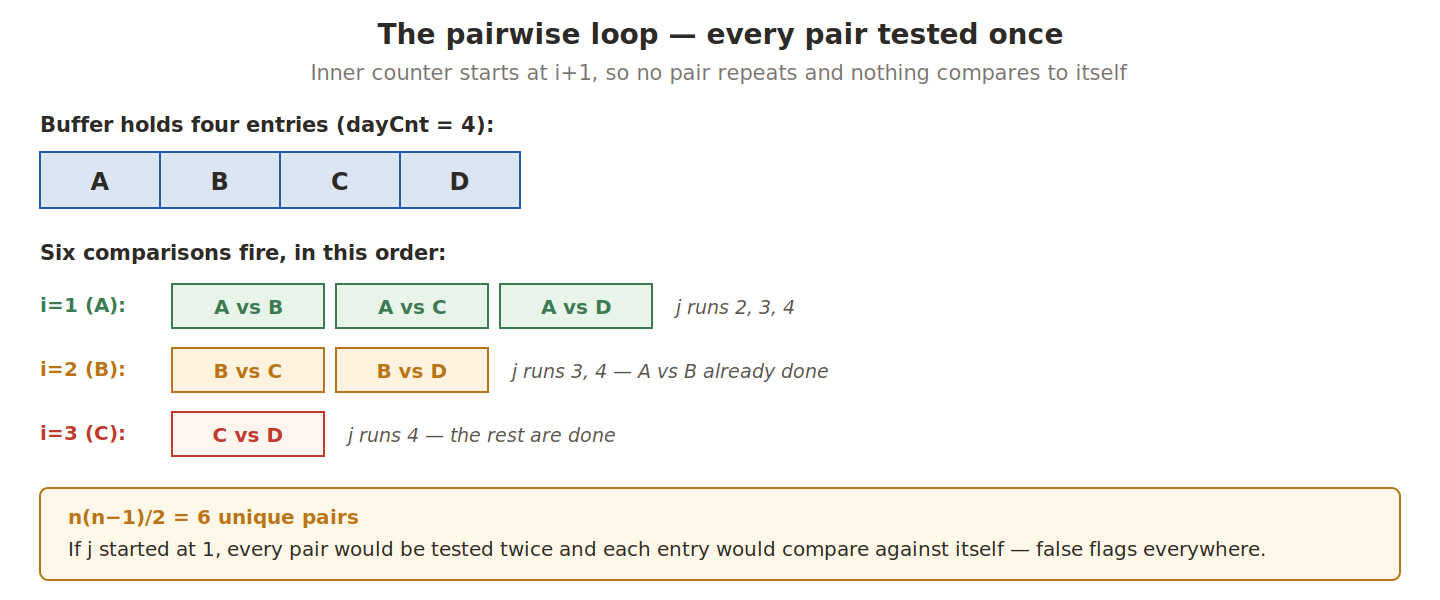
The pattern is O(n²) — n(n−1)/2 comparisons. Normally that’s a warning sign, but n here is one day’s Reg Hours entries. Five entries means ten comparisons; ten entries means forty-five. A worker logging 20 separate Reg Hours entries on a single day is already extreme.
This is a case where understanding the data shape matters more than understanding complexity. Quadratic is fine when n is bounded by problem constraints. Optimising with sweep-line algorithms or interval trees would add real complexity for zero measurable gain.
The intersection test
IF (dayStarts[i] < dayStops[j]
    AND dayStarts[j] < dayStops[i]) THEN
( flagIdx = dayIdxs[j]
  OUT_MSG[flagIdx] =
      get_msg_attribute('StartTime') ||
      get_output_msg('HXT', p_msg_overlap)
)
Two intervals overlap if and only if each one starts before the other ends. That single rule covers every case — partial overlap, complete containment, touching boundaries, disjoint.
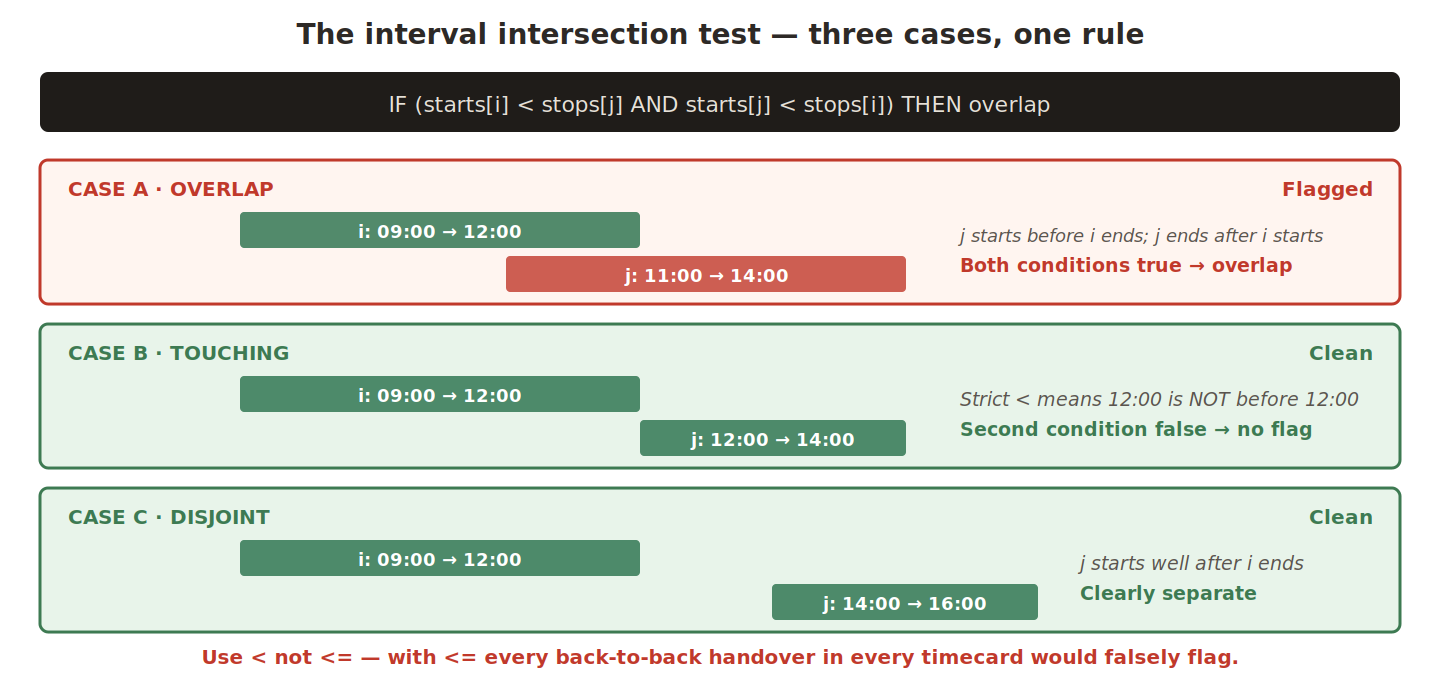
The < is strict less-than, and that one character decides whether the formula is usable. Picture the most common timecard pattern there is: a morning shift ending at 12:00 followed immediately by a lunch starting at 12:00. They touch; they don’t overlap. With strict <, the second condition asks is 12 less than 12? — false, no flag. With <= it becomes true, and every clean back-to-back transition in every timecard falsely flags.
Which entry gets flagged isn’t arbitrary either. The code uses dayIdxs[j], and since j always starts past i, that’s the entry added more recently. This matches how workers think: “the row I just added is the problem”, not “a row I added earlier is suddenly broken.” Flagging the earlier entry would turn a previously-correct row red because of something entered later.
The boundary reset
dayStarts    = EMPTY_DATE_NUMBER
dayStops     = EMPTY_DATE_NUMBER
dayIdxs      = EMPTY_NUMBER_NUMBER
dayCnt       = 0
l_meal_taken = 'N'
stretchStart = NullDate
inStretch    = 'N'
Seven lines, one atomic group. Note that OUT_MSG is not reset here — it accumulates flags across the entire run until the formula returns. Resetting it would erase every flag generated so far.
Each missing reset breaks the formula differently:
| Forgotten | Symptom | Direction |
|---|---|---|
| Day buffer | Day 2 entries pile on yesterday’s leftovers; intervals from different days falsely overlap | Over-flags — visible noise |
l_meal_taken | Flag stays 'Y' for the rest of the period; Block 8’s gate never reopens; tracking silently dies | Under-flags — legally dangerous |
| Stretch tracker | Day 1’s stretch survives into day 2; contHrs includes yesterday’s hours | Over-flags — wrong metrics |
None of them crash. All of them ship silently.
Why this bug class evades testing — UAT timecards are typically one or two days, curated to exercise particular validation paths. A missing reset only misbehaves when the formula crosses a day boundary, so single-day test data never triggers it. Then real biweekly timecards arrive with 10 to 14 days of data and the bug fires on the first real submission. The defence isn’t more careful testing — it’s treating the reset block as atomic. Every variable with a per-day lifetime must appear here.
Next in the Series
Part 4 — The State Machine
The hardest part of the formula is the continuous-hours tracker — a two-state machine with four transitions that survives across loop iterations. Part 4 walks through every transition (START, EXTEND, RESTART, RESET), the OTL setup dependencies that must exist for the formula to fire, and a full end-to-end trace of Sarah’s broken timecard.
Abhishek Mohanty · Oracle ACE Associate | AIOUG Member | Oracle HCM Cloud Consultant & Technical Lead — Fast Formulas, Absence Management, Time & Labor, Core HR, Redwood, HDL, OTBI.
The TER Series · Part 3 / 4