
Oracle Fast Formula: Time Entry Rules in OTL — Where TER Sits, Why Cross-Row Validation Needs Code, and a Timecard That Fails Three Rules
Where Time Entry Rules sit in OTL's submission pipeline, why declarative validation can't express cross-row rules, and a worked example of a four-row timecard that trips the continuous-work cap, the meal-break window, and the overlap check.
Part 1 of 4 · The TER Series
Time Entry Rule (TER) formulas live inside Oracle’s Time and Labor module — the part of HCM Cloud that workers use to log their hours. This post introduces what OTL is, where TER sits in its submission flow, and why this is the validation layer where the real business logic lives.
What OTL Is
Oracle Time and Labor (OTL) is the time-tracking module inside Oracle HCM Cloud. Workers log their hours into it through a timecard layout. Managers approve those timecards. The approved data flows downstream to payroll, project costing, or wherever the hours need to land. That’s the loop at its simplest.
What makes OTL interesting from a developer’s point of view is the extensibility model. Between the worker hitting Submit and the data landing in payroll, OTL runs the timecard through a series of rule formulas that you, as the implementer, can write. Each formula type plays a different role:
- Time Entry Rules (TER) — run when the worker tries to save or submit. They validate the data and either let it through or flag it with messages the worker can see. This is what the series is about.
- Time Calculation Rules (TCR) — run after validation passes. They derive new values from the worker’s entries: overtime, premium pay, shift differentials. The worker’s original entries stay untouched; TCR adds calculated rows on top.
- Time Device Rules (TDR) — handle integration with physical badge readers and punch clocks. They map raw punch events into the OTL data model.
Each rule type sees a different shape of data, gets different inputs from the framework, and is allowed to do different things. TER is the strictest of the three because it runs before the data is accepted — its job is to be a guard. Calculations and device integration come later.
Why TER Is the Hard One
OTL’s framework gives you some validation for free. If a worker leaves a required field blank, OTL catches it. If they type letters into a numeric field, OTL catches that too. These are declarative validations — you configure them in the timecard layout, and the framework enforces them with no code.
But declarative validation can only check one cell at a time. The validations that actually matter in production are about relationships between cells, between rows, and between days:
- “Did this worker take a meal break after 6 hours of continuous work?” — spans multiple rows on the same day
- “Do any of these entries overlap with each other?” — pairwise comparison across rows
- “Is this meal break inside the worker’s scheduled hours?” — requires reading the schedule, which lives elsewhere in HCM
- “Has this worker exceeded their weekly hours cap?” — cumulative across days
None of these can be expressed in declarative configuration. They need code that loops, remembers, and compares. That’s where TER formulas earn their place — and that’s where most teams either skip the validation entirely or get it subtly wrong.
What This Formula Does
The job is straightforward to describe and surprisingly subtle to build. When a worker submits their timecard, OTL needs to verify that what they entered makes sense — not just structurally, but according to the company’s actual labour rules.
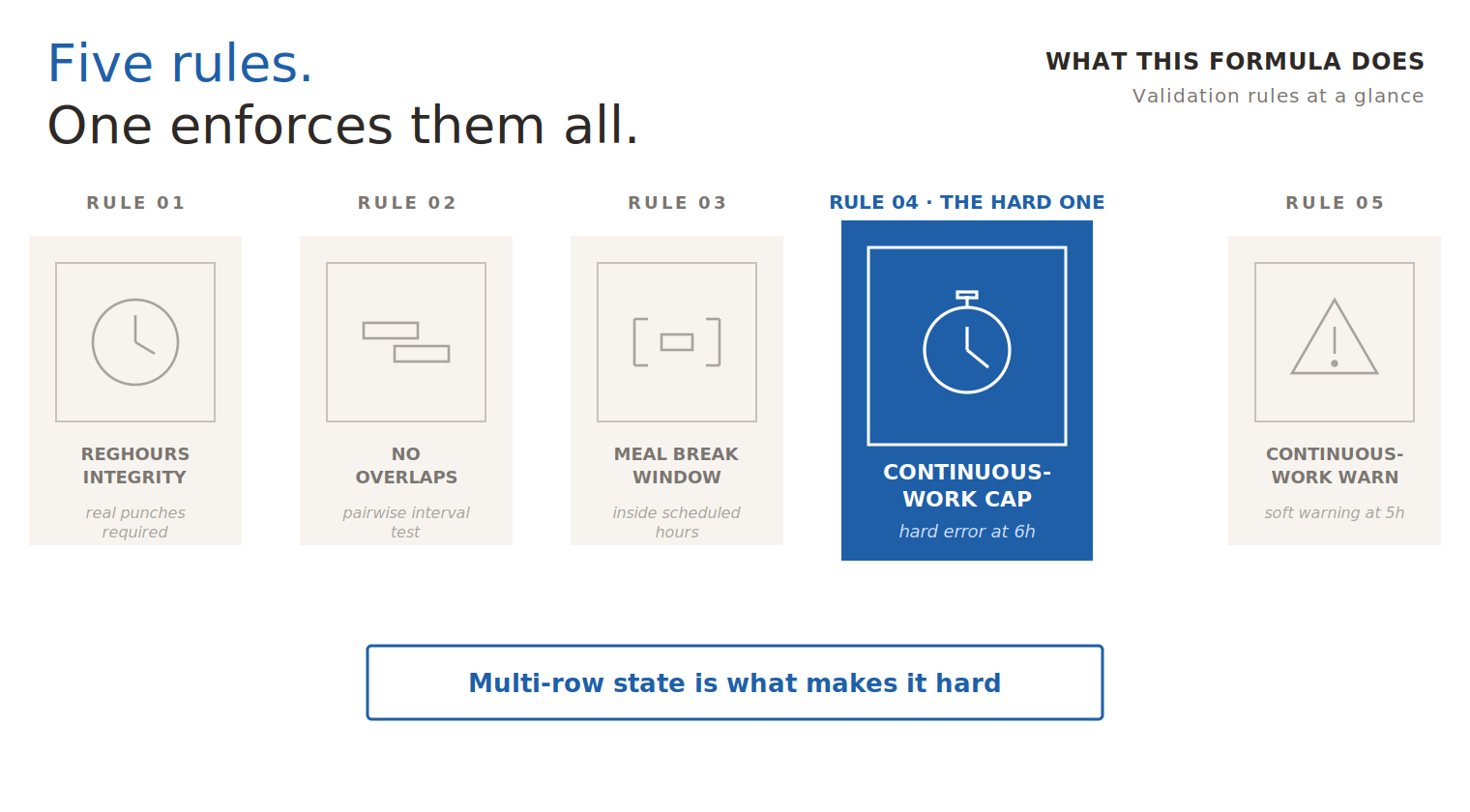
Rules 1 and 3 only need a single row. Rules 2, 4, and 5 are multi-row validations — they need to know about other rows on the same day, or remember state from earlier iterations. That single architectural requirement — seeing more than one row at a time — is what separates TER from anything you can do with declarative configuration.
| Rule | Check | Rows needed | Severity |
|---|---|---|---|
| 01 | RegHours integrity — real punches required | Single | Error |
| 02 | No overlapping entries — pairwise interval test | Multi | Error |
| 03 | Meal break inside scheduled hours | Single | Error |
| 04 | Continuous-work cap | Multi · stateful | Hard error at 6h |
| 05 | Continuous-work warning | Multi · stateful | Soft warning at 5h |
Expert framing — Rules 4 and 5 are the genuinely hard ones. Not because the maths is complex, but because they require state that persists across loop iterations. You can’t look at row 3 and decide whether continuous work has been exceeded; you need to know what rows 1 and 2 said, whether a meal break has been logged yet, and whether yesterday’s data has been correctly cleared. Most TER implementations I’ve reviewed either get this wrong — the formula incorrectly extends a stretch across a meal break — or skip it entirely, declaring the validation “out of scope” and pushing it to a manager-review step. Both outcomes are bad.
Where TER Fits in OTL’s Processing Chain
Before getting into the formula’s internals, it helps to know where TER sits in OTL’s bigger picture. When a worker hits Submit, OTL runs through a sequence of stages — and TER is just one of them. Understanding the sequence tells you why TER receives the data it does, and why your validation logic belongs here and not somewhere else.
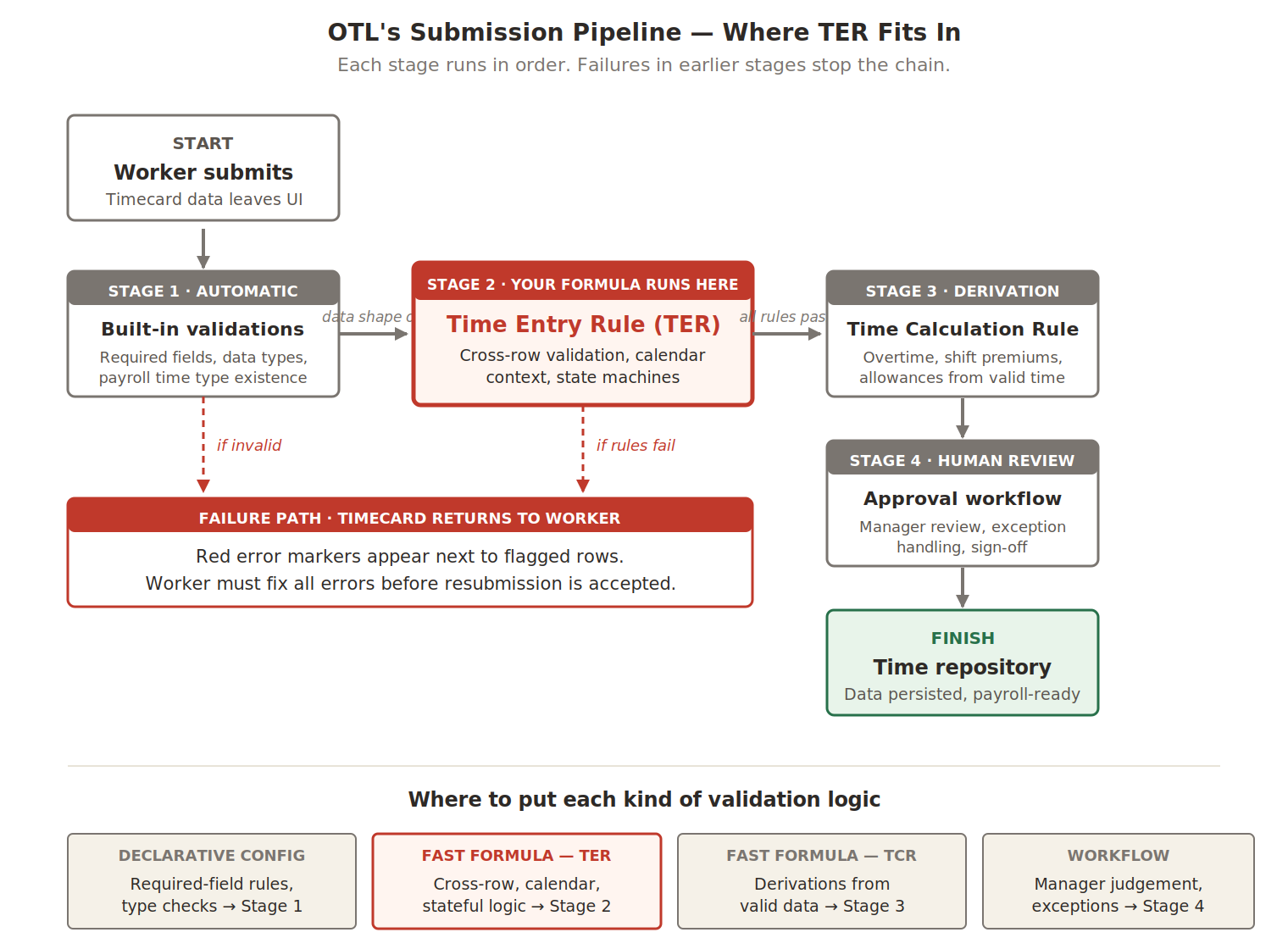
The pipeline is sequential and the failure paths are unforgiving. If built-in validations reject the data, your TER never even runs — the timecard bounces back to the worker before reaching Stage 2. If your TER returns errors, the timecard bounces at Stage 2, before Stages 3 and 4 ever execute. Only when every stage passes does the data land in the time repository where payroll can pick it up.
This sequencing has practical consequences for what your TER should and shouldn’t try to do:
- Don’t reimplement Stage 1. Built-in validations already check that required fields are filled and types are correct. Your TER will never see malformed data, so don’t waste code defending against it.
- Don’t try to do Stage 3’s job. Calculations like overtime, shift premiums, and allowances belong in TCR formulas. TER’s job is “is this data valid?” — not “what should we pay them?”
- Don’t push Stage 2 logic into Stage 4. If a rule has a clear yes/no answer, validate it here. Sending every borderline case to a manager for sign-off creates an approval bottleneck that becomes the team’s full-time job.
A Real World Example
The fastest way to understand what a TER formula does is to watch one fail a timecard. Sarah is a software engineer scheduled 9:00 AM to 6:00 PM, and her employer has one labour-policy rule worth knowing: no worker may log more than 6 hours of continuous Regular Hours without a meal break in between.
Tuesday is a deadline day. Sarah gets pulled into a code review at 10 AM and forgets to take lunch. By 6:15 PM she sits down to fill in her timecard, looks at the half-finished entries she made earlier, decides the rows look messy, and tries to fix things by adding one big block covering the whole day. Then she clicks Submit.
This is her timecard at the moment of submission — four rows in OTL’s grid, exactly as the framework will hand them to your formula:
| # | Date | Time Type | Start | Stop | Hours | What the formula does |
|---|---|---|---|---|---|---|
| 1 | 14-Apr-2026 | Regular Hours | 08:30 | 10:00 | 1.5 | ✓ Clean — no flag |
| 2 | 14-Apr-2026 | Regular Hours | 10:00 | 14:45 | 4.75 | ✗ Continuous work over 6 hours |
| 3 | 14-Apr-2026 | Meal Break | 19:00 | 20:00 | 1.0 | ✗ Break outside working hours |
| 4 | 14-Apr-2026 | Regular Hours | 08:00 | 20:00 | 12.0 | ✗ Overlapping entries |
One clean row, three problem rows. Before reading on, take a moment to spot the three errors yourself — they’re all visible if you know what to look for.
The Day, Drawn on a Timeline
Tables are good for precise data; timelines are better for understanding the shape of a day. Here are Sarah’s same four rows plotted against the actual hours of Tuesday, 14 April:
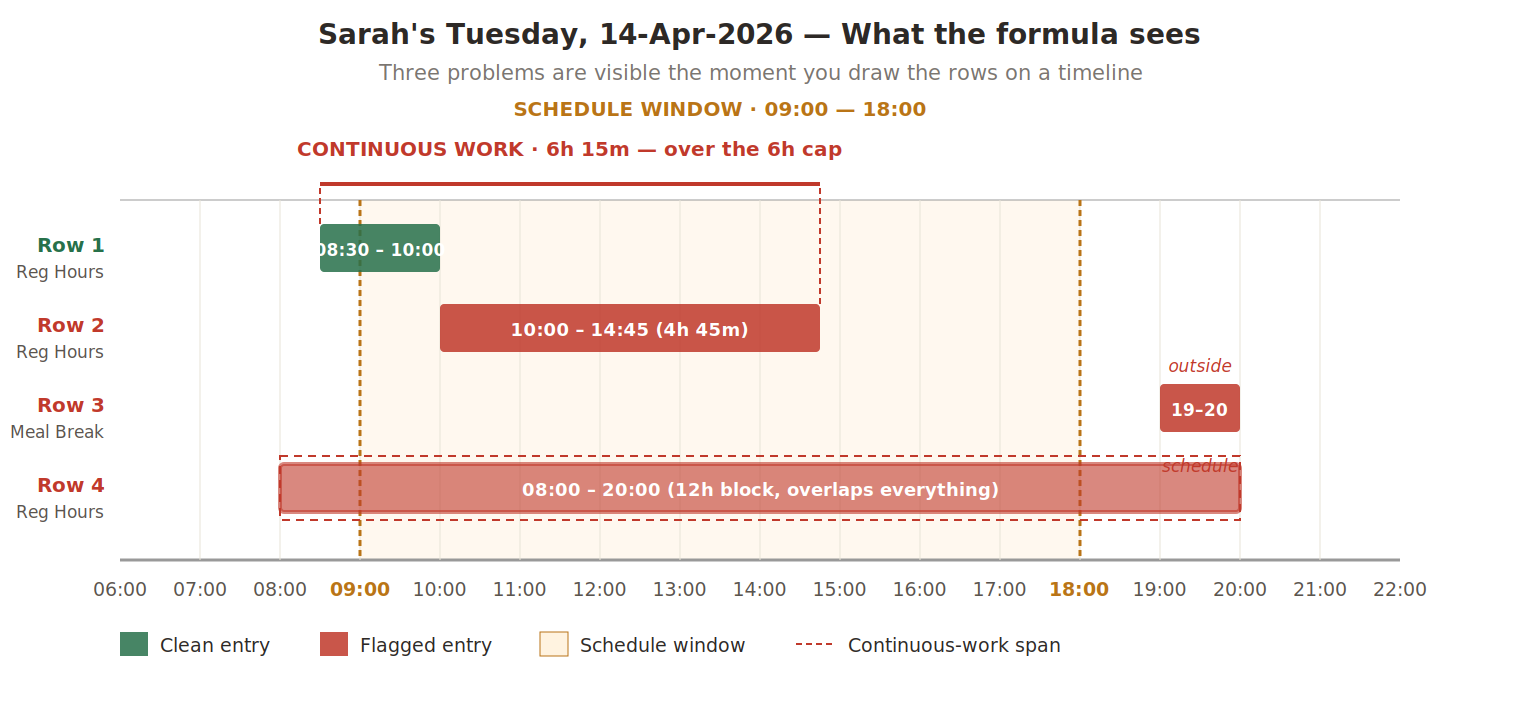
The picture makes the violations visible at a glance:
- Rows 1 and 2 touch. Row 1 ends at 10:00 and row 2 starts at 10:00 — no gap. From the formula’s perspective this is a single 6h 15m stretch of continuous work, sitting clearly above the 6-hour cap.
- Row 3 sits outside the schedule window. The shaded amber band shows where Sarah was scheduled to work. Her meal break at 19:00–20:00 falls a full hour past the schedule’s edge.
- Row 4 covers the entire day in one massive bar. It physically overlaps rows 1, 2, and 3 simultaneously — the consolidated entry Sarah added without removing the originals.
Practitioner’s tip — When sketching out a TER’s behaviour for a client, start with a timeline like this one. Tables hide temporal relationships; timelines surface them. If you’re explaining to a non-technical stakeholder why their data is producing strange results, draw a timeline. Five minutes of pen-and-paper sketching saves an hour of meeting time.
The Same Data as a Row-by-Hour Grid
The timeline shows where the entries sit. The grid below shows how each entry occupies hours — one row per timecard entry, one column per hour. Cells light up where the entry is active, and the cell numbers count consecutive hours within each entry, so you can see when an entry crosses a threshold.
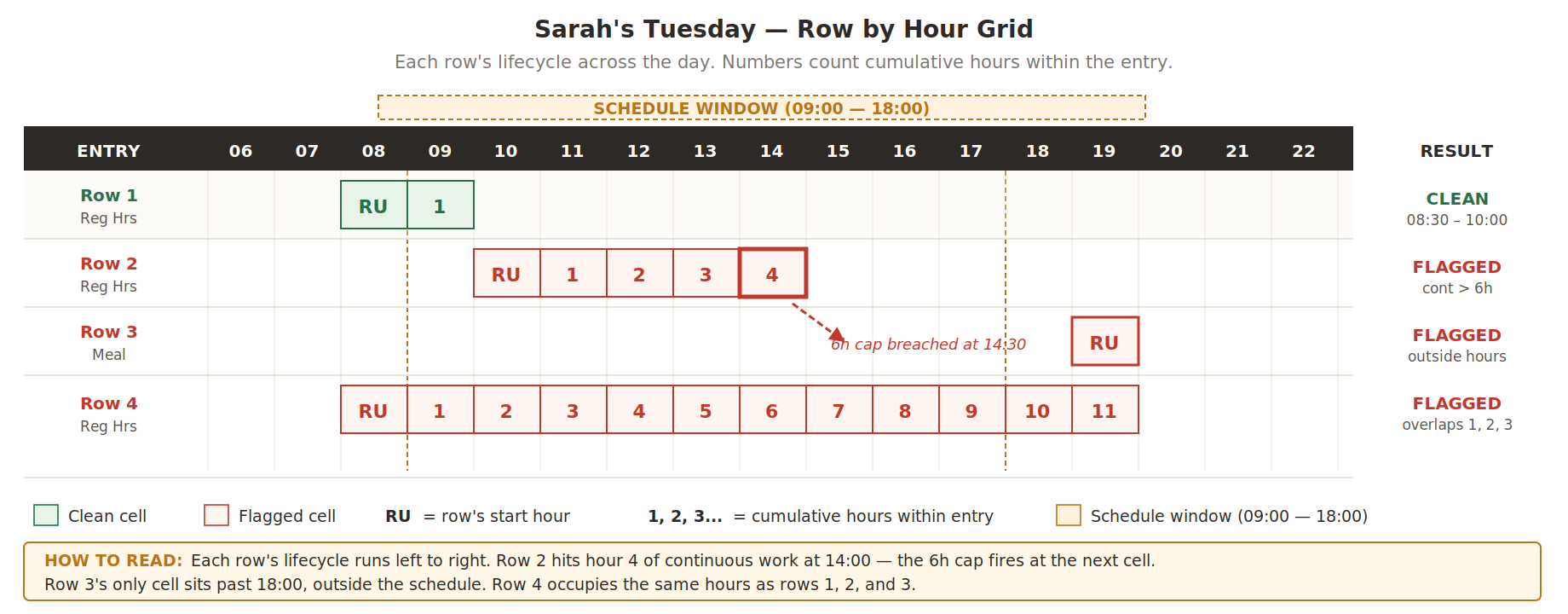
The grid makes two things obvious that the timeline doesn’t. First, the 6-hour cap breach in Row 2 is visible as soon as the cumulative-hour counter passes 6 — you can see the exact cell where the rule fires. Second, Row 4’s overlap problem is undeniable: its row of red cells sits directly below the same hour-columns occupied by rows 1, 2, and 3.
What the Formula Does, Row by Row
When Sarah hits Submit, OTL packages her four rows into input arrays and hands them to your TER formula. The formula walks the rows one at a time, applies its checks, and decides what to flag.
Row 1 (Regular Hours, 08:30–10:00). The first real entry. The formula starts a continuous-work tracker at 8:30, with the stretch currently at 1.5 hours — well below any threshold. Nothing to flag.
Row 2 (Regular Hours, 10:00–14:45). The formula sees this row’s start time matches the previous row’s stop time exactly. That’s not two separate work blocks — that’s continuation of the same block. The tracker extends the stretch from 8:30 to 14:45, totalling 6 hours 15 minutes against a 6-hour cap. Row 2 flagged: “Continuous work exceeds 6 hours.”
Row 3 (Meal Break, 19:00–20:00). The formula checks every meal break against the schedule window. Sarah’s schedule is 09:00 to 18:00; her meal falls outside it. Row 3 flagged: “Break outside working hours.”
Row 4 (Regular Hours, 08:00–20:00). At every day boundary, the formula compares each Regular Hours entry against every other to detect overlapping intervals. Row 4 contains row 1’s interval, row 2’s, and row 3’s. Three overlaps. Row 4 flagged: “Overlapping entries.”
Expert insight — The formula always flags the later row in any conflict. Row 1 stays clean even though row 4 collides with it, because row 1 was already there when row 4 was added. This matches the worker’s mental model: the entry I just added is the one that’s wrong. Flagging row 1 instead would turn a previously-correct entry red, which is profoundly confusing.
What Sarah Sees on Screen
The formula’s output is a single sparse array called OUT_MSG, indexed by row number. Most slots stay empty — those rows passed every check. The flagged rows have error message strings in their slots:
/* Row 1 has no entry — it's clean. */
OUT_MSG[2] = 'Continuous work exceeds 6 hours'
OUT_MSG[3] = 'Break outside working hours'
OUT_MSG[4] = 'Overlapping entries'
The OTL framework reads this array, walks it, and renders red error markers next to rows 2, 3, and 4 in Sarah’s timecard screen. Row 1 has no marker because its slot is empty. Sarah now sees exactly which entries are wrong and what each problem is.
She fixes them — deletes row 4 entirely, moves the meal break to a real lunch slot, and breaks up the long stretch by inserting it. Then she resubmits. The formula re-runs from scratch on the corrected timecard, every row passes, and the submission goes through to approval and on to payroll.
That’s the entire job of a TER formula in one example: catch problems early, tell the worker exactly what’s wrong, let them fix it before bad data lands in payroll.
Next in the Series
Part 2 — The Input Contract
OTL doesn’t hand your formula a timecard object. It hands you six parallel arrays with shared row indexes, plus a strict contract about what goes in and what must come out. Part 2 dissects the data shape, every input variable, and the naming conventions that keep production TER code maintainable.
Abhishek Mohanty · Oracle ACE Associate | AIOUG Member | Oracle HCM Cloud Consultant & Technical Lead — Fast Formulas, Absence Management, Time & Labor, Core HR, Redwood, HDL, OTBI.
The TER Series · Part 1 / 4