
Oracle Fast Formula: The TER State Machine — Continuous-Hours Tracking, Setup Dependencies, and a Full End-to-End Trace
The two-state machine that makes the TER formula stateful, why Julian Day arithmetic is non-negotiable for night shifts, the twelve setup artefacts that must exist before the formula fires, and a complete trace of a broken timecard from Submit to error markers. Series finale.
Part 4 of 4 · The TER Series
The first three posts covered what TER does, the input contract, and the first half of the algorithm. Now the final piece: the continuous-hours state machine that makes the whole formula stateful, the OTL configuration that has to exist for any of it to fire, and a full end-to-end trace of a broken Tuesday timecard.
The Continuous-Hours State Machine
This is the heart of the formula. The rule says no worker shall log more than 6 hours of continuous Regular Hours without a meal break. Simple to state, easy to get wrong. You can’t write it as a stateless IF inside the loop — the formula has to remember what came before.
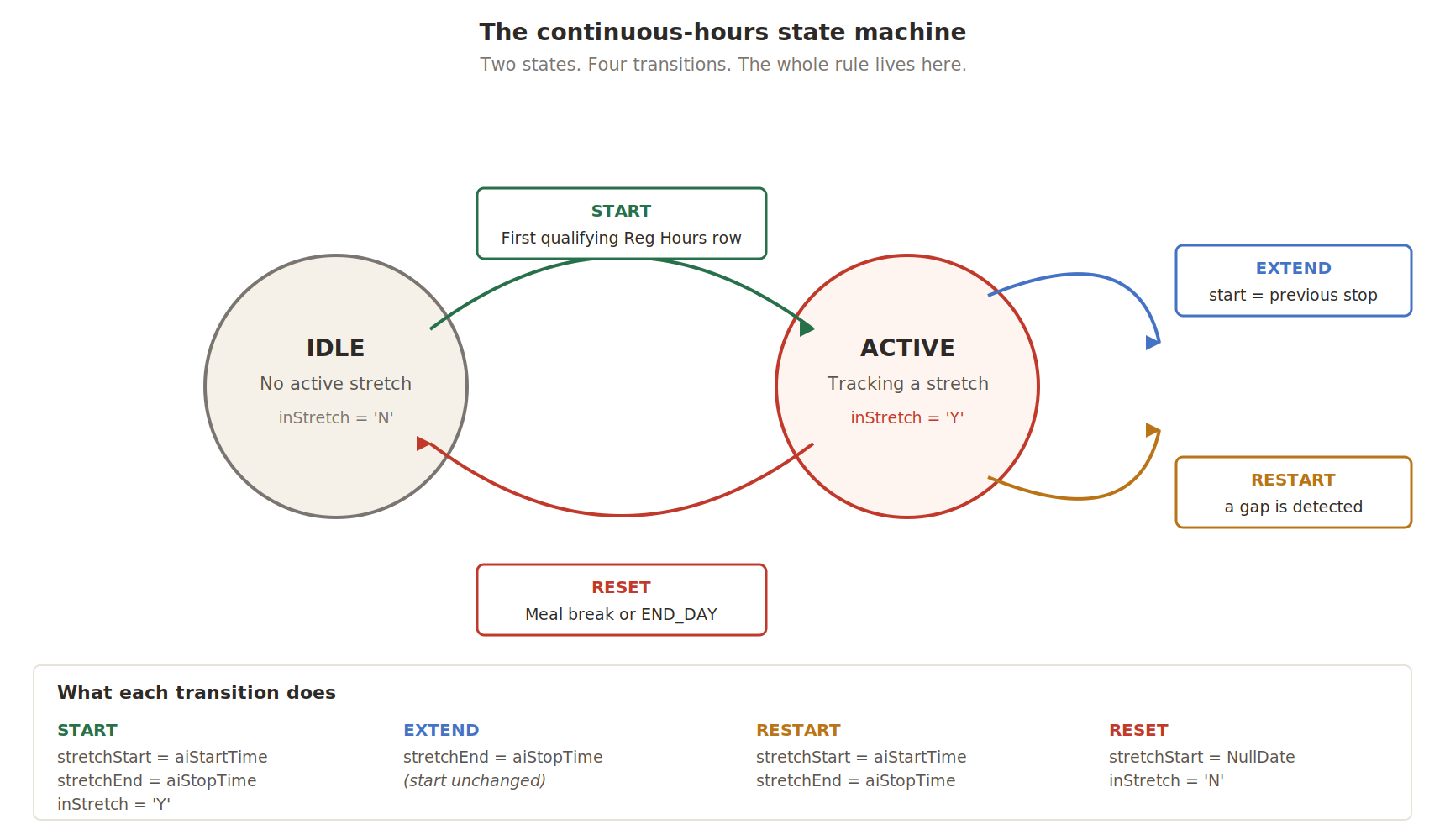
Idle is the starting state. Active is where the formula spends most of its time when work is happening. The four transitions cover every case: a stretch begins, continues without a break, resumes after a gap, or ends because the worker took a meal break.
Why this is the formula’s hardest concept — Most production bugs in continuous-hours validation come down to one of two mistakes. Writing EXTEND as “start > previous stop” instead of “start = previous stop”, which makes any tiny gap incorrectly extend the stretch. Or forgetting that meal breaks force a RESET, which makes the formula keep counting after the worker has already eaten. Both pass UAT and fail audits months later.
Block 8a — The Gate
IF (aiTimeType = p_reg_type
    AND aiStartTime <> NullDate
    AND aiStopTime <> NullDate
    AND l_qty_only = 'N'
    AND l_meal_taken = 'N') THEN
(
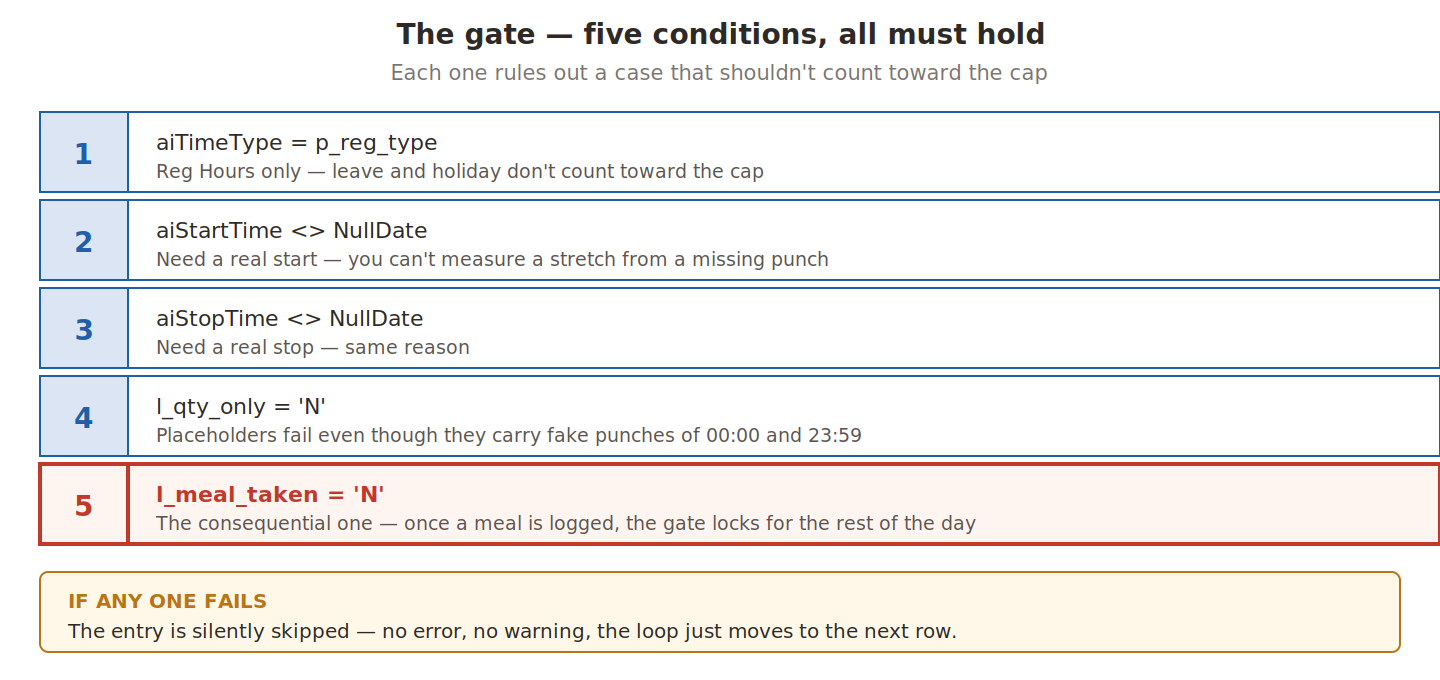
Why condition 5 locks the gate for the whole day. The cap measures uninterrupted work before a meal break. Once the worker eats, they’ve satisfied the requirement — the legal counter resets in their favour. The pre-meal stretch was the only one that needed validating.
Could the post-meal stretch also exceed 6 hours? In theory. In practice it doesn’t happen in office environments, where workers stop at the end of the schedule rather than 6+ hours after lunch. Manufacturing with double shifts is different, and those entities would configure differently. If your business genuinely needs post-meal stretches tracked, removing condition 5 is the architectural change — don’t carve out a special case in the middle of the algorithm.
Conditions 2 and 3 are technically redundant after Block 6c already flagged missing punches. They stay because Block 8 shouldn’t crash on data that Block 6c merely flagged.
Block 8b — EXTEND and RESTART
IF (inStretch = 'N') THEN
( stretchStart = aiStartTime
  stretchEnd   = aiStopTime
  inStretch    = 'Y'
)
ELSE
( IF (aiStartTime = stretchEnd) THEN
  ( stretchEnd = aiStopTime )          /* EXTEND */
  ELSE
  ( stretchStart = aiStartTime         /* RESTART */
    stretchEnd   = aiStopTime
  )
)
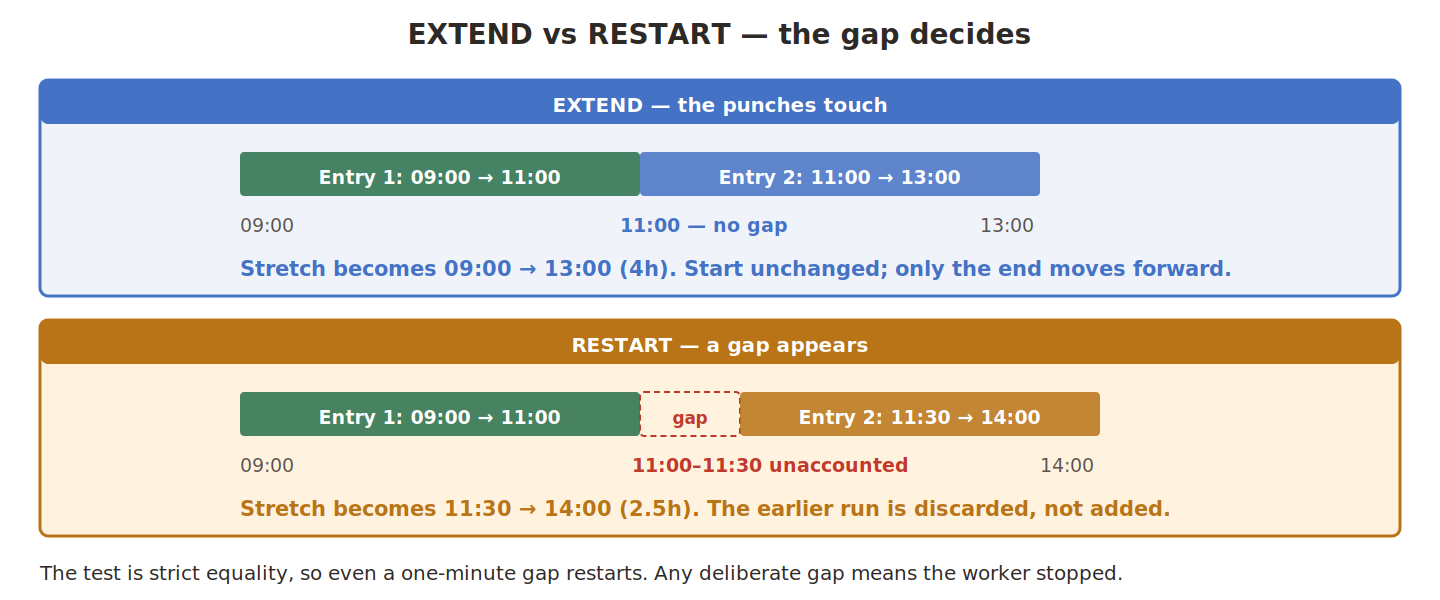
EXTEND correctly recognises that splitting a continuous work session into multiple Reg Hours rows — for cost-centre tracking, say — doesn’t break continuity. The worker hasn’t stopped working; they’ve changed which project they’re billing.
RESTART discards the previous stretch entirely. The formula doesn’t know what happened in the gap and doesn’t need to. The gap itself is proof that continuous work was interrupted.
Why even a one-minute gap forces a restart. The condition is strict equality. A worker logging 09:00–11:00 then 11:01–14:00 gets two separate stretches. That’s a deliberately strict reading of “continuous,” and for most office work it’s correct — even small gaps imply a break, and breaks are what the cap exists to encourage. If your jurisdiction allows a tolerance, one extra check does it:
IF ((aiStartTime - stretchEnd) < (5/1440)) THEN   /* 5-minute grace */
  stretchEnd = aiStopTime
But the default should be strict.
Block 8c — Cross-Midnight Arithmetic
endMins = TO_NUMBER(TO_CHAR(stretchEnd, 'J'))*1440
        + TO_NUMBER(TO_CHAR(stretchEnd, 'HH24'))*60
        + TO_NUMBER(TO_CHAR(stretchEnd, 'MI'))
stMins  = TO_NUMBER(TO_CHAR(stretchStart, 'J'))*1440
        + TO_NUMBER(TO_CHAR(stretchStart, 'HH24'))*60
        + TO_NUMBER(TO_CHAR(stretchStart, 'MI'))
contHrs = (endMins - stMins) / 60
A graveyard-shift worker punches in at 23:00 and out at 03:00. That’s four hours. Any formula that gets it wrong fires false errors at exactly the workers least equipped to argue back.
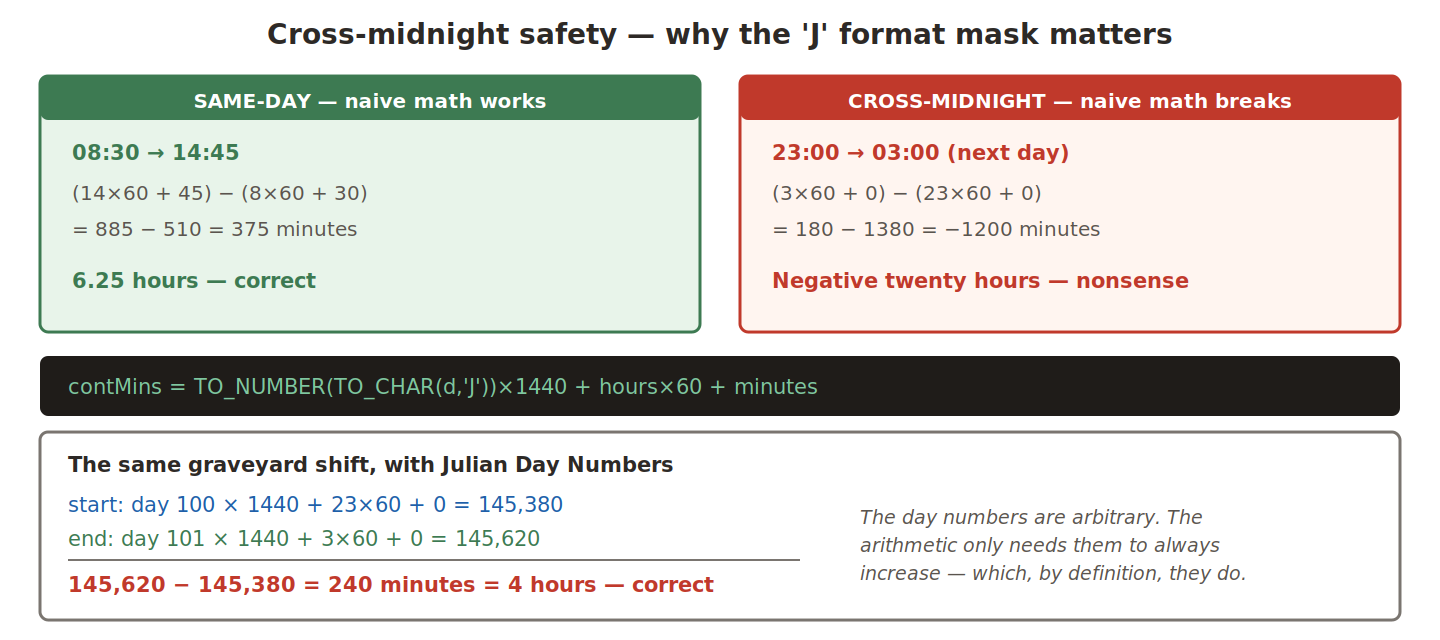
The Julian Day Number is a continuous count of days since a fixed reference in 4713 BCE. TO_CHAR(date, 'J') returns it. Multiply by 1440 — minutes in a day — add the time within that day, and you get a single absolute minute count that always increases. Two such numbers subtract cleanly regardless of whether they’re on the same day, adjacent days, or weeks apart. No special case needed for “is this cross-midnight?”
Why the safeguard gets skipped. The naive calculation is easier to read and works for the vast majority of timecards. Developers under deadline can’t immediately see when it would matter. Then a manufacturing client goes live with a night shift, and the bug is opaque — negative minutes? what? — until someone recognises the pattern.
The cost of including it is one extra character per call. The pattern generalises: any time arithmetic that might cross a boundary — midnight, year-end, daylight saving — deserves the same treatment.
Block 8d — Threshold Checks
IF (contHrs > p_max_cont_err
    AND l_day <> 'SAT'
    AND l_day <> 'SUN'
    AND length(hol) = 0) THEN
( OUT_MSG[nidx] = ... p_msg_cont_err )
ELSE
( IF (contHrs > p_max_cont_warn
      AND l_day <> 'SAT'
      AND l_day <> 'SUN'
      AND length(hol) = 0) THEN
  ( OUT_MSG[nidx] = ... p_msg_cont_warn )
)
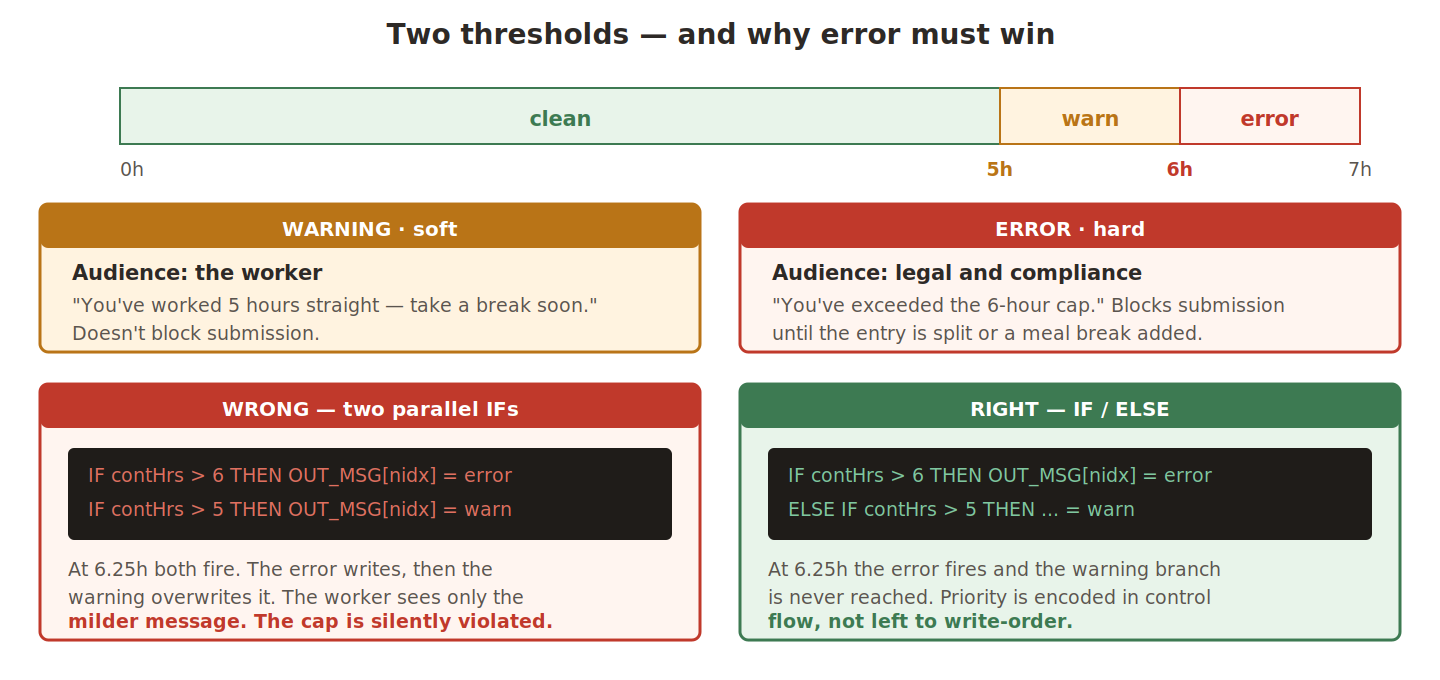
The hour of separation between warning and error is deliberate — it gives the worker time to wrap up and take a break. A single threshold at the cap would be too abrupt; a single threshold at the warning level would be ineffective.
At 6.25 hours both conditions technically apply. The IF/ELSE structure ensures only the more severe message survives. Encode priority through control flow, not through write-order.
Both checks are suspended on weekends and public holidays, since those days are governed by different rules and usually paid at premium. The holiday check uses length(hol) = 0 against a value-set lookup. If you’re rolling out where the weekend isn’t Saturday–Sunday, parameterise the weekend days rather than hardcoding them.
Setup Dependencies
The formula is one piece of a larger picture. Miss a prerequisite and the formula compiles but throws at runtime. Miss a pipeline step and it never reaches the worker at all.
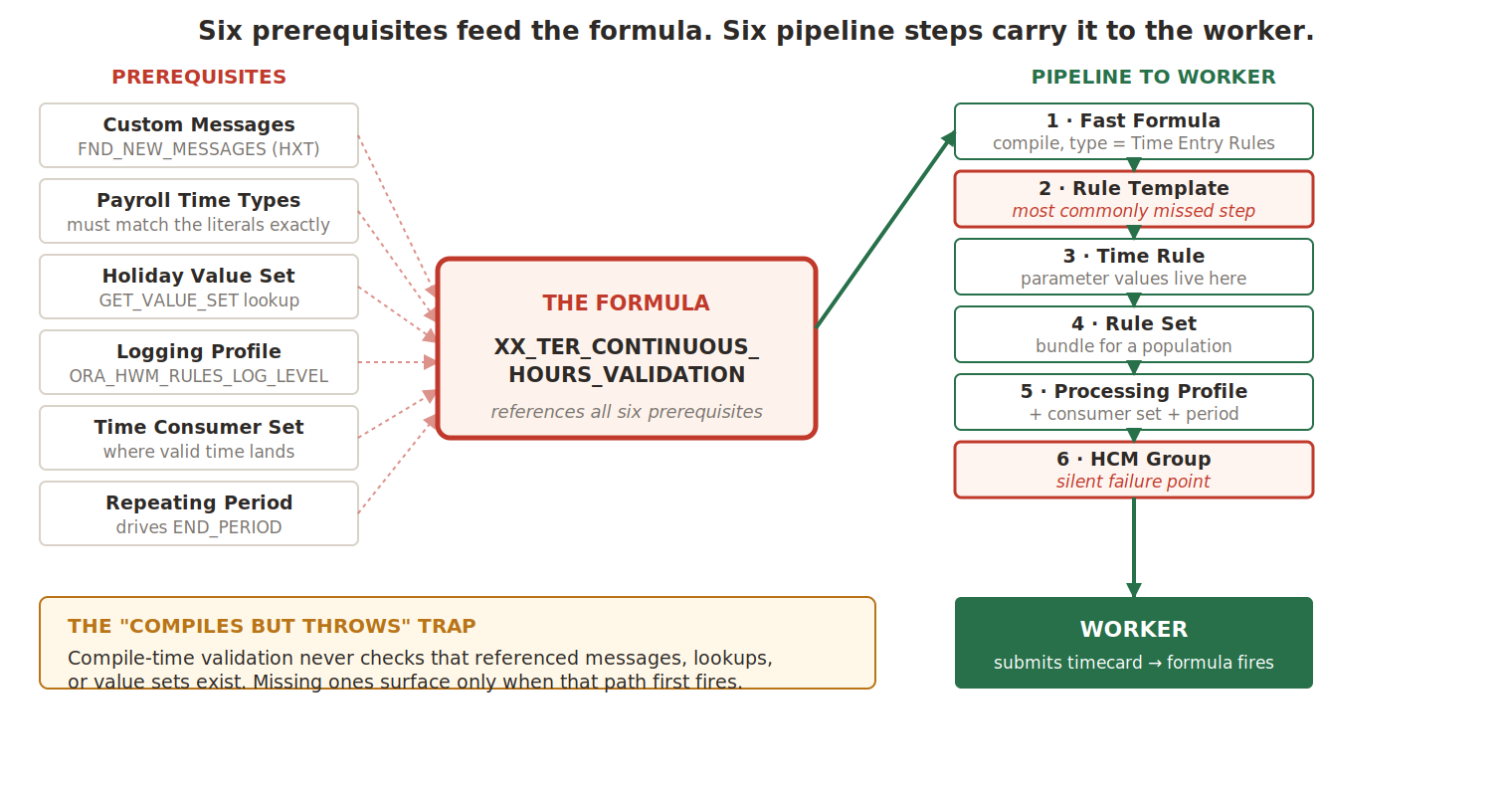
Prerequisites
| Prerequisite | Where | Why the formula needs it |
|---|---|---|
| Custom messages | Manage Messages (Application = HXT) | Every get_output_msg('HXT', ...) resolves a name into translated text. The formula compiles without them but throws when a path fires. |
| Payroll Time Type values | Manage Common Lookups | The literals in p_reg_type and p_break_type must match configured types exactly. If a timecard uses 'Reg Hrs', the gate never matches and every rule silently skips. |
| Holiday value set | Manage Value Sets | GET_VALUE_SET looks up the holiday calendar at runtime. Test it with a BIP query before attaching. |
| Rule logging profile | ORA_HWM_RULES_LOG_LEVEL | add_rlog writes to a buffer only persisted if logging is enabled. Set Site-level to Fine in non-production or your debug output vanishes. |
| Time Consumer Sets | Manage Time Consumer Sets | Tells the framework where validated time goes — Payroll, Project Costing, both. Without one, time has nowhere to land even after approval. |
| Repeating Time Periods | Manage Repeating Time Periods | Defines the timecard period and drives the END_PERIOD marker in the input array. |
The “compiles but throws” trap — Fast Formula’s compile-time validation does not verify that referenced messages, lookup values, or value sets exist. Your formula compiles cleanly even if every message is missing; the failure surfaces only when that specific path fires for a specific worker. Verify before production with a query against
FND_NEW_MESSAGESfiltered to your message prefix and theHXTapplication. It should return every name the formula references.
The Rule Pipeline
| Step | Task | What to set |
|---|---|---|
| 1 | Fast Formulas | Create the formula, type = Time Entry Rules, compile clean. The UI is plain-text with no highlighting — author elsewhere and paste. |
| 2 | Rule Templates | Create a TER template, select the formula, configure classification, reporting level, trigger events, and each parameter and output including OUT_MSG severity. |
| 3 | Rules | Create a rule from the template. The actual parameter values live here — this is what get_rvalue_number reads via rule_id. |
| 4 | Rule Sets | Bundle the rule with the other validations for a worker population. |
| 5 | Worker Time Processing Profiles | Attach the rule set plus consumer set, repeating period, default payroll time type. |
| 6 | HCM Groups + assignment | Link workers to the profile. Run Evaluate HCM Group Membership for the date range. |
Step 2 is the most commonly missed. It’s tempting to think “I have a formula, now attach it to a worker” — but you cannot create a Time Rule directly from a formula. The template is the bridge that tells OTL what parameters need values and how to interpret outputs. Without it, the rule-creation UI can’t render parameter fields at all. One template plus many rules plus many rule sets is the typical multi-entity pattern.
Step 6 is the silent failure point. If a worker isn’t linked to the processing profile through HCM Group membership, the formula never fires for them — with no error. UAT testers usually have the profile manually assigned, so this passes cleanly. In production the assignment is batch-driven; if the batch hasn’t run or the eligibility criteria excluded a population, those timecards bypass validation entirely and sail through. Validate this as part of go-live readiness, not just the formula compile.
The Worked Example, End to End
Sarah’s timecard for 14-Apr-2026 has four worker entries plus three system markers. The framework hands the formula seven array slots.
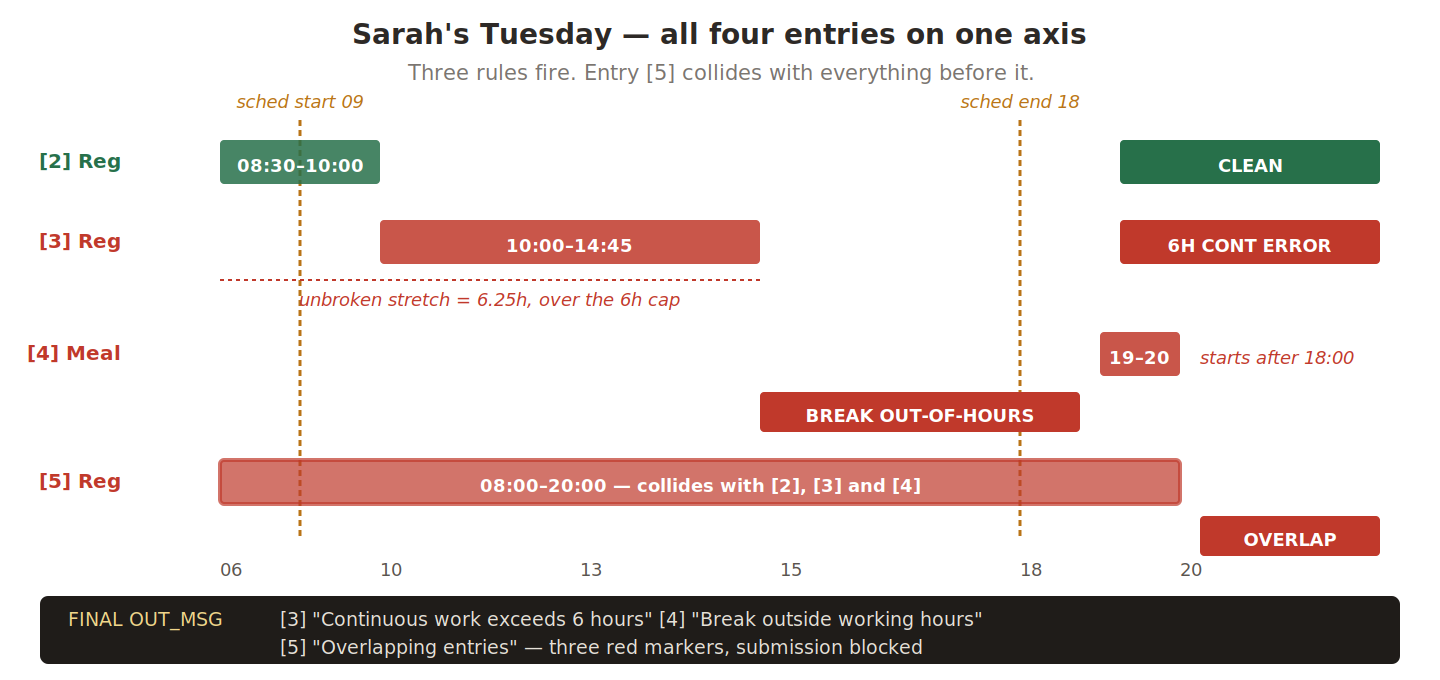
Iteration by iteration
| # | Row | What happens | State after |
|---|---|---|---|
| 1 | HEADER [1] | Reads 'HEADER'. Other arrays empty at [1]; the .exists() guards skip those reads. No validation, no state change. | Buffer empty, tracker idle |
| 2 | Reg [2] 08:30–10:00 | Block 6c confirms both punches. 6d buffers it. Block 8 starts a stretch (1.5h). | Buffer: 1 entry. Stretch 08:30–10:00 |
| 3 | Reg [3] 10:00–14:45 | 6d buffers it. Block 8 sees start (10:00) matches previous end (10:00) → EXTEND to 08:30–14:45 = 6.25h. Over the 6h cap → error on [3] | Buffer: 2. OUT_MSG[3] set |
| 4 | Meal [4] 19:00–20:00 | 6e checks the window: 19:00–20:00 falls outside 09:00–18:00 → error on [4]. Also sets l_meal_taken = 'Y' | OUT_MSG[4] set, meal flag on |
| 5 | Reg [5] 08:00–20:00 | 6d buffers it. Block 8’s gate is now closed (condition 5), so the tracker doesn’t grow. | Buffer: 3 entries — [2], [3], [5] |
| 6 | END_DAY [6] | Block 7 fires. Pair (2,3) touch at 10:00 — no overlap. Pairs (2,5) and (3,5) both overlap, since [5] contains them → error on [5], the later entry. Then 7c clears buffer, tracker, meal flag. | OUT_MSG[5] set, day state reset |
| 7 | END_PERIOD [7] | Loop ends. RETURN OUT_MSG. | Formula returns |
Three errors, one return. Notice how each block’s output — buffer growth, stretch extension, the meal flag — feeds the next block’s decisions on later iterations.
The framework renders three red markers on Sarah’s screen. She removes the consolidated entry [5], moves the meal to a real lunch slot, and resubmits. The formula re-runs from scratch on the corrected array; every row passes; the timecard moves to approval.
Where This Formula Sits
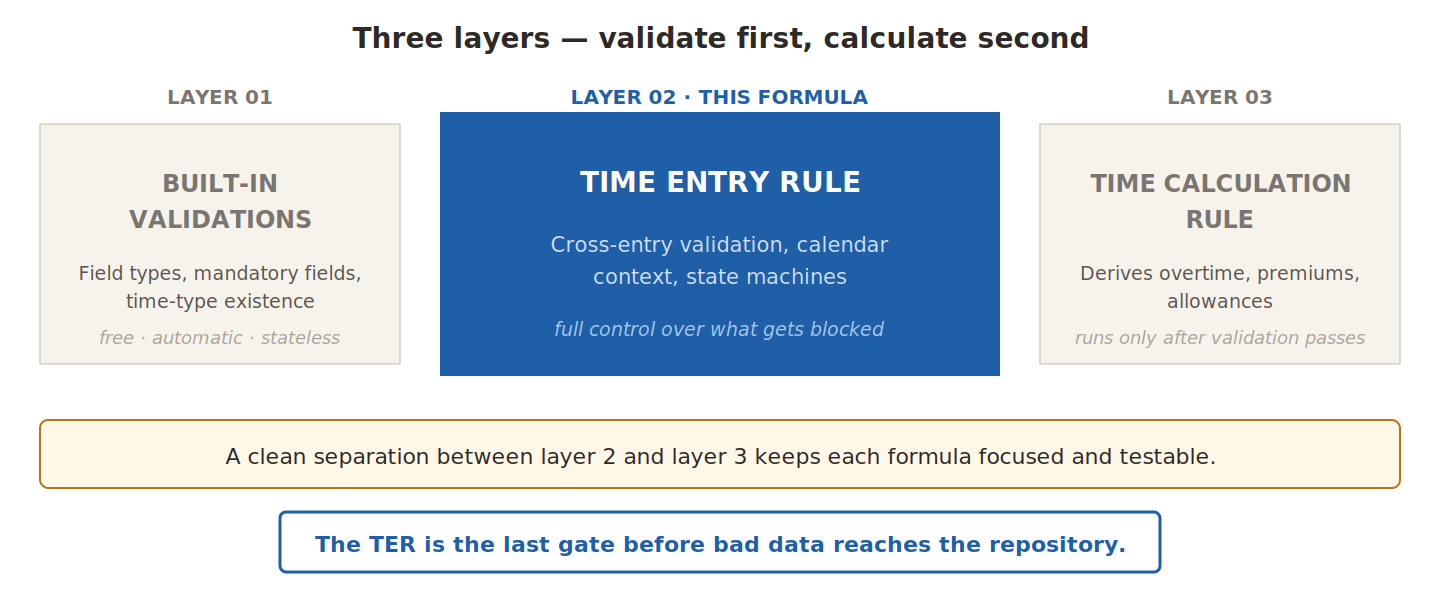
Build it once with care, parameterise the entity-specific values, and the same formula serves the whole rollout — one source of truth, configured per legal entity through rule parameters.
The Series
- OTL Foundations — what TER does and where it fits in the submission pipeline
- The Input Contract — marker rows, parallel arrays, and the
.exists()guard - The Algorithm — setup, per-line routing, and the pairwise overlap test
- The State Machine — continuous-hours tracking, setup dependencies, end-to-end trace
That’s the complete picture of how a production Oracle HCM Cloud TER formula works, from the submission flow through to the error markers a worker actually sees.
Abhishek Mohanty · Oracle ACE Associate | AIOUG Member | Oracle HCM Cloud Consultant & Technical Lead — Fast Formulas, Absence Management, Time & Labor, Core HR, Redwood, HDL, OTBI.
The TER Series · Part 4 / 4 · Series complete