
Oracle Fast Formula: How to Generate Logs in OTL — Setup, Code, and Where to Find the Output
Why OTL logging fails in two distinct ways — an incomplete setup chain, or a visibility switch left off — and how to fix both. Covers TCR and TER template configuration, add_log and add_rlog, the profile option that gates everything, and working skeletons for both rule types.
If you have ever written an OTL Fast Formula, deployed it, saved a timecard, and then opened the rule processing page expecting to see your debug lines — only to find the page empty — this post is for you.
OTL logging fails for two reasons. Either the setup chain is incomplete and the formula never fires, or the visibility switch is off and the engine throws your log lines away before saving them.
The order matters. Most posts jump straight to the add_log call, but if the rule never fires, no function call inside it can produce a line. This post walks the chain in the right order: setup first, then the formula, then the profile that makes everything visible.
TCR Setup — The Calculation Engine
We start with the TCR because it is the engine that actually does something — it generates overtime entries, splits hours into pay tiers, applies premium rates. The TER comes after, because the TER’s job is to validate the inputs the TCR will consume. Build the engine first, then the gatekeeper to feed it cleanly.
TCR Rule Template — Definition tab
Setup and Maintenance → Manage Time Rule Templates → Definition tab.
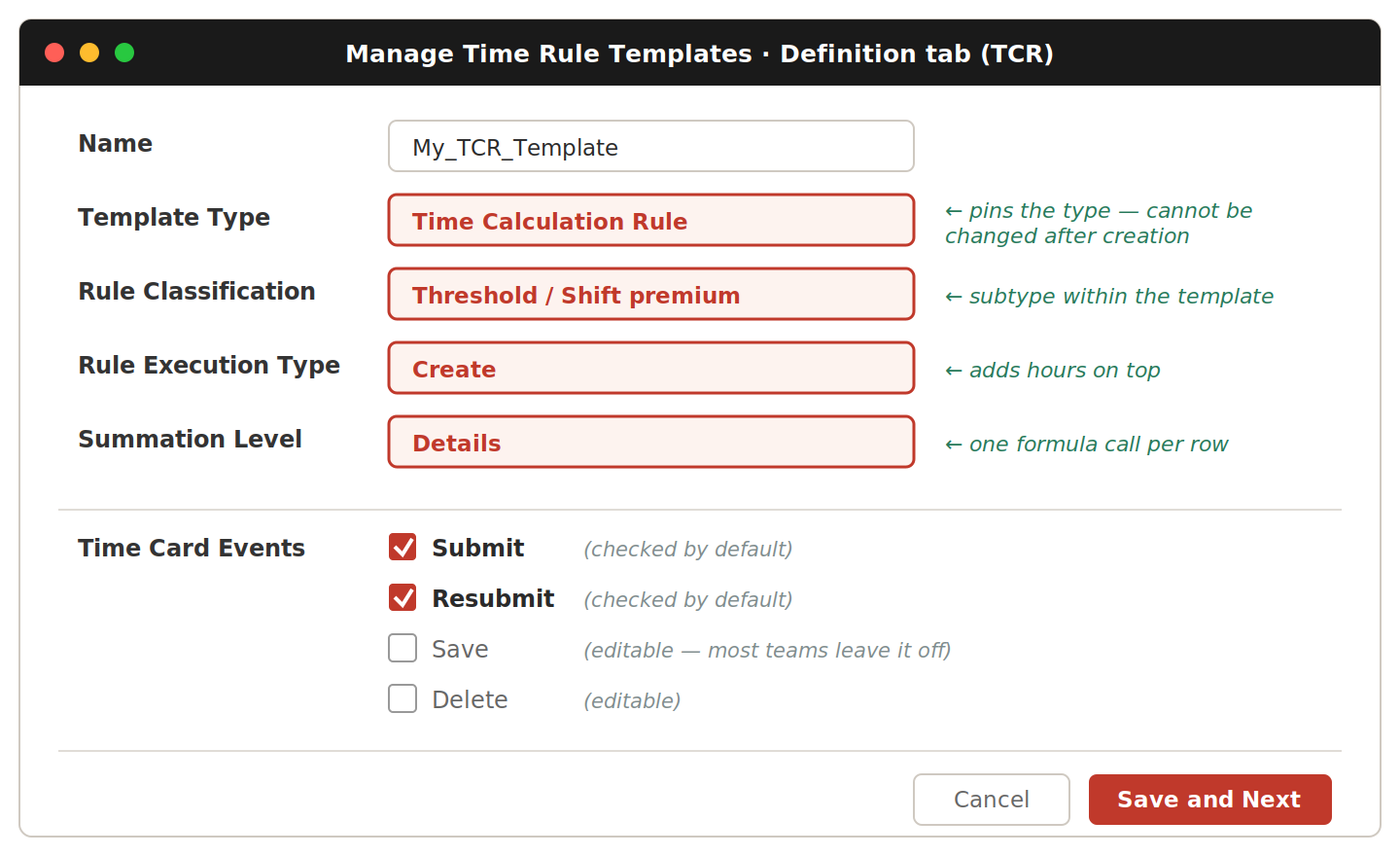
| Field | Value | Why |
|---|---|---|
| Name | A clear, prefixed name | Cannot be edited after first save in some releases — get it right the first time |
| Template Type | Time Calculation Rule | Determines which formula types the engine accepts. Cannot be changed after creation. |
| Rule Execution Type | Create | Most overtime calculations need Create — see below |
| Summation Level | Details | Engine calls the formula once per detail row. Day would batch a whole day and you couldn’t tell which entry crossed the cap. |
| Time Card Events | Submit + Resubmit | Checked by default. Overtime must run at submit time when payroll consumes the data. Save is editable — most teams leave it off so users don’t watch overtime numbers shift as they type. |
At Details level the formula keeps running totals across calls using set_wrk_num and get_wrk_num.
Execution Type — Create vs Update
Oracle’s distinction is about total hours.
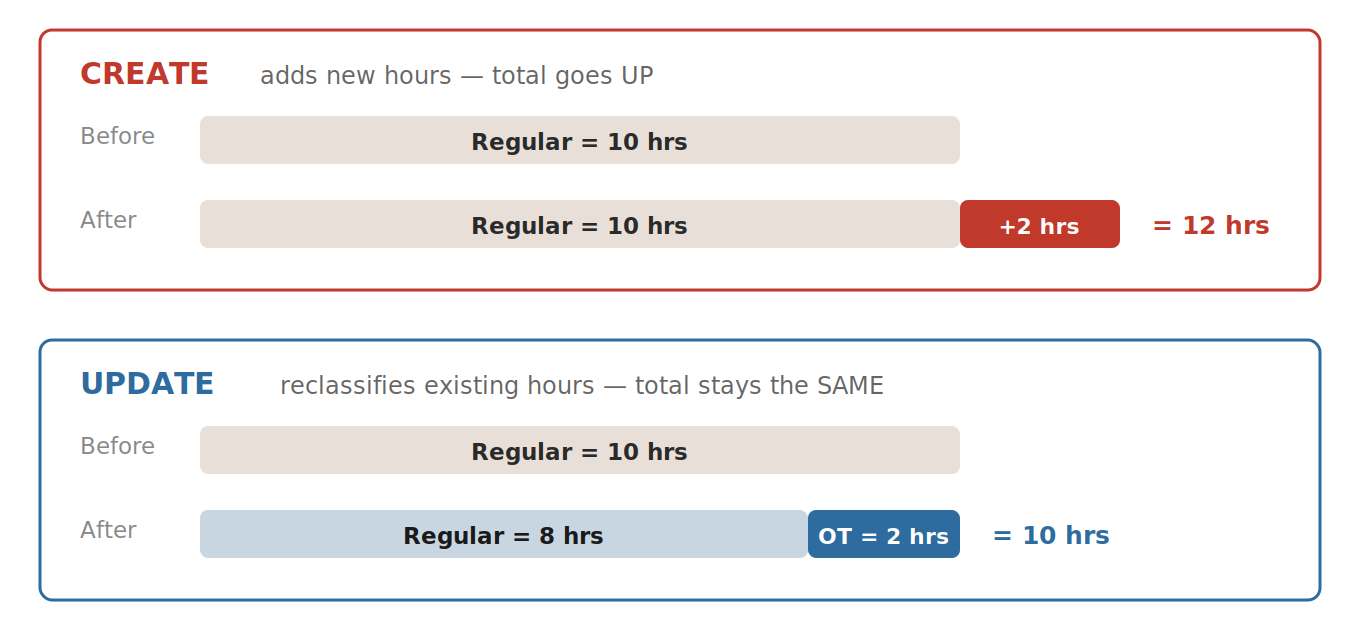
Create adds new premium hours on top of reported time — the total goes up. Update redistributes the same reported hours into different pay categories — the total stays the same. Pick the value that matches whether your formula is adding hours or reclassifying them.
Time Category — Conditions tab
Setup and Maintenance → Manage Time Categories → Conditions tab.
The Time Category is a reusable filter telling the rule which Payroll Time Types to look at. The principle: one rule, one job. Don’t let the TCR see entries it has no business processing.
If the TER already validates meal breaks, the TCR has no reason to see them. Pulling Meal Break out of the category fixes two problems with one save — noisy log lines disappear, and meal hours stop inflating the daily worked-hours total.
| Time Type | Include? |
|---|---|
| Regular Hours | Include |
| Overtime tiers (1.5x, 2x) | Include |
| Holiday / Rest Day premiums | Include |
| Meal Break / Unpaid Break | Remove |
| Absence entries, anything the TER handles | Remove |
The exact list depends on your design. The principle is what matters.
TCR Rule — Parameters tab
The rule is an instance of the template with parameter values filled in. The most important is WORKED_TIME_CONDITION — the link between the rule and the Time Category. Without it the engine processes all time types regardless of what your category says. Set it on the rule, not the rule set, not the template.
Threshold parameters are custom — you choose names and values when you build the template. The advantage over hardcoding: a functional consultant can edit the value in the UI without touching the formula.
Verify the binding visually. “Confirmed” in a chat message is not the same as “I see it on screen.” Open the rule’s Parameters tab, screenshot it, attach it to your design document.
A Time Category can also bind at the rule set level. Use rule-level binding via WORKED_TIME_CONDITION when the category scopes which entries one rule processes. Use rule-set-level binding when the category gates whether the entire rule set member runs at all.
TER Setup — The Gatekeeper
The TER validates entries before the TCR sees them. Different rule type, different needs.
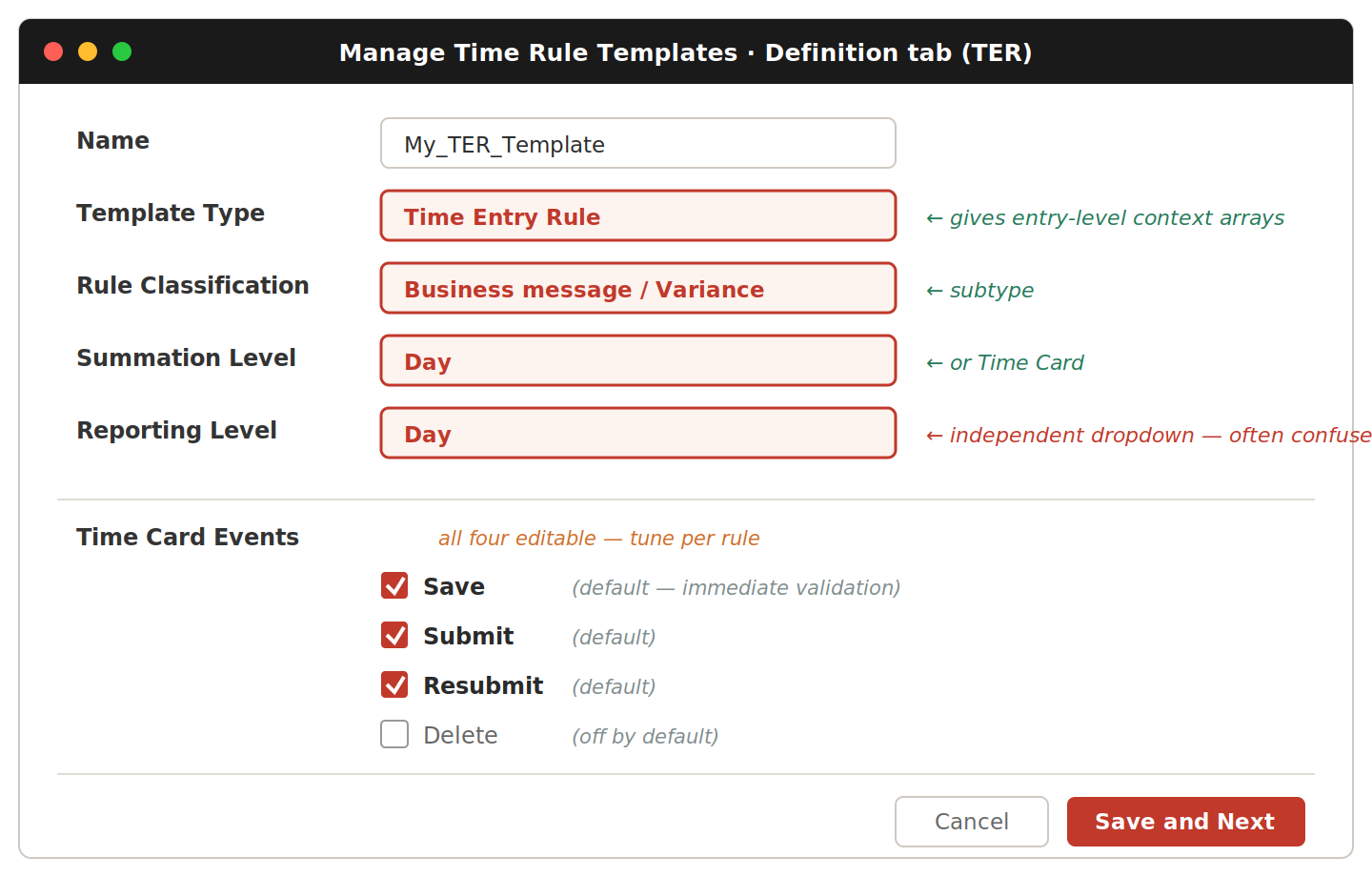
| Field | Value | Why |
|---|---|---|
| Template Type | Time Entry Rule | Gives the formula access to entry-level context arrays |
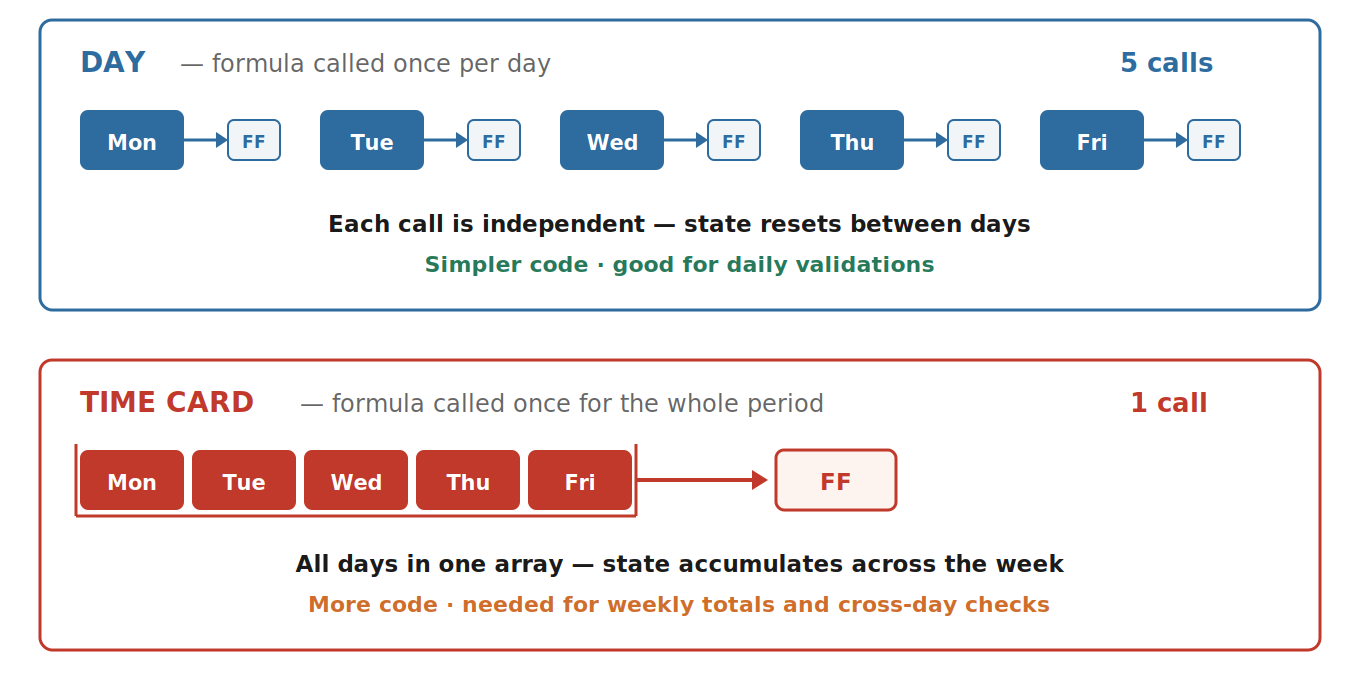
| Summation Level | Day or Time Card | Day bundles all detail rows for one day plus an END_DAY marker — good for overlap, continuous stretch, meal break checks. Time Card bundles the entire period — good for weekly max hours. |
| Reporting Level | Match your summation | Where the error appears: Details = row-level, Day = day banner, Time Card = period banner. Independent of Summation Level — two separate dropdowns that people routinely mix up. |
| Time Card Events | Save, Submit, Resubmit | Typically all three so validation fires on every user action. Untick Save if validation is expensive. |
Regenerate after changing the template. Changing Summation Level doesn’t take effect until you click through the wizard to Review and re-save. The rule built from the template also needs regeneration. Skip either step and the engine behaves as if nothing changed.
The TER rule typically doesn’t need a Time Category binding — validation runs across all time types. Its parameters are the validation thresholds: schedule start and end hour, maximum continuous hours before warning or error.
Binding Both Rules Into Rule Sets and Profile
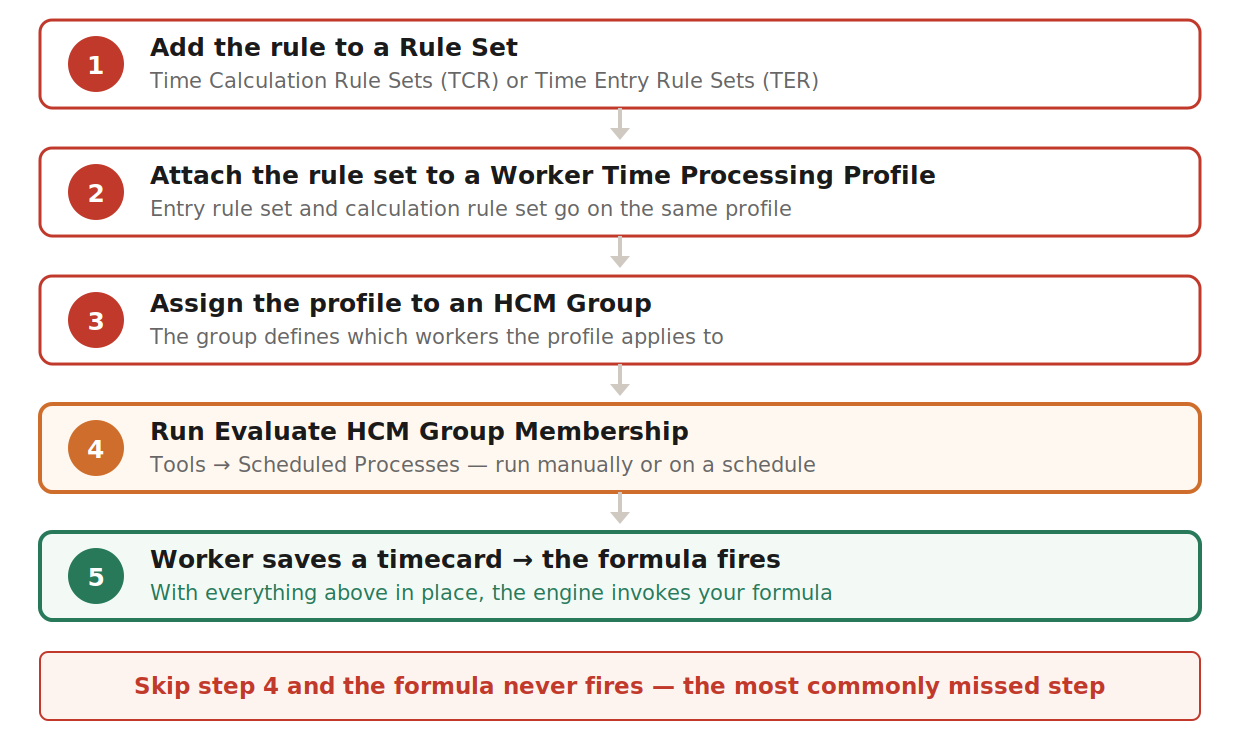
The remaining setup is identical for TER and TCR. Five steps, and all five must be in place or the formula never fires.
Logging Inside the Formula
Setup chain done — the engine will now call your formula. OTL exposes two functions for logging. Both work, both write to the same place.
| Function | Arguments | When to use |
|---|---|---|
add_log | (ffs_id, message) | The shorter form. The rule_id is determined automatically. Works in standard TER and TCR formulas. |
add_rlog | (ffs_id, rule_id, message) | The longer form with rule_id passed explicitly. Use when the auto-determined rule_id misbehaves. |
Both return a number. Fast Formula requires every expression to be assigned, so write flog = add_log(...) — the value of flog is never used.
The two required contexts
ffs_id  = GET_CONTEXT(HWM_FFS_ID, 0)
rule_id = GET_CONTEXT(HWM_RULE_ID, 0)
The
HWM_prefix matters. Older posts showHXT_FFS_IDorHXT_RULE_ID— leftover names from the on-premises HXT module. In Fusion HCM Cloud the contexts areHWM_. Mixing them up gives you a NULL ffs_id, and everyadd_logcall silently writes nothing.
Where the lines actually go
Both functions produce lines you view on the Analyze Rule Processing Details page. That’s the supported way to read OTL formula logs.
ESS_LOG_WRITE only works when the formula runs inside an ESS batch job — it stays silent on UI-triggered saves. Stick with add_log or add_rlog for universal coverage.
If you used to query the table directly — In earlier releases, consultants queried
HWM_RULE_FF_WORK_LOGvia BI Publisher SQL data models as a debugging shortcut. From 2025 onward Oracle has decommissioned this table; it is no longer reliably populated and isn’t exposed in OTBI. The Analyze Rule Processing Details UI is the only supported path.
A useful convention: the >>> prefix
The rule processing log mixes Oracle’s engine messages with your custom lines. Prefix every message so you can search straight to yours:
flog = add_log(ffs_id, '>>> Enter ' || ffName || ' v1.0')
flog = add_log(ffs_id, '>>> idx=' || to_char(nidx) || ' qty=' || to_char(aiMeasure))
flog = add_log(ffs_id, '>>> Exit ' || ffName)
The Profile Option That Controls Everything
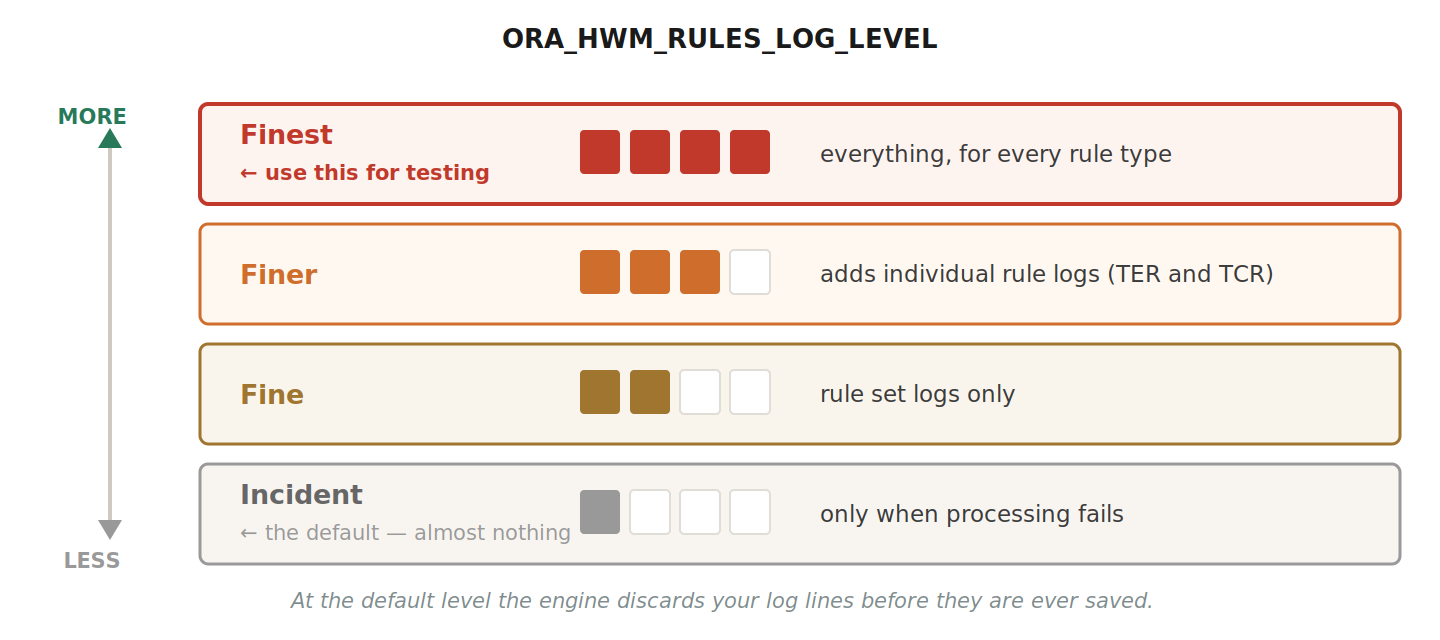
Until somebody flips this, every add_log call you wrote is the equivalent of waving at a camera nobody is recording.
| Level | What gets kept |
|---|---|
| Incident | Default. Logs only when processing fails. Successful runs leave no trace. |
| Fine | Rule set logs. No individual rule logs. |
| Finer | Adds individual rule logs for calculation and entry rules. |
| Finest | Everything, for every rule type. This is what you want during testing. |
How to flip it: Setup and Maintenance → Manage Administrator Profile Values → search profile code ORA_HWM_RULES_LOG → set ORA_HWM_RULES_LOG_LEVEL to Finest at Site level → also set ORA_HWM_RULES_LOG_MONTHS_TO_KEEP to 1 at Site level → Save and Close → sign out completely and sign back in.
Data role and security profile
Setting the profile is necessary but not sufficient. The user viewing Analyze Rule Processing Details also needs the Time and Labor Administrator job role with security profiles for View All Organizations, View All Positions, View All LDGs, and View All People — not “View All Workers,” which is a different thing.
If the profile is Finest, the formula compiles, the chain is intact, and you still see “No data to display” — the cause is almost always this data-role gap. Oracle MOS Doc 2120220.1 documents the exact situation.
TER Skeletons
Minimal TER logging skeleton
The smallest TER formula that produces useful logs. Deploy this first after enabling Finest. If you save a timecard and see these lines, every link in the chain works.
/******************************************************************
  FORMULA: MY_TER_LOG_TEST
  TYPE   : Time Entry Rule
  PURPOSE: Smallest TER that produces useful logs.
******************************************************************/

DEFAULT FOR HWM_CTXARY_RECORD_POSITIONS IS EMPTY_TEXT_NUMBER
DEFAULT FOR measure                     IS EMPTY_NUMBER_NUMBER
DEFAULT FOR PayrollTimeType             IS EMPTY_TEXT_NUMBER

INPUTS ARE
  HWM_CTXARY_RECORD_POSITIONS,
  measure, PayrollTimeType

ffName  = 'MY_TER_LOG_TEST'
ffs_id  = GET_CONTEXT(HWM_FFS_ID, 0)
rule_id = GET_CONTEXT(HWM_RULE_ID, 0)
asg_id  = GET_CONTEXT(HWM_SUBRESOURCE_ID, 0)

flog = add_log(ffs_id, '>>> Enter ' || ffName)
flog = add_log(ffs_id, '>>> ffs_id=' || to_char(ffs_id))
flog = add_log(ffs_id, '>>> rule_id=' || to_char(rule_id))

CHANGE_CONTEXTS(HR_ASSIGNMENT_ID = asg_id)
(
  wMaAry = HWM_CTXARY_RECORD_POSITIONS.count
  flog = add_log(ffs_id, '>>> Total rows: ' || to_char(wMaAry))

  nidx = 0
  WHILE (nidx < wMaAry) LOOP
  (
    nidx = nidx + 1
    aiRecPos = HWM_CTXARY_RECORD_POSITIONS[nidx]
    aiType   = '**NULL**'
    IF (PayrollTimeType.exists(nidx)) THEN  aiType = PayrollTimeType[nidx]

    flog = add_log(ffs_id,
             '>>> idx=' || to_char(nidx) ||
             ' pos='   || aiRecPos ||
             ' type=[' || aiType || ']')
  )
)

flog = add_log(ffs_id, '>>> Exit ' || ffName)
RETURN OUT_MSG
You should see the Enter line, both context IDs as non-zero numbers, the row count, one >>> idx= line per timecard entry, and the Exit line. If anything is missing, walk the checklist at the end of this post.
Day vs Time Card — what changes in the code
The Summation Level changes what the engine sends to the formula, so the code must be written differently.
| Aspect | Day | Time Card |
|---|---|---|
| Formula called | Once per day | Once for the entire period |
| Array contains | DETAIL rows + END_DAY | DETAIL rows + END_DAY per day + END_PERIOD at the end |
| Day-level state reset | Not needed — starts fresh each call | Required — clear at END_DAY or Monday leaks into Tuesday |
| END_PERIOD handling | Not needed — no such marker | Required — run period-level checks here |
| Cross-day totals | Not possible (no memory between calls) | Built in — running totals accumulate naturally |
Day summation is the simpler pattern:
WHILE (nidx < wMaAry) LOOP
(
  nidx = nidx + 1
  aiRecPos = HWM_CTXARY_RECORD_POSITIONS[nidx]

  IF (aiRecPos = 'DETAIL') THEN
  (
    /* Read entry data, log it, business logic */
    flog = add_log(ffs_id, '>>> idx=' || to_char(nidx) || ' type=[' || aiType || ']')
  )

  IF (aiRecPos = 'END_DAY') THEN
  (
    /* Day-level checks. No state reset needed — next call starts fresh */
    flog = add_log(ffs_id, '>>> END_DAY checks done')
  )
)
Time card summation adds exactly two blocks the Day pattern doesn’t need:
WHILE (nidx < wMaAry) LOOP
(
  nidx = nidx + 1
  aiRecPos = HWM_CTXARY_RECORD_POSITIONS[nidx]

  IF (aiRecPos = 'DETAIL') THEN
  (
    /* Identical to the Day pattern */
    l_week_total = l_week_total + aiMeasure
  )

  IF (aiRecPos = 'END_DAY') THEN
  (
    /* Day-level checks, same as Day pattern */

    /* EXTRA 1: manual state reset — without this Monday leaks into Tuesday */
    l_day_total     = 0
    l_stretch_start = NullDate
    l_stretch_end   = NullDate
    l_in_stretch    = 'N'
    l_day_count     = 0
  )

  /* EXTRA 2: END_PERIOD — period-level final checks */
  IF (aiRecPos = 'END_PERIOD') THEN
  (
    IF (l_week_total > l_weekly_max) THEN
    (
      OUT_MSG[nidx] = 'Weekly hours exceed maximum'
    )
    flog = add_log(ffs_id, '>>> END_PERIOD weekTotal=' || to_char(l_week_total))
  )
)
The DETAIL processing is identical between the two. Start with Day; add these two blocks if you later switch.
Production-ready TER skeleton
Once logging works, build on this. It adds runaway-loop protection, header-attribute readback, parameter logging, and explicit business-logic placement. The formula and parameter names are placeholders; the Oracle-defined names must stay exactly as shown.
/* A. DEFAULTS */
DEFAULT FOR HWM_CTXARY_RECORD_POSITIONS IS EMPTY_TEXT_NUMBER
DEFAULT FOR HWM_CTXARY_HWM_MEASURE_DAY  IS EMPTY_NUMBER_NUMBER
DEFAULT FOR measure                     IS EMPTY_NUMBER_NUMBER
DEFAULT FOR PayrollTimeType             IS EMPTY_TEXT_NUMBER
DEFAULT FOR StartTime                   IS EMPTY_DATE_NUMBER
DEFAULT FOR StopTime                    IS EMPTY_DATE_NUMBER

INPUTS ARE
  HWM_CTXARY_RECORD_POSITIONS, HWM_CTXARY_HWM_MEASURE_DAY,
  measure, PayrollTimeType, StartTime, StopTime

/* B. CONTEXT INIT */
ffName  = 'MY_TER_FORMULA'
ffs_id  = GET_CONTEXT(HWM_FFS_ID, 0)
rule_id = GET_CONTEXT(HWM_RULE_ID, 0)
asg_id  = GET_CONTEXT(HWM_SUBRESOURCE_ID, 0)
NullDate = '01-JAN-1900'(DATE)
NullText = '**FF_NULL**'

/* C. ENTRY MARKER */
flog = add_log(ffs_id, '>>> Enter ' || ffName || ' v1.0')
flog = add_log(ffs_id, '>>> ffs_id=' || to_char(ffs_id) || ' rule_id=' || to_char(rule_id))

/* D. ASSIGNMENT CONTEXT WRAPPER */
CHANGE_CONTEXTS(HR_ASSIGNMENT_ID = asg_id)
(
  /* E. Read and log header attributes */
  rptLvl = Get_Hdr_Text(rule_id, 'RUN_TBB_LEVEL', 'DAY')
  flog = add_log(ffs_id, '>>> rptLvl=' || rptLvl)

  /* F. Read rule parameters and log them */
  p_sched_start = get_rvalue_number(rule_id, 'SCHEDULE_START_HOUR', 0)
  p_sched_end   = get_rvalue_number(rule_id, 'SCHEDULE_END_HOUR',   0)
  flog = add_log(ffs_id, '>>> sched=' || to_char(p_sched_start) || '-' || to_char(p_sched_end))

  /* G. Loop with guards */
  nidx   = 0
  wMaAry = HWM_CTXARY_RECORD_POSITIONS.count
  flog = add_log(ffs_id, '>>> Total rows: ' || to_char(wMaAry))

  WHILE (nidx < wMaAry) LOOP
  (
    nidx = nidx + 1
    IF (nidx > 1000) THEN ( flog = add_log(ffs_id, '>>> ABORT runaway')  RETURN OUT_MSG )

    aiRecPos = HWM_CTXARY_RECORD_POSITIONS[nidx]

    IF (aiRecPos = 'DETAIL') THEN
    (
      aiMeasure = 0
      aiType    = NullText
      IF (measure.exists(nidx))         THEN  aiMeasure = measure[nidx]
      IF (PayrollTimeType.exists(nidx)) THEN  aiType    = PayrollTimeType[nidx]

      flog = add_log(ffs_id,
               '>>> idx=' || to_char(nidx) || ' pos=' || aiRecPos ||
               ' type=[' || aiType || ']' || ' qty=' || to_char(aiMeasure))

      /* === Your business logic goes here === */
    )
    IF (aiRecPos = 'END_DAY') THEN
    (  flog = add_log(ffs_id, '>>> END_DAY checks here')  )
    IF (aiRecPos = 'END_PERIOD') THEN
    (  flog = add_log(ffs_id, '>>> END_PERIOD checks here')  )
  )
)

/* H. EXIT MARKER */
flog = add_log(ffs_id, '>>> Exit ' || ffName)
RETURN OUT_MSG
TCR Skeletons
TCR formulas calculate or reclassify hours — they don’t validate. At Details level the engine calls the formula once per matched row and passes scalar values, not arrays. That makes TCR formulas shorter than TER formulas.
The key structural difference. TER receives arrays and loops through them. TCR at Details level receives scalars — no loop needed. The engine calls the formula once per matched row with one row’s worth of data.
Minimal TCR logging skeleton
/******************************************************************
  FORMULA: MY_TCR_LOG_TEST
  TYPE   : Time Calculation Rule (Create · Details)
  PURPOSE: Creates nothing — just confirms the engine calls it.
******************************************************************/

DEFAULT FOR measure         IS 0
DEFAULT FOR PayrollTimeType IS ' '
DEFAULT FOR StartTime       IS '01-JAN-1900 00:00:00'(DATE)
DEFAULT FOR StopTime        IS '01-JAN-1900 00:00:00'(DATE)

INPUTS ARE
  measure, PayrollTimeType, StartTime, StopTime

ffName  = 'MY_TCR_LOG_TEST'
ffs_id  = GET_CONTEXT(HWM_FFS_ID, 0)
rule_id = GET_CONTEXT(HWM_RULE_ID, 0)

flog = add_log(ffs_id, '>>> Enter ' || ffName)
flog = add_log(ffs_id, '>>> measure=' || to_char(measure))
flog = add_log(ffs_id, '>>> type=' || PayrollTimeType)
flog = add_log(ffs_id, '>>> start=' || to_char(StartTime, 'DD-MON-YYYY HH24:MI'))
flog = add_log(ffs_id, '>>> stop='  || to_char(StopTime,  'DD-MON-YYYY HH24:MI'))

flog = add_log(ffs_id, '>>> Exit ' || ffName)
RETURN
Production-ready TCR skeleton (Create · Threshold)
/* A. DEFAULTS */
DEFAULT FOR HWM_CTXARY_RECORD_POSITIONS  IS EMPTY_TEXT_NUMBER
DEFAULT FOR HWM_CTXARY_HWM_MEASURE_DAY   IS EMPTY_NUMBER_NUMBER
DEFAULT FOR MEASURE                      IS EMPTY_NUMBER_NUMBER
DEFAULT FOR PayrollTimeType              IS EMPTY_TEXT_NUMBER
DEFAULT FOR StartTime                    IS EMPTY_DATE_NUMBER
DEFAULT FOR StopTime                     IS EMPTY_DATE_NUMBER

/* B. INPUTS */
INPUTS ARE
    HWM_CTXARY_RECORD_POSITIONS,
    HWM_CTXARY_HWM_MEASURE_DAY,
    MEASURE, PayrollTimeType, StartTime, StopTime

/* C. CONTEXT INIT + NULL GUARDS */
ffName       = 'XX_GENERIC_TCR_SKELETON'
ffs_id       = GET_CONTEXT(HWM_FFS_ID,  0)
rule_id      = GET_CONTEXT(HWM_RULE_ID, 0)
NullDate     = '01-JAN-1900'(DATE)
NullText     = '**FF_NULL**'

/* D. HEADER-LEVEL RULE READS */
l_hdr_sum_lvl  = Get_Hdr_Text(rule_id, 'RUN_SUMMATION_LEVEL', 'TIMECARD')
l_hdr_ExecType = Get_Hdr_Text(rule_id, 'RULE_EXEC_TYPE',      'CREATE')

flog = ADD_RLOG(ffs_id, '>>> Enter ' || ffName || ' v1.0')
flog = ADD_RLOG(ffs_id, '>>> ExecType=' || l_hdr_ExecType || ' SumLvl=' || l_hdr_sum_lvl)

/* Only proceed on the CREATE pass — skip VALIDATE to avoid duplicates */
IF (l_hdr_ExecType = 'CREATE') THEN
(
  /* E. READ RULE PARAMETERS */
  p_threshold = GET_RVALUE_NUMBER(rule_id, 'DAILY_THRESHOLD',        0)
  p_ot_type   = GET_RVALUE_TEXT  (rule_id, 'OT_PAYROLL_TIME_TYPE', ' ')

  flog = ADD_RLOG(ffs_id, '>>> threshold=' || TO_CHAR(p_threshold) || ' ot_type=' || p_ot_type)

  /* F. PROCESS CURRENT MEASURE */
  IF (MEASURE WAS NOT DEFAULTED AND PayrollTimeType <> NullText) THEN
  (
    l_excess = MEASURE - p_threshold

    IF (l_excess > 0) THEN
    (
      flog = ADD_RLOG(ffs_id, '>>> SPLIT: reg=' || TO_CHAR(p_threshold) ||
                              ' ot=' || TO_CHAR(l_excess))

      /* Row 1 — regular hours capped at the threshold */
      out_measure[1]         = p_threshold
      out_PayrollTimeType[1] = PayrollTimeType
      out_StartTime[1]       = StartTime
      out_StopTime[1]        = StopTime

      /* Row 2 — overtime hours */
      out_measure[2]         = l_excess
      out_PayrollTimeType[2] = p_ot_type
      out_StartTime[2]       = StartTime
      out_StopTime[2]        = StopTime
    )
    ELSE
    (
      flog = ADD_RLOG(ffs_id, '>>> PASSTHROUGH: measure <= threshold')
      out_measure[1]         = MEASURE
      out_PayrollTimeType[1] = PayrollTimeType
      out_StartTime[1]       = StartTime
      out_StopTime[1]        = StopTime
    )
  )
  ELSE
  (
    flog = ADD_RLOG(ffs_id, '>>> SKIP: null measure or type')
  )
)
ELSE
(
  flog = ADD_RLOG(ffs_id, '>>> Skipping — ExecType=' || l_hdr_ExecType)
)

/* G. EXIT */
flog = ADD_RLOG(ffs_id, '>>> Exit ' || ffName)

RETURN out_measure, out_PayrollTimeType, out_StartTime, out_StopTime
Four things this skeleton covers: an execution-type guard so it runs only on the CREATE pass and skips VALIDATE, avoiding duplicate entries. WAS NOT DEFAULTED as a null-safe check so the formula doesn’t process empty rows. A two-row output where row 1 caps regular hours and row 2 holds the excess. And every branch logged, so you can trace which one fired.
Reading the Logs
My Client Groups → Time Management → Tasks panel → Analyze Rule Processing Details → search by employee or rule set name plus date range → click the most recent processing run → in Processing Results, click Rule Processing Log → search for your >>> prefix.
Sample output:
>>> Enter MY_TER_FORMULA v1.0
>>> ffs_id=<session_id> rule_id=<rule_id>
>>> rptLvl=DAY
>>> Total rows: 3
>>> idx=1 pos=DETAIL   type=[Regular Hours] qty=<hours>
>>> idx=2 pos=DETAIL   type=[Meal Break]    qty=<hours>
>>> idx=3 pos=END_DAY  type=[**FF_NULL**]   qty=0
>>> Exit MY_TER_FORMULA
The forced-error trick
If you’ve done everything right and still see nothing, push diagnostic data straight into the validation message that surfaces on the timecard. The output variable name varies by template — some Oracle samples use out_msg_ary rather than OUT_MSG. Check your template’s output spec first.
/* DEBUG MODE — push diagnostic payload into the user-facing message */
OUT_MSG[1] = 'DEBUG: idx=1 type=' || aiType || ' qty=' || to_char(aiMeasure)
RETURN OUT_MSG
Your future self will thank you for removing this before UAT. Your functional lead will not thank you if you don’t.
The 30-second checklist
If logs don’t appear, walk these in order.
| # | Check | Where |
|---|---|---|
| 1 | TCR template — Execution Type and Summation Level correct | Manage Time Rule Templates |
| 2 | TER template — Summation Level and Reporting Level correct | Manage Time Rule Templates |
| 3 | Time Category cleaned — only what the rule needs | Manage Time Categories → Conditions |
| 4 | WORKED_TIME_CONDITION bound to the category | Manage Time Calculation Rules → Parameters |
| 5 | Rule sets → Profile → HCM Group → Evaluate Membership | Worker Time Processing Profiles + Scheduled Processes |
| 6 | add_log / add_rlog with correct HWM_ contexts | Inside the Fast Formula |
| 7 | ORA_HWM_RULES_LOG_LEVEL = Finest, then sign out and back in | Manage Administrator Profile Values |
| 8 | Data role: View All People, Orgs, Positions, LDGs | Manage Data Role and Security Profiles (MOS 2120220.1) |
Key Takeaways
Setup before code, code before profile, profile before debugging. Most of us start at the wrong end — writing add_log calls and wondering why nothing shows up — when the answer is usually one screen away.
Two functions, same destination. add_log and add_rlog both write to the same internal log. View the output on Analyze Rule Processing Details. Nothing else works for UI-triggered timecard saves.
Day vs Time Card comes down to two extras. Time Card summation needs manual state reset at END_DAY and an END_PERIOD handler. Day needs neither. Start with Day; switch only when you need period-level checks.
The skeleton is the starting point. Drop the minimal version in, confirm logs appear, then graduate to the production skeleton with all the guards. Business logic goes on top.
Abhishek Mohanty · Oracle ACE Associate | AIOUG Member | Oracle HCM Cloud Consultant & Technical Lead — Fast Formulas, Absence Management, Time & Labor, Core HR, Redwood, HDL, OTBI.