
Oracle Fast Formula ALIAS: How the Compiler Resolves Long DBI Names at Parse Time
ALIAS is a compile-time reference, not a runtime variable — and that distinction decides whether your formula returns the right answer inside CHANGE_CONTEXTS. Statement order, what you can and cannot alias, reference-versus-snapshot semantics, WAS DEFAULTED compatibility, and the three compiler errors you'll actually hit.
ALIAS looks like a convenience for shortening long database item names. It is — but it’s also the only shortening technique that preserves the DBI’s runtime semantics. Assign a DBI to a local variable instead and you get a snapshot, which silently returns the wrong answer the moment a CHANGE_CONTEXTS block is involved.
ALIAS in the Five-Section Formula Structure
Every Fast Formula follows the same five-section template, in exactly this order:
| Position | Section | Purpose |
|---|---|---|
| 1 | ALIAS | Shortens long DBI names. Compile-time symbol binding. |
| 2 | DEFAULT FOR | Null handling for database items, including aliased ones. |
| 3 | INPUTS ARE | Typed parameters passed in by the calling formula type. |
| 4 | Calculation body | Assignments, IF/THEN/ELSE, function calls — the actual logic. |
| 5 | RETURN | One or more values handed back to the calling application. |
A minimal formula showing all five in order:
ALIAS CMP_ASSIGNMENT_SALARY_AMOUNT AS ASG_SAL   /* 1. ALIAS — shortens the DBI       */
ALIAS ASG_HR_ASG_ID                AS ASG_ID    /*    one alias per line             */

DEFAULT FOR ASG_SAL IS 0                        /* 2. DEFAULT — null handling        */
DEFAULT FOR ASG_ID  IS 0

INPUTS ARE BONUS_PERCENTAGE                     /* 3. INPUTS — typed parameters      */

L_BONUS = ASG_SAL * (BONUS_PERCENTAGE / 100)    /* 4. CALCULATION — the logic        */

RETURN L_BONUS, ASG_ID                          /* 5. RETURN — values passed back    */
One structural fact drives everything that follows: ALIAS resolution happens at compile time, not at runtime. By the time execution begins, every alias has already been substituted with the underlying DBI’s fetch logic. The alias has no independent existence at runtime — it’s a label the compiler removes.
That’s why the alias inherits the semantic properties of the underlying DBI — lazy evaluation, context-sensitive re-fetching, WAS DEFAULTED compatibility — that a local-variable assignment cannot reproduce.
How the Compiler Resolves an Alias
The Oracle Administering Fast Formulas guide defines ALIAS as a statement that gives a database item a shorter, formula-local name, and explicitly recommends it over assigning a DBI to a local variable for shortening — because the alias is a reference, not a copy.
The compiler builds a symbol table mapping both the long DBI name and your short alias to the same metadata handle:
| Database Item | Alias |
|---|---|
PER_ASG_REL_LENGTH_OF_SERVICE | ASG_LOS |
CMP_ASSIGNMENT_SALARY_AMOUNT | ASG_SAL |
PER_ASG_JOB_NAME | ASG_JOB |
ASG_HR_ASG_ID | ASG_ID |
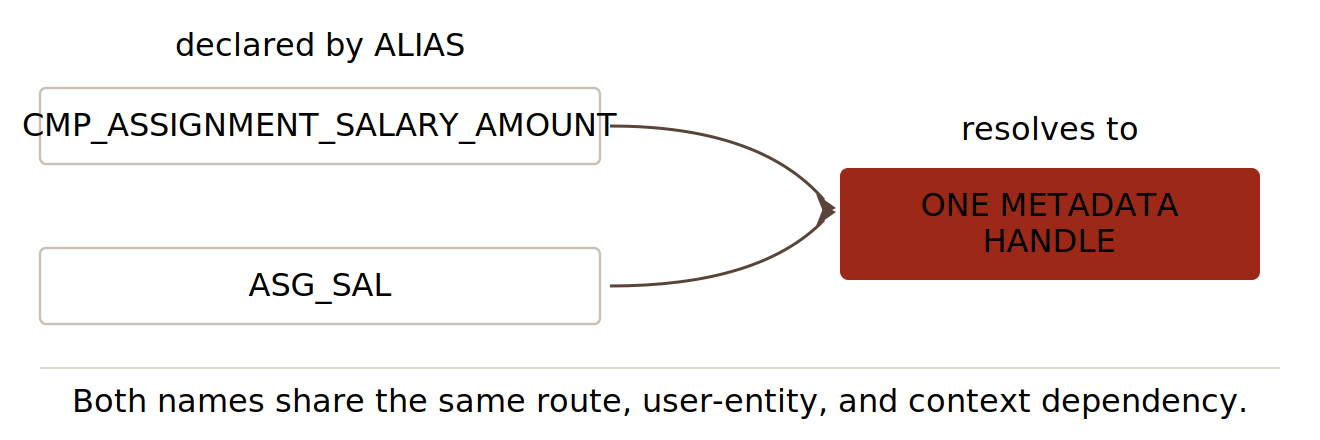
One handle, two labels. Reading either name at runtime triggers the same DBI fetch under whichever contexts are active.
What happens behind the scenes:
- You write the
ALIASline. - The compiler records both names — long DBI and short alias — against one metadata handle.
- Every later reference to the alias in the formula body resolves to that handle.
- No runtime storage is allocated, and no separate value is held against the alias.
Every reference is a fresh evaluation of the underlying DBI under whatever contexts are active at the point of reference.
Syntax and the Reserved Identifier List
The form is fixed, one declaration per line:
ALIAS DATABASE_ITEM_NAME AS SHORT_NAME
Three things to know:
- The
ASkeyword is required. BothALIASandASare reserved and can’t be used as variable names elsewhere. - Case-insensitive.
ALIAS x AS Yandalias X as ycompile identically. Pick a convention and hold to it. - One alias per line. No comma-separated multi-alias declarations.
The alias name can’t collide with a reserved word. They fall into six categories:
| Category | Reserved identifiers |
|---|---|
| Declaration & section | ALIAS, AS, DEFAULT, DEFAULT_DATA_VALUE, DEFAULTED, FOR, INPUTS, ARE, RETURN |
| Control flow | IF, THEN, ELSE, WHILE, LOOP, EXIT |
| Logical & comparison | AND, OR, NOT, IS, LIKE, WAS |
| Context management | CHANGE_CONTEXTS, GET_CONTEXT, CONTEXT_IS_SET, NEED_CONTEXT |
| Formula execution & I/O | EXECUTE, IS_EXECUTABLE, SET_INPUT, GET_OUTPUT |
| Working storage area | WSA_GET, WSA_SET, WSA_EXISTS, WSA_DELETE |
If your formula won’t compile and you’ve named an alias something like DEFAULT, FOR or IS — that’s why. Add a prefix or suffix to escape: L_DEFAULT, FOR_DT, IS_FLAG.
Statement Order: Why ALIAS Comes First
Fast Formula enforces strict ordering of declarative sections, and the compiler rejects violations with Incorrect Statement Order.
| Section | |
|---|---|
| First | ALIAS — all declarations, grouped at the top |
| Second | DEFAULT FOR and DEFAULT_DATA_VALUE FOR — scalar and array defaults |
| Third | INPUTS ARE — single block, all parameters typed |
| Fourth | Body and RETURN — logic, control flow, assignments |
What going out of order looks like
The mistake is common when refactoring an existing formula and adding an alias mid-file.
Wrong:
DEFAULT FOR ASG_HR_ASG_ID IS 0      /* DEFAULT before ALIAS */

ALIAS PER_ASG_JOB_NAME AS ASG_JOB   /* ← raises the error */

INPUTS ARE EFFECTIVE_DATE_FROM (DATE)
Incorrect Statement Order — ALIAS, DEFAULT, or INPUT statements come after other statements.
Right:
ALIAS PER_ASG_JOB_NAME AS ASG_JOB

DEFAULT FOR ASG_HR_ASG_ID IS 0
DEFAULT FOR ASG_JOB IS ' '

INPUTS ARE EFFECTIVE_DATE_FROM (DATE)
When adding a new alias to an existing formula, scroll to the top and add it to the existing ALIAS block. Never insert it next to the DEFAULT or DBI it relates to — that breaks the ordering rule.
What You Can and Cannot Alias
The Fusion 24D guide narrows ALIAS to one target type: database items. The diagnostic is unambiguous — you can use an ALIAS statement only for a database item.
The practical test is the Database Items picker in the formula editor. If the identifier appears there for your current formula type, it’s aliasable. If it doesn’t, it isn’t.
What ALIAS will accept
| Aliasable | Notes |
|---|---|
| Scalar DBIs | The standard case. Any DBI returning a single text, number or date value. |
| Array DBIs | Grammatically aliasable. Oracle’s documentation is silent — no worked examples either way. |
What ALIAS will not accept
Five categories produce compilation failures.
1. Local variables. They don’t exist until the formula’s first assignment creates them. ALIAS lines run before any assignment, so there’s no metadata to bind to.
ALIAS L_TEMP_VALUE AS TMP /* L_TEMP_VALUE is a local var, not a DBI */
2. Inputs from INPUTS ARE. Inputs are bound via the formula type definition. They aren’t DBIs, they’re already short, and there’s no metadata layer to alias.
ALIAS EFFECTIVE_DATE_FROM AS EFF_DT /* declared in INPUTS ARE */
3. Contexts. HR_ASSIGNMENT_ID, EFFECTIVE_DATE, ABSENCE_PLAN_ID, PERSON_ID are language-level handles for evaluation state, not data records. Read them with GET_CONTEXT.
ALIAS HR_ASSIGNMENT_ID AS AID /* contexts are not DBIs */
4. Formula functions.
ALIAS DAYS_BETWEEN AS DB /* functions cannot be aliased */
5. DBIs not visible to your formula type. This one is subtler — the DBI genuinely exists, just not for you.
/* In an Absence Entry Validation formula, no benefits contexts are supplied. */
/* The DBI exists in the dictionary but is invisible to this formula type.    */
ALIAS BEN_PEN_BNFT_AMT_NN AS BNFT_AMT
The first four raise Misuse of ALIAS Statement. The fifth raises Unknown Variable.
Should I alias this? Three checks
- Is the identifier in the Database Items picker for this formula type?
- Will I reference it more than once, or is its name long enough to hurt readability at one use?
- Have I picked a short, project-consistent, non-reserved name?
Three yeses means declare it in the ALIAS block at the top, with a one-line trailing comment describing what the DBI represents in business terms. Then use the alias uniformly — in the body, in DEFAULT FOR, and in any WAS DEFAULTED checks.
The Reference vs Snapshot Distinction
ALIAS and L_VAR = LONG_DBI_NAME are not equivalent. They behave differently at runtime, and one of them silently produces wrong answers under CHANGE_CONTEXTS.
The local-variable pattern
DEFAULT FOR PER_ASG_REL_LENGTH_OF_SERVICE IS 0

/* Read the DBI once into a local variable for shorter access */
L_ASG_LOS = PER_ASG_REL_LENGTH_OF_SERVICE

IF L_ASG_LOS >= 5 THEN
  L_FLAG = 'Y'
Two things happen on that assignment line that aren’t evident from the source. The DBI is fetched eagerly at that point, whether or not the value is later read. And the local variable holds a snapshot under whichever contexts were active at assignment — any later CHANGE_CONTEXTS block does not update it.
The ALIAS pattern
ALIAS PER_ASG_REL_LENGTH_OF_SERVICE AS ASG_LOS

DEFAULT FOR ASG_LOS IS 0

IF ASG_LOS >= 5 THEN
  L_FLAG = 'Y'
Functionally similar in isolation. But four behavioural differences matter:
| Property | Local-variable assignment | ALIAS |
|---|---|---|
| DBI evaluation timing | Eager — fetched at assignment, regardless of later use | Lazy — fetched only when a code path evaluates it |
Behaviour under CHANGE_CONTEXTS | Frozen at the original assignment context | Re-evaluates — reads fetch under the new context |
| Runtime memory | Allocates a variable slot in the generated PL/SQL package | No runtime allocation; resolved at compile time |
WAS DEFAULTED compatibility | Not supported — the check needs DBI metadata, lost in assignment | Fully supported — behaves identically to the underlying DBI |
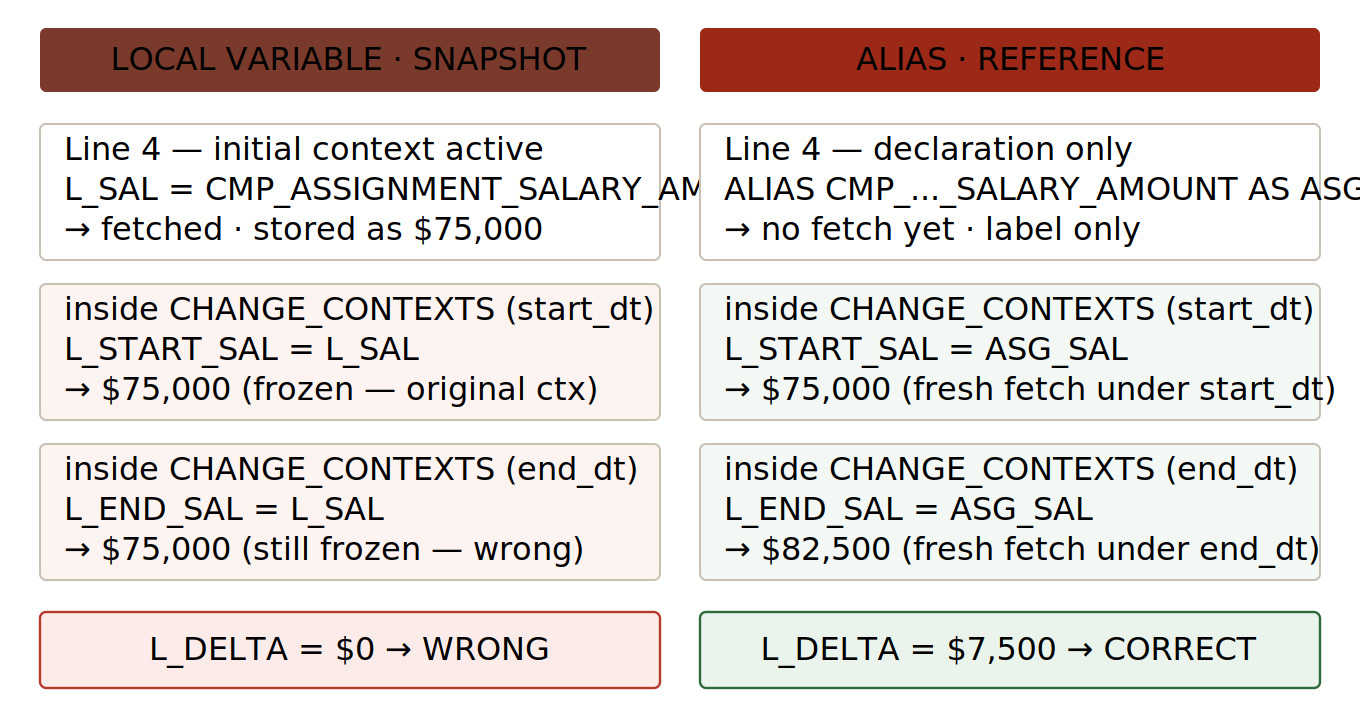
For shortening identifiers, ALIAS is the correct choice every time. Use local-variable assignment from a DBI only when a snapshot is the explicit requirement — capturing a value at one context for comparison after a deliberate context change. In that case name the variable accordingly: L_SAL_AT_PERIOD_START tells the next maintainer this is a snapshot on purpose.
DEFAULT FOR and WAS DEFAULTED Against the Alias
Once an alias is declared, the rest of the formula should reference the alias name. The compiler folds the alias and the DBI into the same symbol, so writing the default against either resolves to the same metadata.
ALIAS PER_ASG_JOB_NAME              AS ASG_JOB
ALIAS CMP_ASSIGNMENT_SALARY_AMOUNT  AS ASG_SAL
ALIAS ASG_HR_ASG_ID                 AS ASG_ID

/* Defaults written against the alias names */
DEFAULT FOR ASG_JOB IS ' '
DEFAULT FOR ASG_SAL IS 0
DEFAULT FOR ASG_ID  IS 0

INPUTS ARE EFFECTIVE_PERIOD_END (DATE)

/* WAS DEFAULTED check against the alias */
IF ASG_SAL WAS DEFAULTED THEN
  L_MSG = 'Salary DBI returned NULL — defaulted to 0'
WAS DEFAULTED inspects whether the underlying DBI fetch returned NULL and triggered the DEFAULT FOR substitution. Because the alias and the DBI share one metadata handle, asking ASG_SAL WAS DEFAULTED gives the same answer as asking the long name.
Don’t mix names. The compiler will accept
DEFAULT FOR PER_ASG_JOB_NAME IS ' 'followed byIF ASG_JOB WAS DEFAULTED. It’s a maintenance trap. Pick the alias and use it consistently.
ALIAS Inside CHANGE_CONTEXTS
This is where the reference-versus-snapshot distinction pays off. Because the alias compiles to a DBI fetch operation, evaluating it under a different context produces a fresh fetch under that context — exactly as if you’d written the long name.
ALIAS CMP_ASSIGNMENT_SALARY_AMOUNT AS ASG_SAL

DEFAULT FOR ASG_SAL IS 0

INPUTS ARE PERIOD_START_DT (DATE), PERIOD_END_DT (DATE)

CHANGE_CONTEXTS (EFFECTIVE_DATE = PERIOD_START_DT)
(
  L_START_SAL = ASG_SAL          /* fetch under PERIOD_START_DT */
)

CHANGE_CONTEXTS (EFFECTIVE_DATE = PERIOD_END_DT)
(
  L_END_SAL = ASG_SAL            /* re-fetch under PERIOD_END_DT */
)

L_DELTA = L_END_SAL - L_START_SAL
Two reads of the same alias, each fetching under a different EFFECTIVE_DATE, each producing a different value.
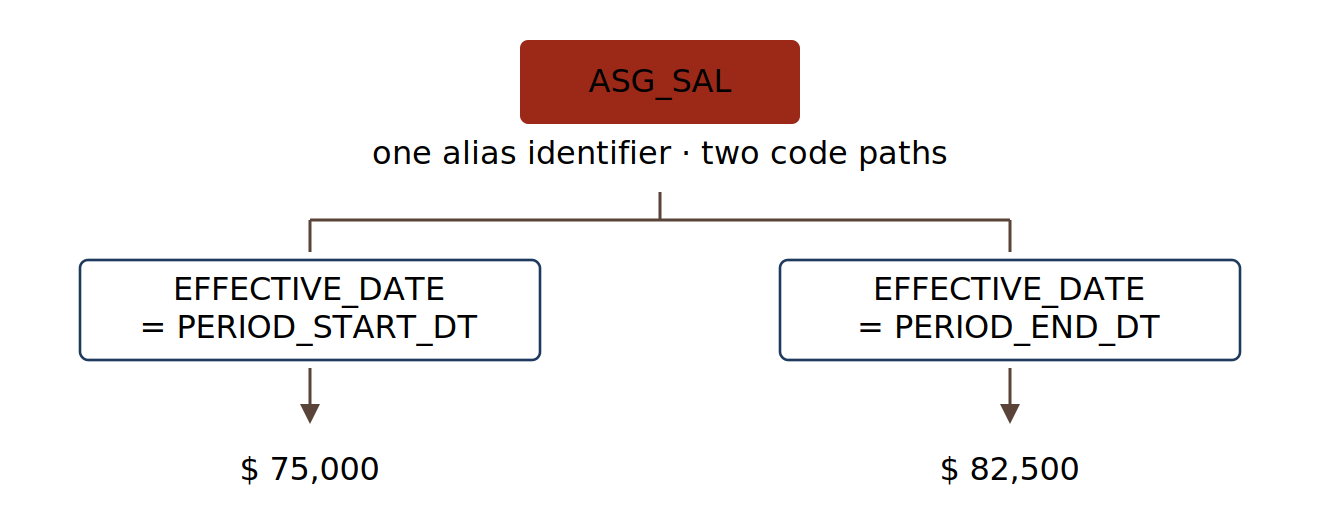
The failure mode. Write the same logic with a local-variable assignment at the top —
L_SAL = CMP_ASSIGNMENT_SALARY_AMOUNTbefore anyCHANGE_CONTEXTSblock — and the DBI is fetched once under the formula’s initial contexts. Reads ofL_SALinside both blocks return the original frozen value.L_DELTAsilently evaluates to zero. No compiler diagnostic, no runtime error, just a wrong number.
The Three Compiler Errors You’ll Actually See
Error 1 — Incorrect Statement Order
Incorrect Statement Order — ALIAS, DEFAULT, or INPUT statements come after other statements.
Fix: reorder so all ALIAS declarations precede all DEFAULT declarations. The required order is ALIAS → DEFAULT → INPUTS → body, every time.
Error 2 — Misuse of ALIAS Statement
Misuse of ALIAS Statement — you can use an ALIAS statement only for a database item.
Fix: confirm the left-hand identifier is a DBI listed in the Database Items picker. Contexts are read with GET_CONTEXT; inputs are declared with INPUTS ARE; anything else is a typo.
Error 3 — Unknown Variable
Unknown Variable:
CMP_ASSIGNMENT_SALARY_AMOUNT
Fix: open the Database Items picker for the specific formula type you’re authoring — Absence Accrual, OTL Time Entry Rule, Compensation Default and Override, Payroll, whichever applies — and confirm the DBI is listed. If it isn’t, your formula type doesn’t supply the contexts the DBI’s route needs, and aliasing won’t fix it.
Production Conventions
| Rule | |
|---|---|
| 1 | Group all ALIAS declarations at the top of the formula, never scattered. |
| 2 | Apply ALIAS when the DBI is referenced more than once, or when its name hurts readability at a single use. |
| 3 | Use a project-wide naming convention. Strip product prefixes and keep the meaningful part. |
| 4 | Annotate each alias with a one-line trailing comment describing what it represents in business terms. |
| 5 | Default to ALIAS over local-variable assignment for shortening. |
| 6 | Restrict ALIAS targets to database items. Inputs, contexts and functions are not valid. |
| 7 | Apply consistent identifier casing. The compiler is case-insensitive; your reviewers aren’t. |
Before and After
Same logic, written twice.
Without ALIAS:
/*======================================================================
FORMULA NAME : XX_OT_ELIG_WITHOUT_ALIAS
FORMULA TYPE : Element Iterative Calculator
PURPOSE      : OT eligibility flag & multiplier from qualifying LOS
               and assignment salary.
======================================================================*/

DEFAULT FOR PER_ASG_REL_LENGTH_OF_SERVICE IS 0
DEFAULT FOR CMP_ASSIGNMENT_SALARY_AMOUNT  IS 0
DEFAULT FOR PER_ASG_JOB_NAME              IS ' '

INPUTS ARE EFFECTIVE_PERIOD_END (DATE)

L_FLAG       = 'N'
L_MULTIPLIER = 1

CHANGE_CONTEXTS (EFFECTIVE_DATE = EFFECTIVE_PERIOD_END)
(
  IF PER_ASG_REL_LENGTH_OF_SERVICE >= 5
     AND CMP_ASSIGNMENT_SALARY_AMOUNT > 0
     AND PER_ASG_JOB_NAME <> ' '
  THEN
  ( L_FLAG       = 'Y'
    L_MULTIPLIER = 1.5 )

  IF PER_ASG_REL_LENGTH_OF_SERVICE >= 10 THEN
    L_MULTIPLIER = 2.0
)

RETURN L_FLAG, L_MULTIPLIER
With ALIAS:
/*======================================================================
FORMULA NAME : XX_OT_ELIG_WITH_ALIAS
FORMULA TYPE : Element Iterative Calculator
NOTES        : ALIAS block sits FIRST. Each alias is a reference to
               its underlying DBI; evaluation is lazy and re-fetches
               under any CHANGE_CONTEXTS block.
======================================================================*/

ALIAS PER_ASG_REL_LENGTH_OF_SERVICE AS ASG_LOS    /* qualifying LOS, years */
ALIAS CMP_ASSIGNMENT_SALARY_AMOUNT  AS ASG_SAL    /* current annual salary */
ALIAS PER_ASG_JOB_NAME              AS ASG_JOB    /* assignment job name   */

DEFAULT FOR ASG_LOS IS 0
DEFAULT FOR ASG_SAL IS 0
DEFAULT FOR ASG_JOB IS ' '

INPUTS ARE EFFECTIVE_PERIOD_END (DATE)

L_FLAG       = 'N'
L_MULTIPLIER = 1

CHANGE_CONTEXTS (EFFECTIVE_DATE = EFFECTIVE_PERIOD_END)
(
  IF ASG_LOS >= 5 AND ASG_SAL > 0 AND ASG_JOB <> ' ' THEN
  ( L_FLAG       = 'Y'
    L_MULTIPLIER = 1.5 )

  IF ASG_LOS >= 10 THEN
    L_MULTIPLIER = 2.0
)

IF ASG_SAL WAS DEFAULTED THEN
  L_MSG = 'Salary DBI returned NULL — defaulted to 0'

RETURN L_FLAG, L_MULTIPLIER
Compare the eligibility test in the two versions. Same logical condition, but the aliased one you can read aloud — “if qualifying service is at least 5 and salary is positive and job is not blank” — without filtering DBI prefixes out of your field of view. That readability is the entire point.
The aliased version also adds the WAS DEFAULTED diagnostic on the salary check, which local-variable assignment can’t give you at all.
Key Takeaways
ALIAS is a compile-time reference, not a runtime variable. The alias and the underlying DBI share a single metadata handle. No separate runtime allocation occurs.
Statement ordering is enforced. ALIAS → DEFAULT → INPUTS → body → RETURN. Violations produce Incorrect Statement Order.
ALIAS interacts correctly with WAS DEFAULTED and CHANGE_CONTEXTS. Local-variable assignment from a DBI does not — it produces a snapshot, not a reference, and silently breaks salary deltas, before/after comparisons, and any logic that re-evaluates a value under a different context.
ALIAS targets are restricted to database items in current Fusion releases. Inputs, contexts, functions and global values are not valid targets.
Abhishek Mohanty · Oracle ACE Associate | AIOUG Member | Oracle HCM Cloud Consultant & Technical Architect — Fast Formulas, Absence Management, Time & Labor, Core HR, Redwood, HDL, OTBI.