
Fast Formula Deep Dive: Contexts, DBIs, Routes & the 7 Building Blocks Oracle Docs Don't Explain Clearly
The seven components every Fast Formula rests on — Formula Type, Contexts, Input Values, Database Items, Routes, Functions, and Return Variables. What each one does, how they connect, and the practical details that cause most compilation errors and runtime surprises.
If you’ve ever tried to write a Fast Formula and wondered what the difference is between a Context, an Input Value, and a Database Item — this post is for you. Seven core building blocks sit underneath every formula, and nearly every compilation error, runtime failure, and unexpected result traces back to one of them being misunderstood.
1. Formula Type
Every Fast Formula belongs to a Formula Type. It’s the category of the formula, and you can’t create one without selecting a type first — the editor won’t let you.
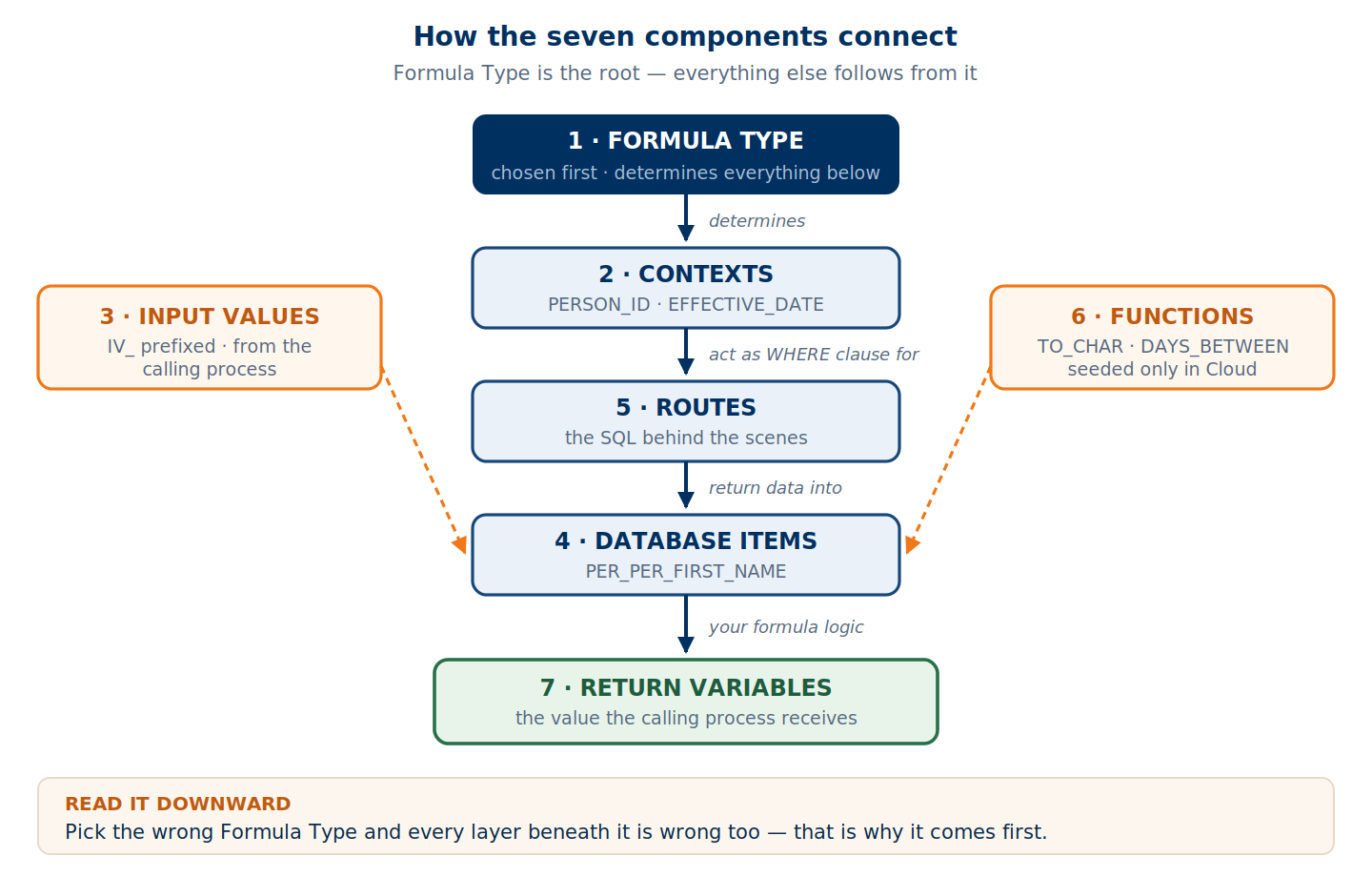
But the type isn’t an administrative label. It determines everything downstream:
- Which Contexts are available to the formula
- Which Input Values the engine will pass in
- Which Database Items you can reference
- Where in the product the formula can be attached
The most common beginner error is creating a formula under the wrong type. Build one as a Compensation Default and Override Rule, then try to attach it to a Total Compensation Item, and it simply won’t appear in the list. The field that consumes the formula filters by type. Know your type before you write a line.
2. Context
A Context is a predefined parameter the engine passes to your formula at runtime. You don’t define contexts — Oracle does, and they’re tied to the formula type. When Oracle created each type, they fixed which contexts come with it. So if you know the type, you already know what context parameters you’ll receive.
| Context | What it provides |
|---|---|
PERSON_ID | Which person the formula is processing |
HR_ASSIGNMENT_ID | The specific assignment record |
EFFECTIVE_DATE | The date the formula runs for |
LEGAL_ENTITY_ID | The legal entity tied to the assignment |
Context determines the who and when of your formula. When a Database Item like PER_ASG_REL_ORIGINAL_DATE_OF_HIRE returns a hire date — whose hire date? The context answers that.
l_person_id     = GET_CONTEXT(PERSON_ID, 0)
l_assignment_id = GET_CONTEXT(HR_ASSIGNMENT_ID, 0)
3. Input Values
Input Values are also parameters passed into the formula, but they differ from contexts in one decisive way: Oracle doesn’t predefine them. They carry additional information that the developer — or the calling process — decides to pass at execution time.
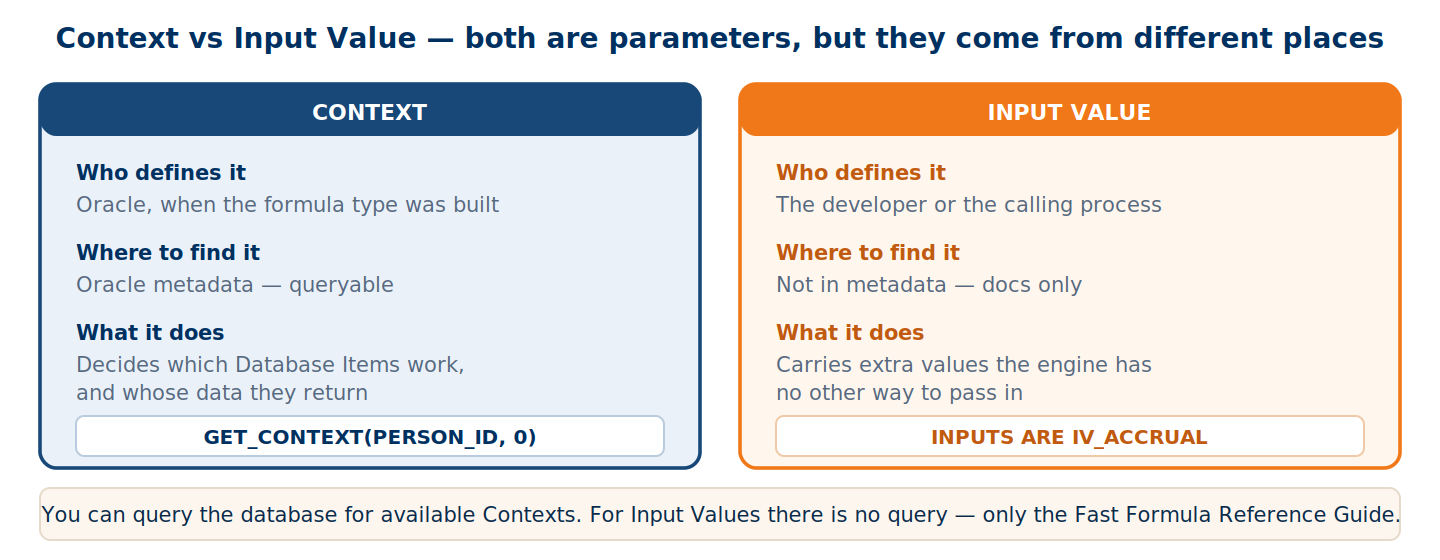
Because they aren’t in Oracle’s metadata tables, you cannot query the database to discover them. The only way to know which Input Values a formula type accepts is the Fast Formula Reference Guide.
They’re declared with INPUTS ARE and conventionally prefixed IV_:
INPUTS ARE
  IV_ACCRUAL,
  IV_ACCRUALPERIODSTARTDATE (DATE),
  IV_ACCRUALPERIODENDDATE   (DATE)
4. Database Items (DBIs)
Database Items are predefined variables holding values from HR tables — Oracle’s way of giving your formula read access to employee data without writing SQL. Each DBI holds one kind of value.
| Database Item | What it returns |
|---|---|
PER_PER_FIRST_NAME | Person’s first name |
PER_PER_LAST_NAME | Person’s last name |
PER_ASG_REL_ORIGINAL_DATE_OF_HIRE | Original hire date |
PER_ASG_STATUS_USER_STATUS | Assignment status, e.g. 'ACTIVE' |
Two kinds exist. Single-value DBIs return one value, like a first name. Range (array) DBIs return multiple values of the same type, like a list of element entries.
The value a DBI returns is decided by the Context. If the context carries PERSON_ID = 12345, then PER_PER_FIRST_NAME returns that person’s first name. Without context, the DBI has no idea whose data to fetch.
5. Routes
Routes are the source behind Database Items. If a DBI is the variable, the Route is the query that populates it — the table or SELECT statement telling the engine where to fetch from.
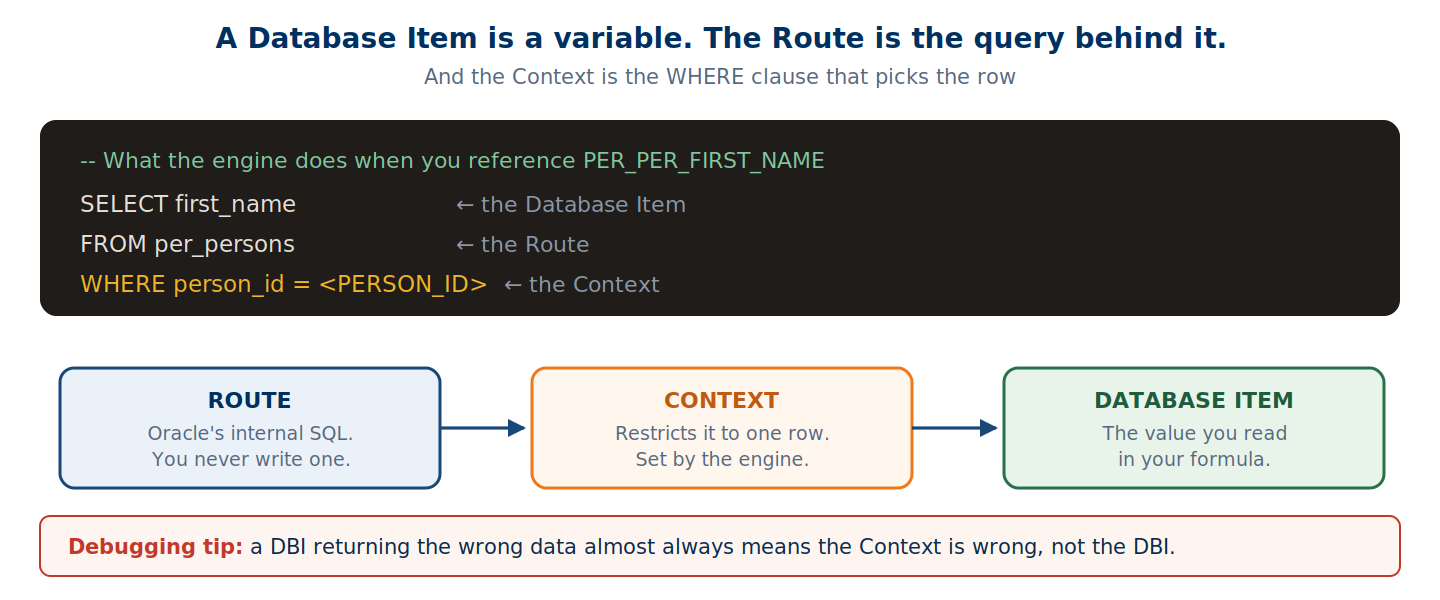
You’ll never define a route yourself; they’re part of Oracle’s internal metadata. But knowing they exist changes how you debug. When a DBI returns something unexpected, the cause is almost always that the context isn’t set correctly — which means the route is querying the wrong row.
6. Functions
Functions come in two categories.
Seeded functions are Oracle-provided and ready to use: TO_CHAR, TO_NUMBER, TO_DATE, ADD_MONTHS, MONTHS_BETWEEN, DAYS_BETWEEN, ESS_LOG_WRITE, GET_CONTEXT, and many more.
Custom functions are the E-Business Suite story. On-premise, you could create your own by accessing the function definition tables and linking PL/SQL.
In Oracle Fusion Cloud you cannot create custom functions. There’s no direct database access, so you’re limited to the seeded set. This is a significant difference from EBS and on-premise deployments, and it’s worth knowing before you design logic that assumes a helper function you’d have written yourself.
7. Return Variables
The Return Variable is what your formula sends back to the calling process. This trips people up because the rules aren’t consistent across formula types.
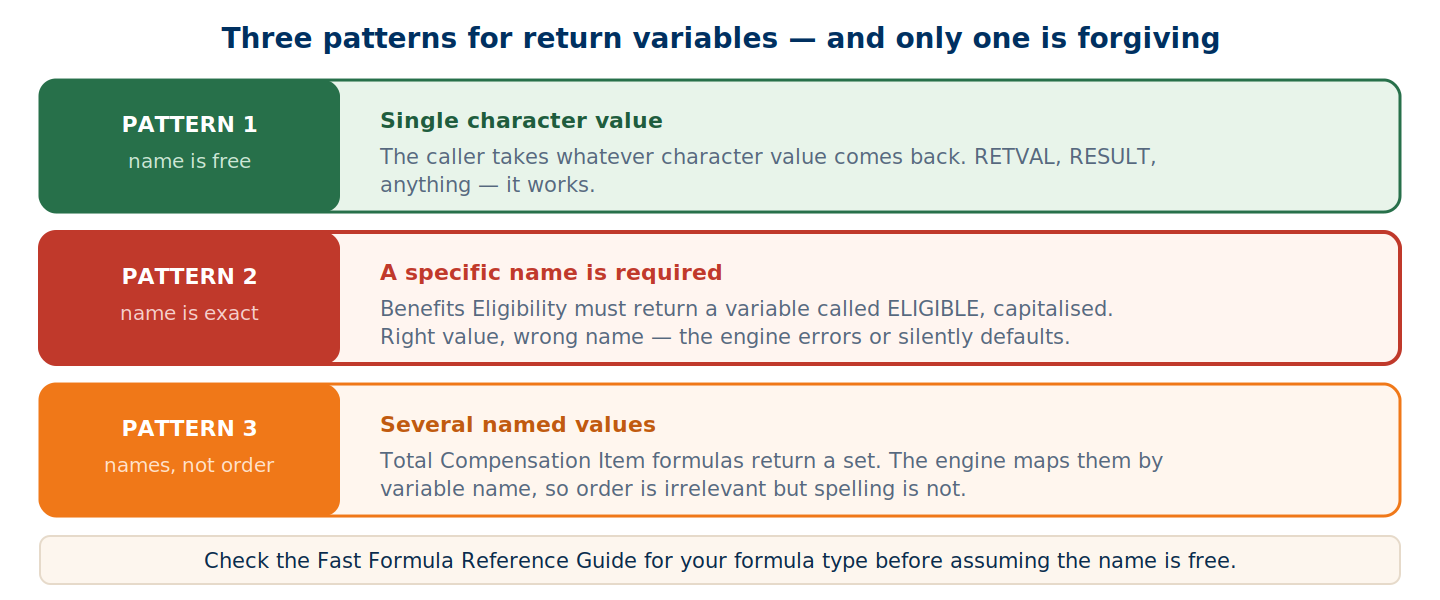
Pattern 1 — the name doesn’t matter. When the formula returns a single character value like 'Y' or 'N', most callers take whatever character value comes back. Name it RETVAL, RESULT, anything.
Pattern 2 — the name is critical. Some types require an exact variable name. The classic case is the Benefits Eligibility formula: the return variable must be ELIGIBLE, capitalised. Return the right value in a differently-named variable and the engine either errors or quietly falls back to default behaviour.
Pattern 3 — multiple named variables. When returning several values, as in a Total Compensation Item formula, each has its own name — one for date, one for value, one for assignment ID, one for legal employer. Order doesn’t matter; the engine maps by name.
/* Pattern 1 — name is free */
RETVAL = 'Y'
RETURN RETVAL

/* Pattern 2 — name must be ELIGIBLE */
ELIGIBLE = 'Y'
RETURN ELIGIBLE

/* Pattern 3 — mapped by name, not position */
COMPENSATION_DATES = '2026/01/31'
VALUES             = '5000'
ASSIGNMENT_ID      = l_assignment_id
LEGAL_EMPLOYER_ID  = l_legal_employer_id

RETURN COMPENSATION_DATES, VALUES,
       ASSIGNMENT_ID, LEGAL_EMPLOYER_ID
Bonus: User Entities
User Entities group Database Items together, mainly for HCM Extract formulas. If you’re working on absence, compensation, or payroll formulas you won’t touch them directly — but they’re part of the component architecture, and worth recognising when you see the term.
Putting It All Together
| Component | Predefined? | Where to find info |
|---|---|---|
| Formula Type | Yes, by Oracle | Formula editor dropdown |
| Contexts | Yes, tied to type | Oracle metadata / docs |
| Input Values | No, developer-defined | FF Reference Guide only |
| Database Items | Yes, by Oracle | DBI lookup in formula editor |
| Routes | Yes, internal | Not user-facing |
| Functions | Yes — Cloud: seeded only | FF Reference Guide |
| Return Variables | Depends on type | Product-specific docs |
Key Takeaways
Understanding these seven before writing your first line saves hours of debugging. The common failures — compilation errors, missing data, wrong return values — almost always trace back to one of them.
Identify your Formula Type first. Everything else flows from it, and getting it wrong invalidates every decision underneath.
Read the Reference Guide for your type before coding. It’s the only place that tells you the available contexts, the input values, and the expected return variables.
DEFAULT every DBI and Input Value. There are no nulls in Fast Formula — a missing default is a hard runtime error, not a warning.
Check the exact return variable name. Some are strict, like ELIGIBLE for Benefits. Others are free. Assume nothing.
No custom functions in Cloud. Plan your logic around the seeded set, unlike EBS where you could register your own PL/SQL.
Abhishek Mohanty · Oracle ACE Associate | AIOUG Member | Oracle HCM Cloud Consultant & Technical Architect — Fast Formulas, Absence Management, Time & Labor, Core HR, Redwood, HDL, OTBI.